
When must I take the Integration Engineering Certification Exam
Access to the Pricefx SANA training materials is available for 30 days from the time you start the course. You must take the Certification exam within the 30 day period of the time that you started the SANA course.
What Is Covered on the Integration Engineering Certification Exam
The Integration Engineering Certification Exam evaluates your practical ability to build, configure, troubleshoot, and manage Pricefx integration routes. The exam is structured around four major competency areas, each testing essential skills needed for real project work using Integration Manager (IM), Platform Manager (PfM), and supporting tools.
Below is a detailed explanation of what you will be expected to demonstrate during the exam.
1. Building Integration Routes with IM (Inbound & Outbound)
You will be required to:
-
Create the necessary Unity tables to accept data imported via FTP from CSV files.
-
Build inbound and outbound Routes in Integration Manager to move this data in and out of Pricefx.
-
Work with Product Extension, Customer Extension, and Company Parameter tables to support the scenario.
-
Understand how to create and modify:
-
Master Data tables
-
Master Extension tables
-
Company Parameter tables
-
-
When modifying a Route, be able to show you understand how to modify the Route without creating a duplicate Route ( Create Local Copy option ) - in other words be able to demonstrate changing a Property.
-
When modifying a Mapper, be able to show how to create a field Constant . Example, be able to show how to cause every record on an export Route to have a constant field with the field name whofrom and a value of Pricefx.
CSV Handling
Be prepared to:
-
Manage CSV files with varying encoding types (UTF-8, ANSI, etc.). Note that ANSI encoded .csv files should specify ISO-8859-1 as their encoding type when constructing the Route.
-
Use tools to identify encoding types (e.g., Notepad++).
-
Adjust your Route configuration to match the encoding type.
-
Handle numeric and percent fields correctly ( in Mapper ) —for example using a conversion such as:
(body."PercentIncrease").replace('%', '').toBigDecimal().divide(100)
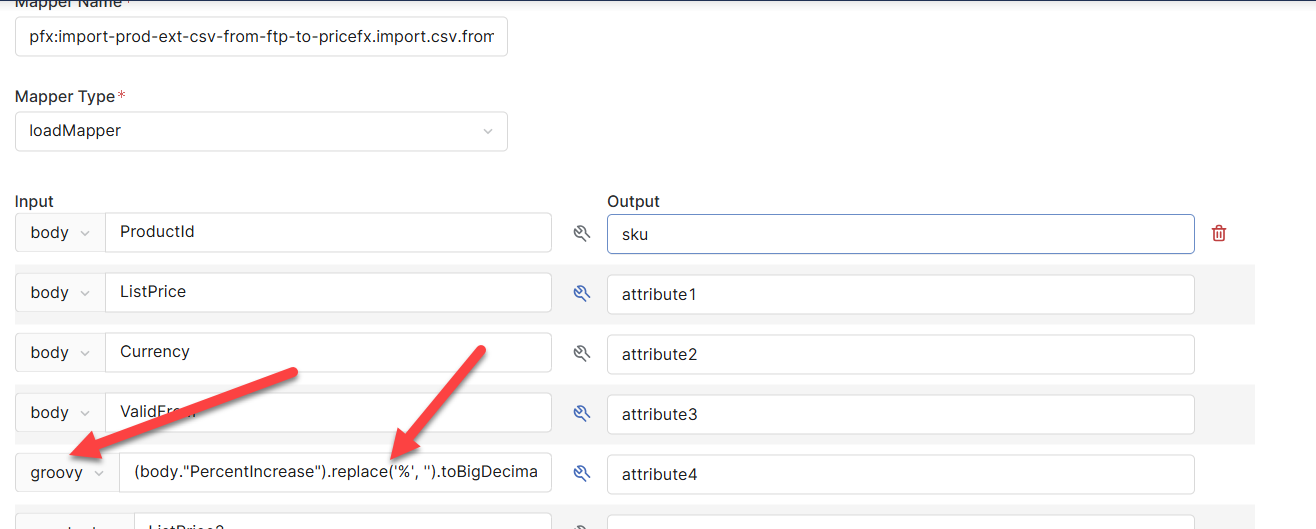
Converters documentation → Here
Converters Examples → Here
If the CSV file you are working with does not use UTF-8 be sure to account for this when constructing the Template route. Specifically note that ANSI encoded files should use an encoding type of ISO-8859-1.
You should also be comfortable comparing different versions of CSV files using tools like WinMerge and searching for files using grepWin.
2. Full Knowledge of Integration Manager (IM) Interface & Features
You must demonstrate, via Oral examination, an understanding of all parts of the Integration Manager, including:
-
Overview tab
-
Routes tab
-
Mapper tab
And be able to:
-
Create new IM instances
-
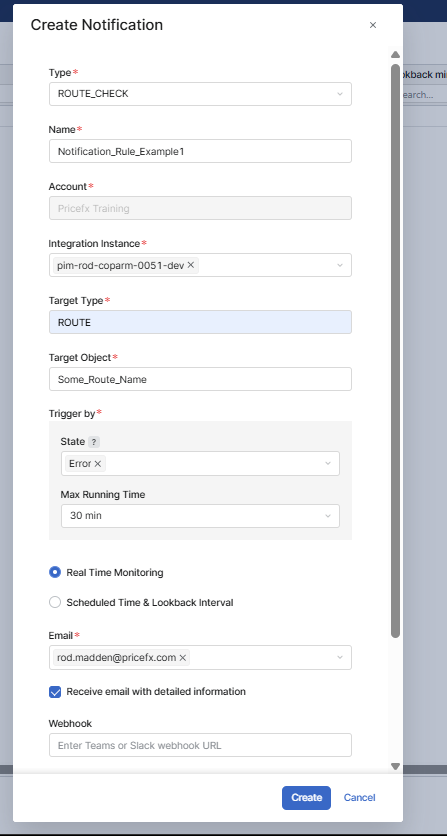
Define Alert Rules and Notification Rules to track errors
-
Use Mapper Constants to map fixed values to Pricefx fields
Be prepared to explain how and when to map constants, including typical customer use cases.
Be able to create ( and explain ) an alert similar to following :
On the IntegrationManager (IM) Overview tab for an IM instance, be sure that you understand the purpose and meaning of the 3 images at the bottom of the screen, under the Integration Over / Overview tab ( see below )
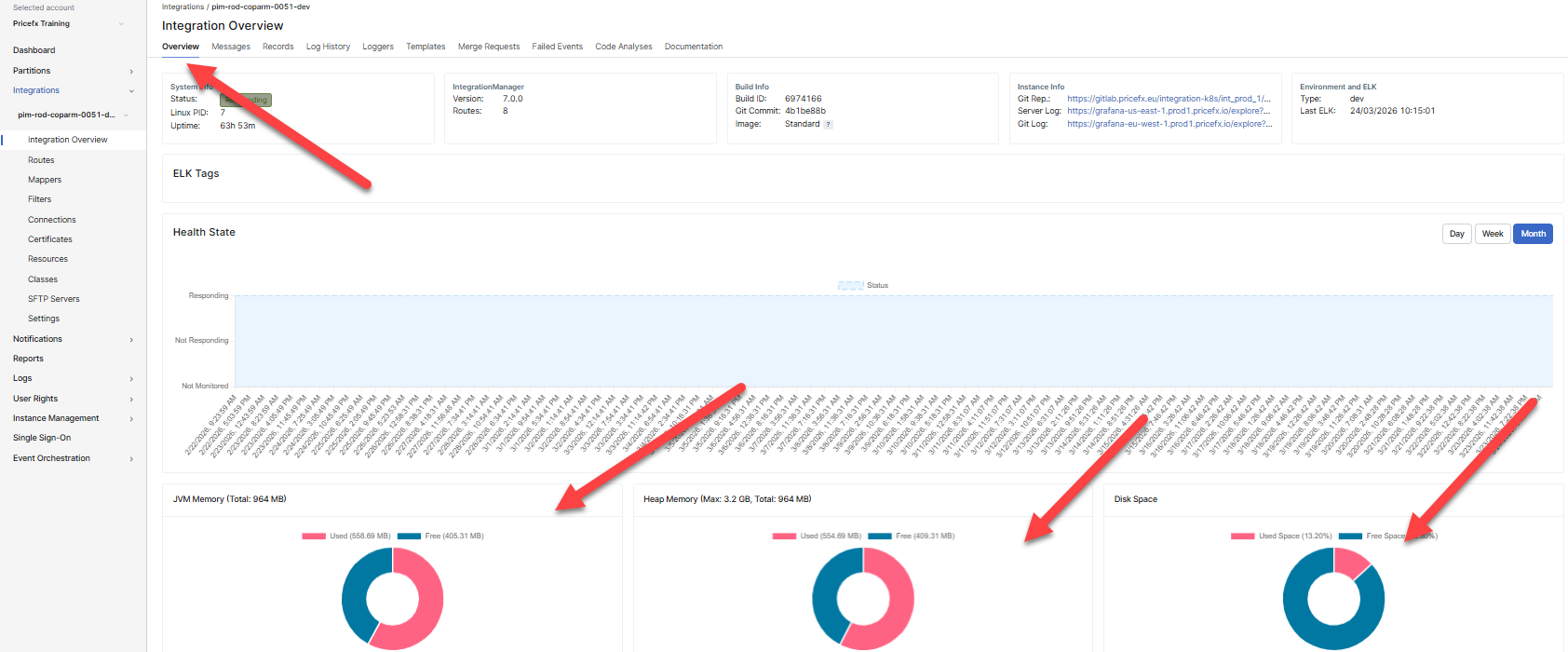
Be able to answer the following questions:
-
What computer / system are these 3 images referring to.
-
What would you do to correct the problem if you found that one of the images indicated that you were running out of resources ( memory, disk space, etc. ). You will be asked to actually show what buttons to click to correct such a problem.
3. Working with GitLab, IntelliJ, and the IM Project
During the exam, you will need to show:
-
How to clone the GitLab project to IntelliJ
-
How to switch to the correct branch (Dev, QA, Prod)
-
Which files contain encrypted credentials, and how to convert them for exam use
-
What modifications to make to the Maven settings.xml so that the project can compile
Important Notes
-
You are not required to actually compile or run the project during the exam.
-
However, you must explain the steps needed for a Java developer to do so.
-
Understanding how GitLab Tokens work is required; IntelliJ may prompt for username/password.
-
Username = token name
-
Password = token value
-
Additional Rules
-
You must create a new IM instance from scratch during the exam.
-
No online step-by-step guides may be used.
-
You will use your existing training partition for exam work (no special partition provided).
If you do not currently have an active training partition, it must be requested before the exam.
4. Filters, Connections, IntelliJ Project Structure & Debugging
You will also need to demonstrate:
Filters
-
Business use cases for Filters
-
Where Filters are defined in a Route
-
How to build a Filter with multiple conditions
Connections
-
Explain when and why to create new Connections in IM
IntelliJ Project Adjustments
-
Show how to create a new Java project from the GitLab repository
-
Identify the two files containing passwords and explain their purpose
-
Alternatively, show knowledge of using a properties file for overriding connection secrets
Overriding Connection Secrets KB page → here
NOTE: The concept here is that the business has determined that the current Template based Route(s) are insufficient to address the integration requirement(s). The existing tools available to adjust the Template to accommodate the integration needs cannot be addressed with the Template based tools available under PfM. These circumstances will require that the Template based Apache Camel code be downloaded to a local PC and adjusted by a resource knowledgeable in Apache Camel development. The student is not required to be aware of Java or Apache Camel development, however, they are required to know how to download the Template based code and prepare the project for change by a qualified Camel resource.
Tokens
-
Demonstrate creating a GitLab token for the exam project
-
Know how to supply credentials to IntelliJ when prompted
Debugging
You must know how to trigger additional logging for debugging integration issues by:
-
Reviewing the Log History
-
Identifying the relevant Stack Trace
-
Determining the correct package name
-
Adding a new Logger entry under the Loggers tab
-
Setting the correct logging level for deeper inspection
Look for package names beginning with
net.pricefx.xxx—they are usually most relevant.
Avoid relying on org.xxx or java.xxx when debugging, as they are typically too generic.
Be able to use the Log History and Logger Tab that is a part of Platform Manager to track down an error and increase logging. ( see here in class materials )
Summary of What the Exam Tests
You must be able to:
-
Build and configure template-based routes
-
Handle data preparation and encoding issues
-
Navigate all components of Integration Manager
-
Configure alerts, notifications, filters, connections
-
Clone and adjust the IM project in IntelliJ
-
Understand GitLab branching and token authentication
-
Prepare a project for compilation (conceptually)
-
Debug routes using logs and targeted logging