
The generate_agent_json tool creates an Agent definition (JSON) from a business objective that you describe. The tool does not create anything on your Pricefx partition. To change the definition, use the Update Agent JSON tool. To create the Agent on your partition, use the Deploy Agent tool.
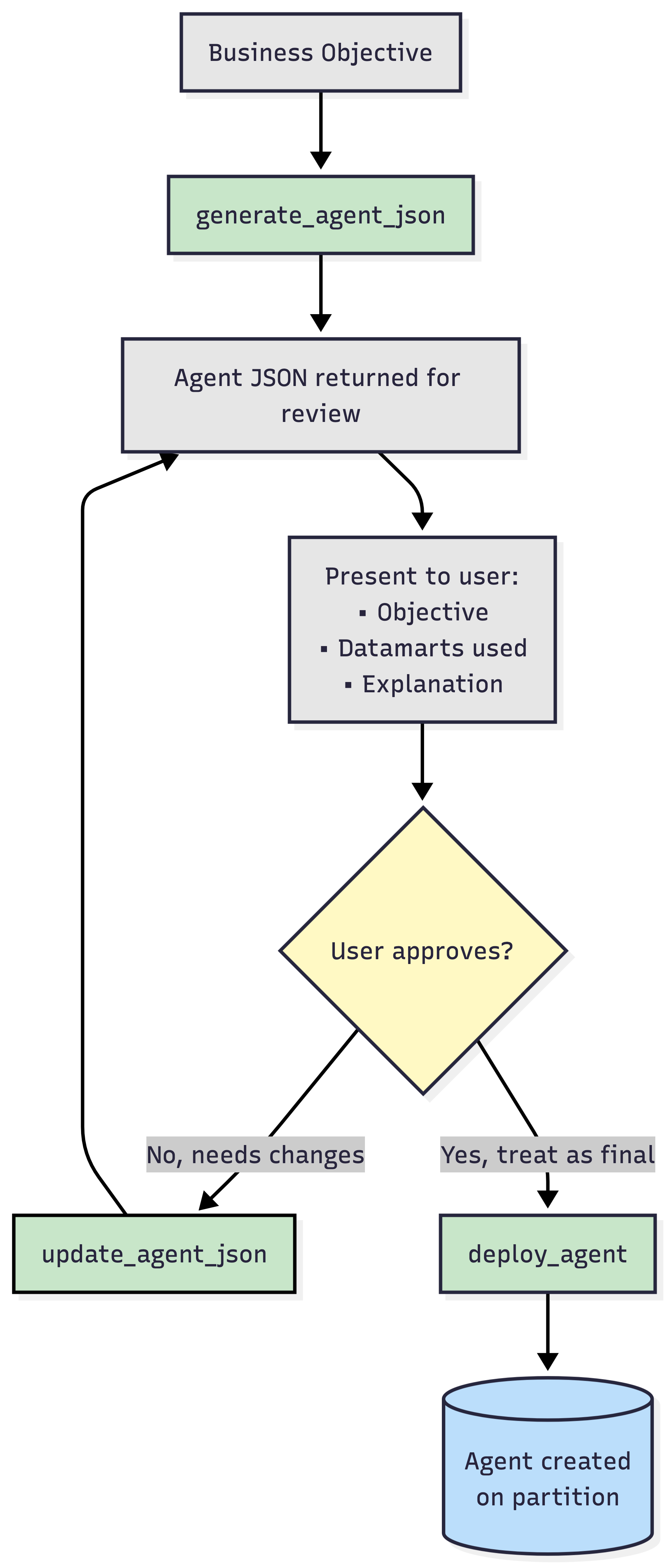
Tool Name – generate_agent_json
Title – Generate Agent JSON
Type – Private
Access Profile – Operator
Permissions
The generate_agent_json tool reads the Agent configuration and the Datamart definitions of your Pricefx partition. The tool does not create or change anything on the partition. The tool is available to the Operator access profile, so every user on a private connection can use it. The tool is available only when the agent generator is set up on the MCP server.
Parameters
|
Parameter |
Required |
Description |
|---|---|---|
|
|
Yes |
What the Agent should do, in business terms. Name the outcome to watch and the data it concerns, for example Alert me when the margin of a product drops more than 5% month over month. |
|
|
No |
Technical names of the Datamarts the Agent should analyze, for example Standard_Sales_Data. The default is the Datamart set in the partition's Agent configuration. Get the names from the List Data Sources tool. |
Output
|
Field |
Description |
|---|---|
|
|
Business objective the Agent was generated for. |
|
|
Generated Agent definition. Pass it to the Update Agent JSON or Deploy Agent tool without changes. |
|
|
Technical names of the Datamarts the generated Agent reads from. This list can differ from |
|
|
Notes from the generator about how it built the Agent. Can be empty. |
|
|
Validation status that the generator reports. |
|
|
Problems that the generator found in the Agent definition. Empty when there are none. |
Behavior and Limitations
-
The tool generates one Agent definition per call.
-
Generation usually takes 30 – 120 seconds, because the generator uses an AI model. Many AI clients stop waiting after 60 seconds. If the generation times out, increase the tool timeout of your AI client, for example to 180 seconds, and try again.
-
The tool returns the Agent definition even when the generator reports validation errors. Check
validation_errorsbefore you deploy the Agent. -
Each call generates a new definition. The same business objective can produce a different Agent each time.
-
The generated definition is not saved anywhere. If you start a new conversation, generate it again.
Errors
|
Situation |
Error Message |
|---|---|
|
A name in |
|
|
The generator returns no Agent |
|
|
The generator fails to create the Agent |
|
|
The generation takes longer than your AI client waits |
A timeout error from your AI client |