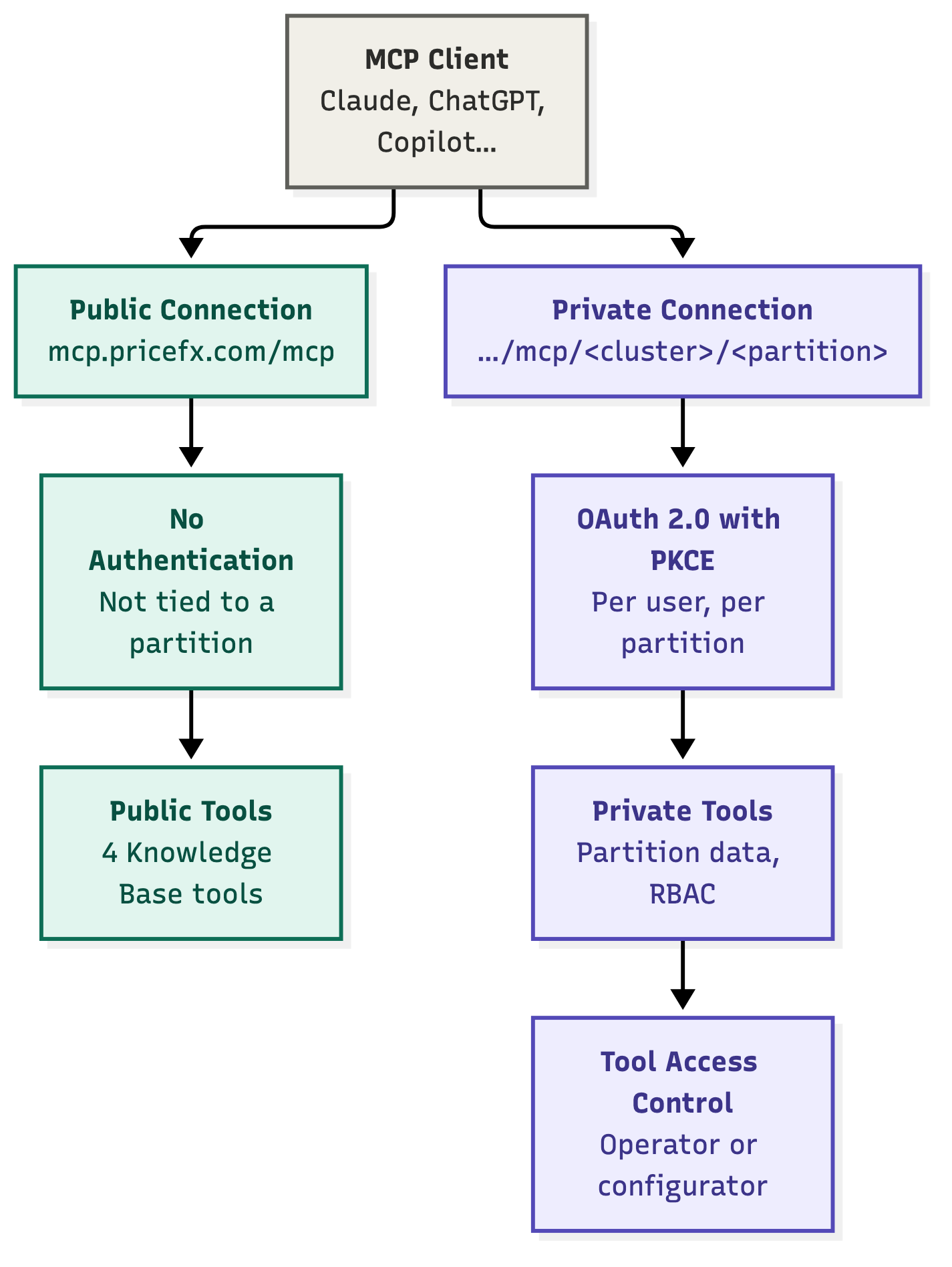
A public connection uses the shared MCP Server URL and does not require authentication. A private connection uses a partition-scoped MCP Server URL and requires OAuth 2.0 authentication. Public connections provide access to public tools, while private connections provide access to private tools.
-
Public tools – Client-agnostic, not tied to any specific partition, and can be exposed without per-partition endpoints.
-
Private tools – Partition-scoped, require OAuth authentication, can read or write tenant data, and enforce Role-Based Access Control (RBAC) and partition permissions.
Public Connection Details
|
Item |
Value |
Description |
|---|---|---|
|
Endpoint |
No authentication |
|
|
Public MCP Tools |
The public connection exposes four knowledge tools that let MCP clients find and read Pricefx Knowledge Base content without partition-specific authorization. |
|
|
Supported Clients |
|
All supported clients can connect using the same public server URL. |
Private Connection Details
|
Item |
Value |
Description |
|---|---|---|
|
Endpoint |
OAuth 2.0 with PKCE |
|
|
Private MCP Tools |
|
|
|
Supported Clients |
|
Clients can automatically discover the authorization server through resource metadata and use it to complete the OAuth flow. |