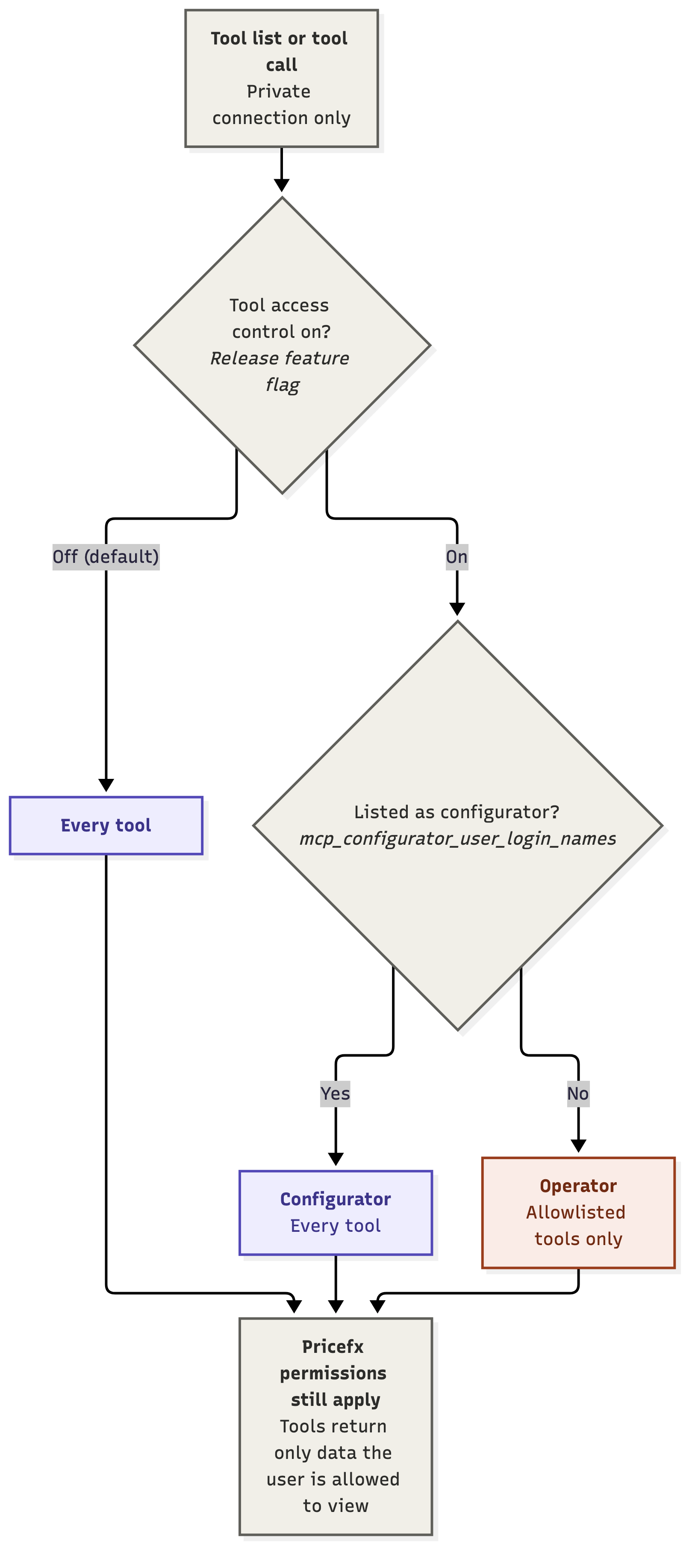
The Pricefx MCP Server can limit which tools a user can see and call on a private connection. Each user has one of two access profiles. An operator can use a fixed set of tools. A configurator can use every tool.
Tool access control applies only to the private connection. Tools on the public connection are available to everyone.
Access Profiles
Operator – The default profile for every user, including users listed as configurators who do not have the View Audits and Users(USERAUDIT) role. Tools that are not on the allowlist are hidden from the tool list and cannot be called.
Configurator – A user whose login name is listed in the mcp_configurator_user_login_names Advanced Configuration Option and who has at least the View Audits and Users (USERAUDIT) role. The MCP Server needs this role to check whether the user is on the configurator list. A listed user without the role is treated as an operator. A configurator can use every tool available on the partition, including Groovy tools. Configurator access applies only to the partition where the user is listed.
Operators can use only the tools listed in the Operator Allowlist: a set of Static tools and a small set of Groovy tools. All other tools are available only to configurators. Groovy tools are defined in the partition configuration rather than shipped with the product, and their logic can change after deployment.
Enabling Tool Access Control
Tool access control is turned on by default. While it is off, every authenticated user on a private connection can use every tool, and the mcp_configurator_user_login_names option has no effect.
Operator Allowlist
The allowlist is fixed on the Pricefx MCP Server and cannot be changed per partition. Any tool that is not listed below is available only to configurators. This applies to both Static and Groovy tools.
Tool access control decides which tools a user can call. It does not replace Pricefx permissions: a tool still returns only the data that the user has permission to view.