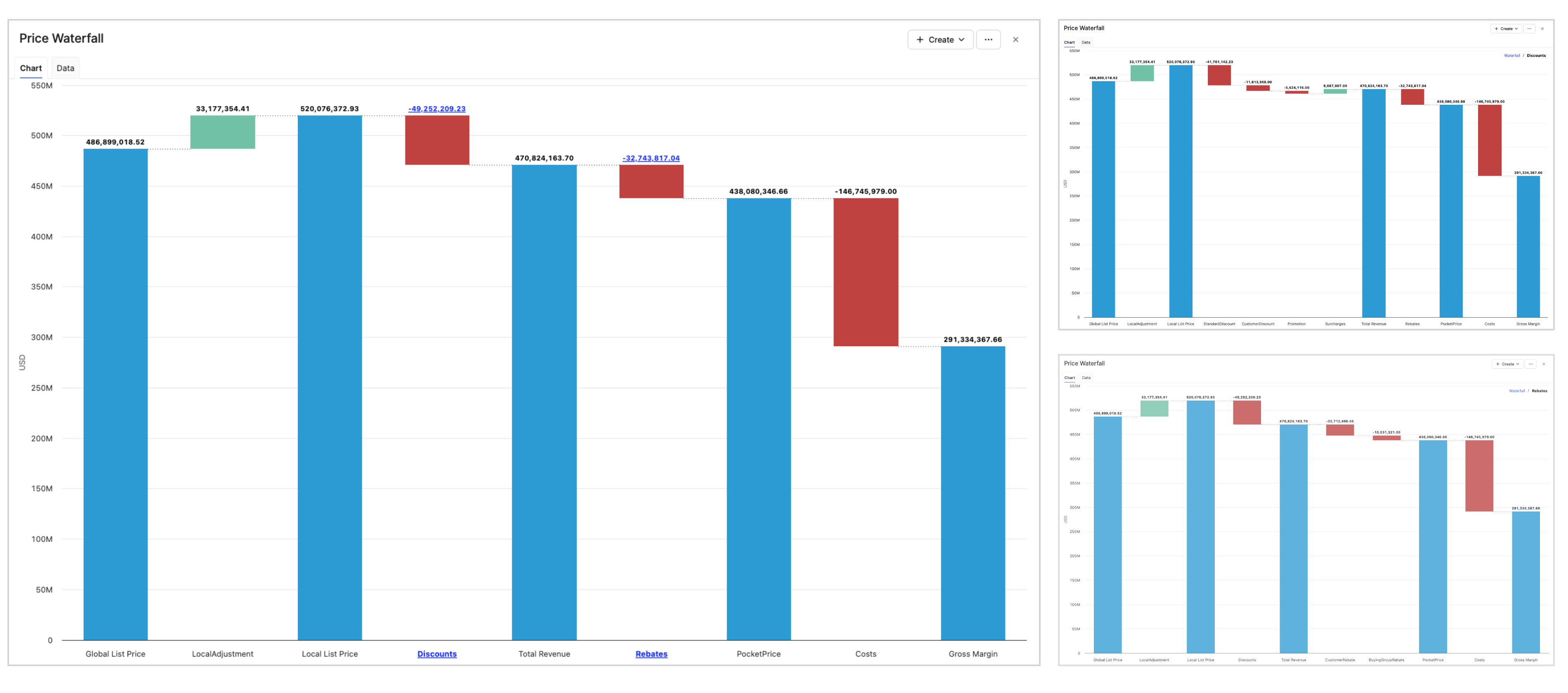
Configure the Price Waterfall chart. This option is required.
Define Waterfall Pillars
-
Click Add Row.
-
Select Field (Fields from datamart
DM.DMName.FieldName). -
Enter Label.
-
Set Level to
0. -
Set Reverse.
If Reverse is set to
true, value is considered to be displayed as negative.
Define Increasing and Decreasing Waterfall Elements
-
Click Add Row.
-
Select Field (Fields from datamart
DM.DMName.FieldName). -
Enter Label.
-
Set Level to
1. -
Set Reverse.
true, value is considered to be displayed as negative.
Define Drilldown Parts
-
Click Add Row.
-
Select Field (Fields from datamart
DM.DMName.FieldName). -
Enter Label.
-
Set Level to
2. -
Set Reverse.
true, value is considered to be displayed as negative.
-
Add row to add a waterfall element
-
Select the field to define the value to use. Last field should be a sum of all others.
-
Define the label to display
-
Level 0 corresponds to the waterfall pillars. These elements are usually computed from previous values, letting “Field” empty (except from the first row that needs to be filled as the starting point).
-
Level 1 corresponds to the increasing and decreasing waterfall elements.
-
Level 2 will be included among the waterfall elements and will be available as a drilldown level. When Level 2 elements are defined, this level acts as a wrapper that aggregates all underlying lower-level elements, including reverse elements if they are defined.
-
Reverse enables to consider use the value as negative.
-
Last row must be a level 0 pillar as it should be calculated from all the previous elements.
Example
Waterfall Definition
|
Order |
Field |
Label |
Level |
Sum from Previous |
Reverse |
|
1 |
GlobalListPrice |
Global List Price |
0 |
|
|
|
2 |
LocalAdjustment |
LocalAdjustment |
1 |
|
|
|
3 |
|
Local List Price |
0 |
true |
|
|
4 |
|
Discounts |
1 |
|
|
|
4.1 |
StandardDiscount |
StandardDiscount |
2 |
|
true |
|
4.2 |
CustomerDiscount |
CustomerDiscount |
2 |
|
true |
|
4.3 |
Promotion |
Promotion |
2 |
|
true |
|
4.4 |
Surcharges |
Surcharges |
2 |
|
|
|
5 |
|
Total Revenue |
0 |
true |
|
|
6 |
|
Rebates |
1 |
|
|
|
6.1 |
CustomerRebate |
CustomerRebate |
2 |
|
true |
|
6.2 |
BuyingGroupRebate |
BuyingGroupRebate |
2 |
|
true |
|
7 |
|
PocketPrice |
0 |
true |
|
|
8 |
Costs |
Costs |
1 |
|
true |
|
9 |
|
Gross Margin |
0 |
true |
|
Waterfall Chart