
Note: This process can be started either manually in PlatformManager or automatically when corresponding Salesfx (Salesforce) field is filled with a value.
Administrators can provision a prospect environment for evaluation of Pricefx Accelerators. The onboarding workflow creates a new partition, deploys required accelerators, and provides access credentials to the prospect.
When to Use
Use Prospect Onboarding to provision a trial environment for a non-customer (a prospect) so that AI Agents or Optimization Accelerators can be evaluated. The onboarding workflow prepares the technical environment and assigns required permissions without manual configuration.
It can be triggered in two ways:
1. Automatically via Salesfx (Salesforce)
The onboarding flow can start automatically based on either Account or Opportunity sync from Salesforce:
When the Account field Agent_deployment_process__c is set to Agents – Self-service, the onboarding flow starts automatically. Additionally, the flow can now be triggered when a Salesforce Opportunity is in the Closed - Won stage and includes the Pricefx Salesforce ISV App in its capabilities.
The field originates on the Lead and cascades to Account, Contact, and Opportunity, ensuring consistency across related objects.
When triggered, Salesfx sends the prospect information to PlatformManager and the onboarding workflow runs end-to-end. The system ensures that any change on the Opportunity does not trigger the flow repeatedly.
2. Manually in PlatformManager
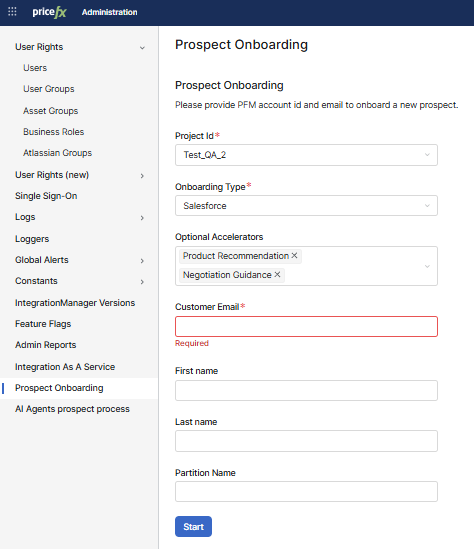
Navigate to Administration > Prospect Onboarding and start the workflow manually in PlatformManager.
Provide the required information and start the onboarding workflow to create a new environment for the prospect.
Prerequisites
For automatic trigger (Salesfx)
-
Set the Account’s Agent_deployment_process__c to Agents – Self-service.
-
Ensure the SalesFxContact entity and pm-sfx payloads (including Account name) are configured correctly.
-
Ensure the Opportunity is in the Closed - Won stage with Pricefx Salesforce ISV App included in the Capabilities in Negotiations field.
For manual trigger (PlatformManager)
-
You must have
Prospect Onboarding - can trigger prospect onboarding jobpermission in PlatformManager. -
A valid PlatformManager Project ID assigned to the prospect.
-
A valid Customer Email address.
Steps To Create Onboarding Environment Manually
Perform the following steps to start the prospect onboarding manually, via PlatformManager:
-
Navigate to Administration > Prospect Onboarding.
-
Enter Project ID (required).
-
Provide the account/project ID for the new prospect.
-
This ID links the onboarding process to the correct customer project.
-
-
Select Onboarding Type (required).
Default, or Salesforce. -
Choose Optional Accelerators
Select one or more accelerators to deploy during onboarding.
If no accelerator is selected, the workflow deploys only the basic components (Agents Accelerator, Customer, Product, Transactions,…).
-
Enter Customer Email (required).
-
Provide the email address of the main prospect contact.
-
This address will be used to send login credentials.
If the email address already exists in PlatformManager, no email is sent and only the permissions to the project are assigned.
-
-
First Name / Last Name
Optional fields for prospect contact details. -
Enter Partition Name (optional).
Define the name of the new partition. The suffixpfxagentswill automatically be appended to the name you provide. If you leave this field blank, a partition name will be auto-generated. -
Click Start.
What the Onboarding Workflow Does
The onboarding workflow is triggered and it runs the following actions:
-
CREATE_PARTITION -
CREATE_USERS:-
A PlatformManager user is created and linked to the relevant Contact in Salesfx.
-
Required permissions (including
agents-deployment) are assigned automatically.
-
-
DEPLOY_ACCELERATOR-
Copilot is enabled.
-
Agents Accelerator:
agents-acceleratoris deployed to the partition. -
Initial CCY/UOM/CAL Data Setup:
supporting-data-setupis deployed to the partition.-
Automatic currency table population: during Agents self-service/prospect onboarding, the CCY data source is created and automatically populated/kept up to date so all self-service packages have a ready-to-use currency table.
-
-
Sales Insights Core:
sales-insights-coreis deployed to the partition.
-
-
REGISTER_PARTITION -
SEND_EMAIL_WITH_ACCESS: An email with login credentials is sent to the customer.
When the onboarding workflow is finished, a notification is received in PlatformManager.
Once the workflow finishes, the prospect receives an email with their login credentials and link to Agents deployment welcome screen. The new partition will be visible in PlatformManager.