
In this section you can schedule an action on a target partition or IM. In addition, this action can trigger a sequence of steps in a workflow. You can also download the Schedulers table in the CSV format (via the Export CSV button).
As an action you can run:
-
Logic at a partition
-
Calculated Field Set (CFS) at a partition
-
Data Load at a partition
-
Route at a IM instance
For details on creation or editing options see How to Create Scheduler.
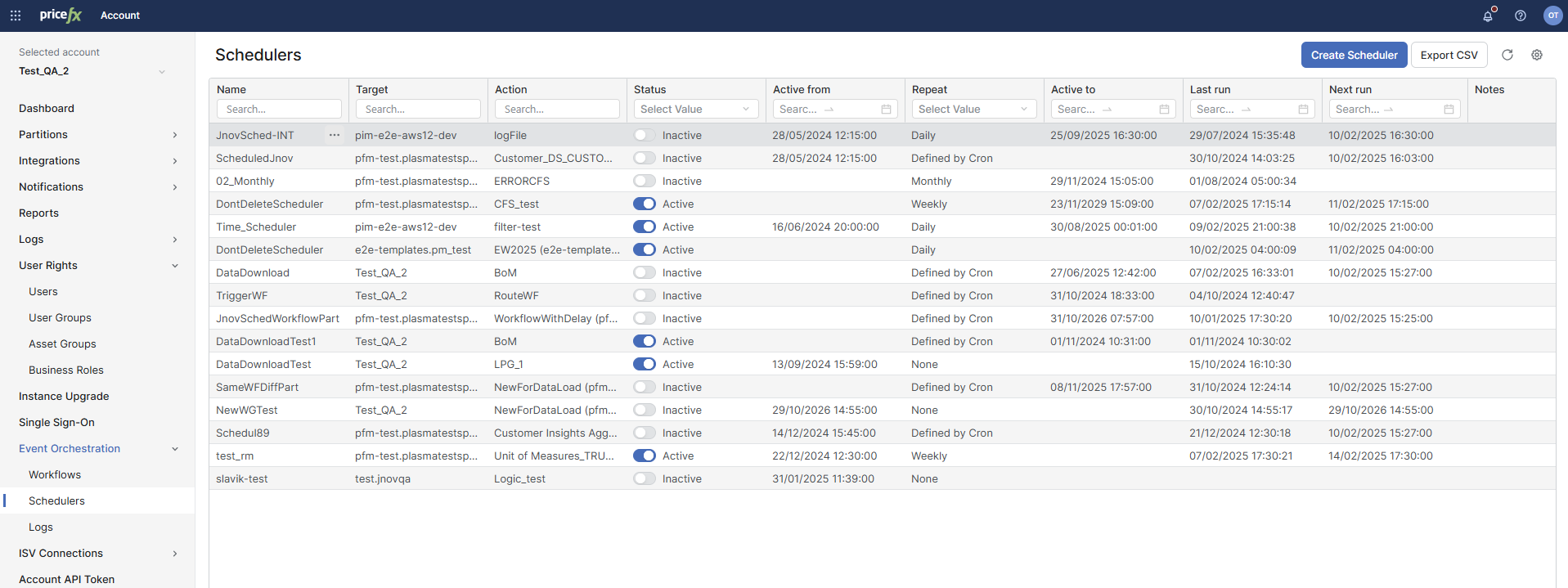
Schedulers Table
|
Column |
Description |
|---|---|
|
Name |
Displays the name of a scheduler. Users can search for specific schedulers by typing keywords into the search box above this column. |
|
Target |
Shows the target name of the partition/integration where the scheduler is set to operate. |
|
Action |
Specifies the action that the scheduler will perform upon activation. |
|
Status |
Indicates whether the scheduler is currently Active or Inactive. You can toggle the scheduler status using the switch in this column. |
|
Active From |
Displays the date and time when the scheduler became active. |
|
Active To |
Displays the date and time until which the scheduler remains active. |
|
Repeat |
Specifies the repetition frequency of the scheduler. Options include Daily, Monthly, Weekly, Yearly, or custom configurations defined by Cron expressions. |
|
Last Run |
Shows the date and time when the scheduler last executed. |
|
Next Run |
Displays the upcoming scheduled run date and time, indicating when the scheduler is set to execute next. |
|
Created At |
This field is hidden by default. Click the cog-wheel in the top-right corner > Fields Visibility in the Table and make the desired field visible. 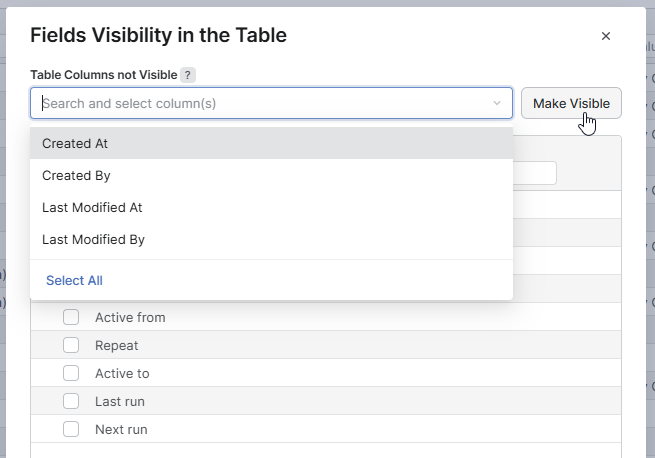
|
|
Created By |
This field is hidden by default. Click the cog-wheel in the top-right corner > Fields Visibility in the Table and make the desired field visible. |
|
Last Modified At |
This field is hidden by default. Click the cog-wheel in the top-right corner > Fields Visibility in the Table and make the desired field visible. |
|
Last Modified By |
This field is hidden by default. Click the cog-wheel in the top-right corner > Fields Visibility in the Table and make the desired field visible. |