
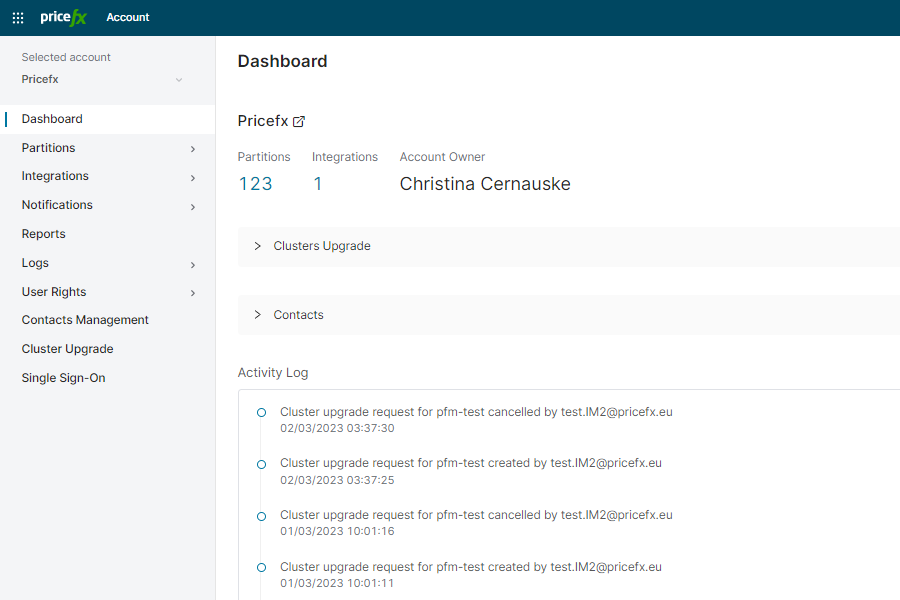
In this section you can see:
-
Account summary (number of partitions, integrations, account owner, implementation partner)
-
Scheduled upgrades (which can be edited or deleted from this screen)
-
Contacts (list of people associated with the account in Salesfx, see a note below; contacts visibility can be set up in Contacts Management)
-
Activity log (list of all changes done on the given project)
Note: Non-Pricefx Salesfx accounts are assigned based on these rules.
-
The contact is found in the domain list.
=> Salesfx direct account is set by this list. If some permissions for accounts in PlatformManager are found, these accounts are set as related accounts in Salesfx. -
The contact is not found in the domain list but has permissions for a specific account in PlatformManager.
=> Salesfx direct account is set by the PlatformManager account. -
The contact is not found in the domain list but has permissions for 0 or more than 1 accounts in PlatformManager.
=> Salesfx direct account is set as Unidentified partitions and related accounts are set according to PlatformManager.
If the contacts synchronization between PlatformManager and Salesfx fails several times (by default 5 times), an email is sent to the Salesfx admin.