
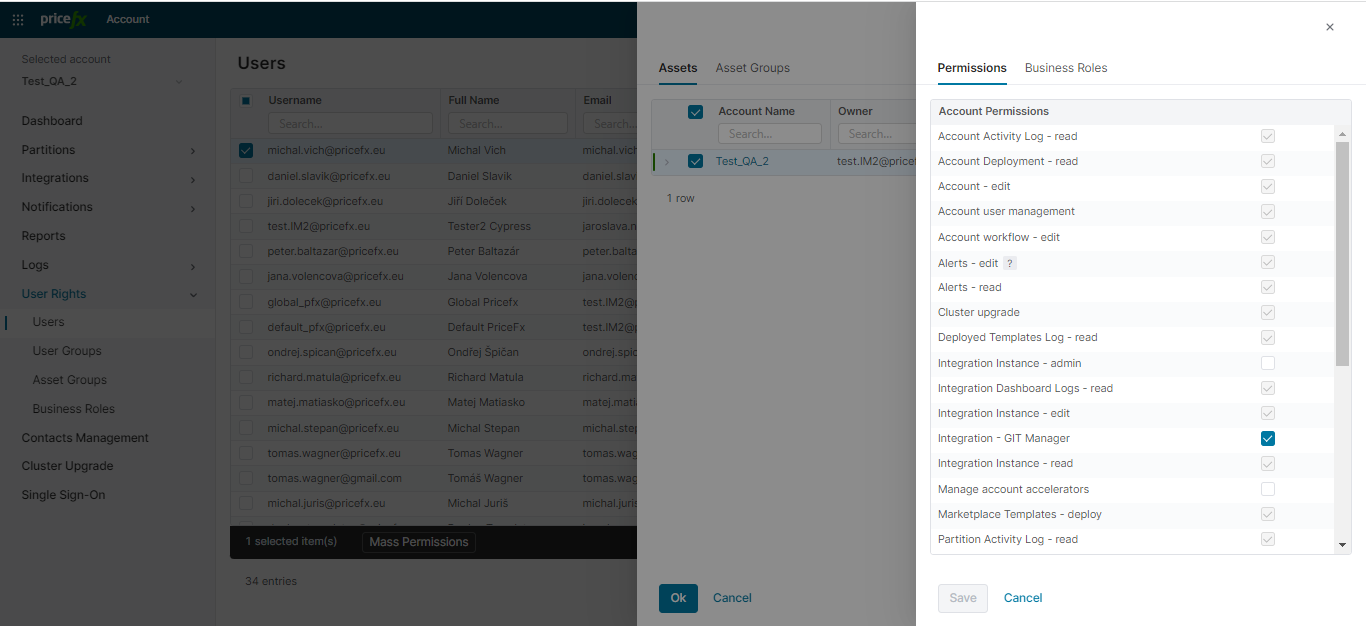
In this section, you define who can access your account and its objects, and what level of permissions (read/write) they have. This includes access to the full account or selected partitions, integrations, and associated assets.
You can also request new user accounts for people you want to add to your project.
-
Users: View and manage individual users in the account. You can assign both account-level and asset-level permissions, as well as invite new users.
-
User Groups: Assign the same permission set to multiple users at once.
-
Asset Groups: Combine partitions, integrations, or other objects into reusable sets. Helpful for bulk permission assignment across multiple users or roles.
-
Business Roles: Group multiple permissions into a predefined role that can be easily reused and applied to users or user groups.
For details see:
Notes:
-
Rights granted via a user group cannot be edited in Administration > Users > Permissions. When new asset rights are assigned to a group, all users in the group have to be assigned to the corresponding assets; if they are not, they need to be invited.
-
When a user group is assigned to a user, changed or removed, the changes are recorded in the log with the old and new value in the context field.
Last Account-Level Change of a User
The Users table has two columns that show the last change of the access of a user in this account:
-
Last account-level change: The time when the change was applied.
-
Account-level change by: The user who made the change. For an automatic change, the column shows a system name, for example PlatformManager sync job for the synchronization of AD groups.
You can sort and filter both columns. Export CSV includes them.
These changes update the columns:
-
The user is invited to the account.
-
A deleted user is reactivated. The columns are updated in all accounts where the user is visible again.
-
The permissions of the user change, in this account or in Administration.
-
The user is added to or removed from a user group, or the permissions of the user group change.
-
A permission for all accounts adds the user to an account. The columns are updated only in the accounts where the user is new.
A change to an asset role or a business role does not update the columns. The deletion of an asset does not update them either.
If a change needs approval, Account-level change by shows the user who requested the change. Last account-level change shows the time when the change was applied.
The columns are filled from PlatformManager 1.98.0. They stay empty for a user until the next change of the access of this user.