
You can iteratively update and refine Pricefx Agent drafts by sending natural language modification requests directly to the Pricefx Copilot. This process allows you to adjust the underlying configuration without manual JSON editing.
Refine Agent Configuration
To modify your Agent draft, perform the following steps in the Copilot chat window:
-
In the Ask Pricefx Copilot... input field, enter a modification request describing the changes you want to apply.
-
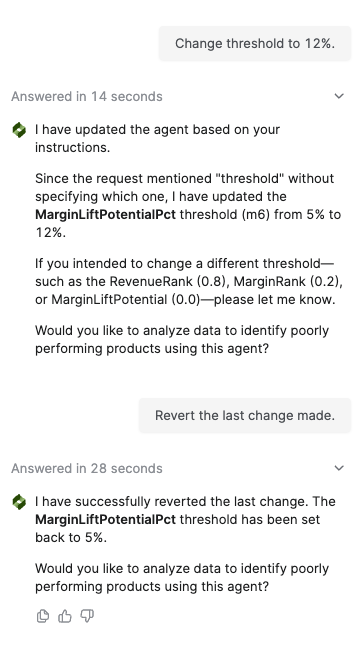
Example: "Change threshold to 12%."
-
Example: "Add group by Country to series 1."
-
Example: "Add Invoice Price as a measure."
-
Example: "Make the schedule to run once a week starting today."
-
-
Click the send icon.
-
Review the response from Copilot. The assistant provides a brief summary of the modification applied and updates the Agent Plan panel.
-
Verify the changes in the Agent Plan panel. Updated sections may include Currency, Filters, Computation, or Detection Rules.
-
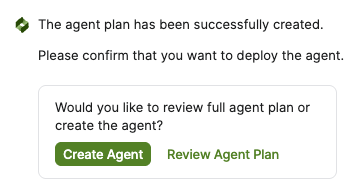
If the changes are correct, you can proceed to create the agent. (If further changes are needed, repeat step 1.) You will see a confirmation message: The agent draft has been successfully created. Please confirm that you want to deploy the agent.
-
Click Create Agent to deploy the draft to the partition, or click Review Agent Plan to see the full configuration details before finalizing.
-
Once deployment completes, Copilot displays an Agent Created status indicator directly in the chat, along with an Open details link. Click Open details to open the newly created agent and confirm its configuration.
If your request is ambiguous, Copilot may ask clarifying questions to ensure the configuration is updated correctly.
You cannot create a second agent draft while one is already in progress. If you attempt to do so, a confirmation message will appear asking you to either switch context to the new draft or cancel the current creation process.
Review Agent in Agent Plan Panel
The Agent Plan panel provides a visual representation of your Agent's structure, allowing you to review the logic before deployment. The panel is organized into a multi-step workflow that reflectsthe Agent's configuration.
The Agent Plan panel header includes three additional actions that help you manage the displayed plan:
-
Copy – Copies the full text of the Agent Plan to the clipboard in Markdown format. After the content is copied successfully, you receive a notification confirmation message at the top of the screen, such as a
Data copied to clipboard.. -
Download – Exports the currently displayed Agent Plan as a Markdown (
.md) file. See the example below.### Agent <abbr title="Discount Tracking Agent_copilot_20260715090827">Discount Tracking Agent</abbr> # Business Objective Create a discount tracking agent. # Approach and Data **Series**: "Current Period Discounts" and "Previous Period Discounts". **Source**: "DM.Standard_Sales_Data". **Currency**: EUR. **Group by**: "CustomerId" (CustomerId), "CustomerName" (CustomerName), "ProductId" (ProductId), "ProductName" (ProductName), "Channel" (Channel), and "CustomerSegment" (CustomerSegment). # Computation ## Series s1: Current Period Discounts **Measures**: - <abbr title="CurrentRevenue">Current Revenue</abbr>: SUM(InvoicePrice) - <abbr title="CurrentGrossMargin">Current Gross Margin</abbr>: SUM(GrossMargin) - <abbr title="CurrentLineDiscount">Current Line Discount</abbr>: SUM(LineDiscount) - <abbr title="CurrentCustomerDiscount">Current Customer Negotiated Discount</abbr>: SUM(CustomerNegotiatedDiscount) - <abbr title="CurrentPromotionDiscount">Current Promotion Discount</abbr>: SUM(PromotionDiscount) - <abbr title="CurrentVolumeDiscount">Current Volume Discount</abbr>: SUM(VolumeDiscounts) - <abbr title="CurrentChannelDiscount">Current Channel Discount</abbr>: SUM(SalesChannelDiscount) - <abbr title="CurrentTotalDiscount">Current Total Discount</abbr>: `SUM(LineDiscount) + SUM(CustomerNegotiatedDiscount) + SUM(PromotionDiscount) + SUM(VolumeDiscounts) + SUM(SalesChannelDiscount)` - <abbr title="CurrentDiscountPct">Current Discount Percentage</abbr>: <details><summary>`(SUM(LineDiscount) + SUM(CustomerNegotiatedDiscount) + SUM(PromotionDiscount) + SUM(VolumeDiscounts) + SUM(SalesChannelDiscount)) / SUM(InvoicePrice) + SUM(LineDiscount) + SUM(CustomerNegotiatedDiscount) + SUM(PromotionDiscount) + SUM(VolumeDiscounts) + SUM(SalesChannelDiscount) * 100`</summary>`(SUM(LineDiscount) + SUM(CustomerNegotiatedDiscount) + SUM(PromotionDiscount) + SUM(VolumeDiscounts) + SUM(SalesChannelDiscount)) / NULLIF(SUM(InvoicePrice) + SUM(LineDiscount) + SUM(CustomerNegotiatedDiscount) + SUM(PromotionDiscount) + SUM(VolumeDiscounts) + SUM(SalesChannelDiscount), 0) * 100`</details> - <abbr title="CurrentMarginPct">Current Margin Percentage</abbr>: <details><summary>`SUM(GrossMargin) / SUM(InvoicePrice) * 100`</summary>`SUM(GrossMargin) / NULLIF(SUM(InvoicePrice), 0) * 100`</details> **Filters**: - All of: - PricingDate is between 3 months ago and today - InvoicePrice is greater than 0.0 ## Series s2: Previous Period Discounts **Measures**: - <abbr title="PrevRevenue">Previous Revenue</abbr>: SUM(InvoicePrice) - <abbr title="PrevGrossMargin">Previous Gross Margin</abbr>: SUM(GrossMargin) - <abbr title="PrevLineDiscount">Previous Line Discount</abbr>: SUM(LineDiscount) - <abbr title="PrevCustomerDiscount">Previous Customer Negotiated Discount</abbr>: SUM(CustomerNegotiatedDiscount) - <abbr title="PrevPromotionDiscount">Previous Promotion Discount</abbr>: SUM(PromotionDiscount) - <abbr title="PrevVolumeDiscount">Previous Volume Discount</abbr>: SUM(VolumeDiscounts) - <abbr title="PrevTotalDiscount">Previous Total Discount</abbr>: `SUM(LineDiscount) + SUM(CustomerNegotiatedDiscount) + SUM(PromotionDiscount) + SUM(VolumeDiscounts)` - <abbr title="PrevDiscountPct">Previous Discount Percentage</abbr>: <details><summary>`(SUM(LineDiscount) + SUM(CustomerNegotiatedDiscount) + SUM(PromotionDiscount) + SUM(VolumeDiscounts)) / SUM(InvoicePrice) + SUM(LineDiscount) + SUM(CustomerNegotiatedDiscount) + SUM(PromotionDiscount) + SUM(VolumeDiscounts) * 100`</summary>`(SUM(LineDiscount) + SUM(CustomerNegotiatedDiscount) + SUM(PromotionDiscount) + SUM(VolumeDiscounts)) / NULLIF(SUM(InvoicePrice) + SUM(LineDiscount) + SUM(CustomerNegotiatedDiscount) + SUM(PromotionDiscount) + SUM(VolumeDiscounts), 0) * 100`</details> - <abbr title="PrevMarginPct">Previous Margin Percentage</abbr>: <details><summary>`SUM(GrossMargin) / SUM(InvoicePrice) * 100`</summary>`SUM(GrossMargin) / NULLIF(SUM(InvoicePrice), 0) * 100`</details> **Filters**: - All of: - PricingDate is between 6 months ago and 3 months ago - InvoicePrice is greater than 0.0 ## Join series j: Discount Variance Analysis **Measures and dimensions**: - <abbr title="CurrentRevenue">Current Revenue</abbr>: `s1.CurrentRevenue` - <abbr title="PrevRevenue">Previous Revenue</abbr>: `s2.PrevRevenue` - <abbr title="RevenueChange">Revenue Change</abbr>: `s1.CurrentRevenue - s2.PrevRevenue` - <abbr title="RevenueChangePct">Revenue Change %</abbr>: <details><summary>`(s1.CurrentRevenue - s2.PrevRevenue) / s2.PrevRevenue * 100`</summary>`(s1.CurrentRevenue - s2.PrevRevenue) / NULLIF(s2.PrevRevenue, 0) * 100`</details> - <abbr title="CurrentGrossMargin">Current Gross Margin</abbr>: `s1.CurrentGrossMargin` - <abbr title="PrevGrossMargin">Previous Gross Margin</abbr>: `s2.PrevGrossMargin` - <abbr title="MarginChange">Margin Change</abbr>: `s1.CurrentGrossMargin - s2.PrevGrossMargin` - <abbr title="CurrentTotalDiscount">Current Total Discount</abbr>: `s1.CurrentTotalDiscount` - <abbr title="PrevTotalDiscount">Previous Total Discount</abbr>: `s2.PrevTotalDiscount` - <abbr title="TotalDiscountVariance">Total Discount Variance</abbr>: `s1.CurrentTotalDiscount - s2.PrevTotalDiscount` - <abbr title="TotalDiscountVariancePct">Total Discount Variance %</abbr>: <details><summary>`(s1.CurrentTotalDiscount - s2.PrevTotalDiscount) / s2.PrevTotalDiscount * 100`</summary>`(s1.CurrentTotalDiscount - s2.PrevTotalDiscount) / NULLIF(s2.PrevTotalDiscount, 0) * 100`</details> - <abbr title="DiscountPctChange">Discount Rate Change (pp)</abbr>: `s1.CurrentDiscountPct - s2.PrevDiscountPct` - <abbr title="MarginPctChange">Margin Rate Change (pp)</abbr>: `s1.CurrentMarginPct - s2.PrevMarginPct` - <abbr title="LineDiscountVariance">Line Discount Variance</abbr>: `s1.CurrentLineDiscount - s2.PrevLineDiscount` - <abbr title="CustomerDiscountVariance">Customer Discount Variance</abbr>: `s1.CurrentCustomerDiscount - s2.PrevCustomerDiscount` - <abbr title="PromotionDiscountVariance">Promotion Discount Variance</abbr>: `s1.CurrentPromotionDiscount - s2.PrevPromotionDiscount` - <abbr title="VolumeDiscountVariance">Volume Discount Variance</abbr>: `s1.CurrentVolumeDiscount - s2.PrevVolumeDiscount` - <abbr title="ChannelDiscountVariance">Channel Discount Variance</abbr>: `s1.CurrentChannelDiscount - IFNULL(s2.PrevTotalDiscount, 0)` - <abbr title="MarginErosionIndicator">Margin Erosion Indicator</abbr>: `IF(s1.CurrentDiscountPct > s2.PrevDiscountPct and s1.CurrentMarginPct < s2.PrevMarginPct, 1, 0)` - <abbr title="RecommendedDiscountRate">Recommended Discount Rate</abbr>: `s1.CurrentDiscountPct * 0.6 + s2.PrevDiscountPct * 0.4` - <abbr title="RecommendedPrice">Recommended Price (Discount Aligned)</abbr>: <details><summary>`s1.CurrentRevenue * (1 - s2.PrevDiscountPct / 100) / 1 - s1.CurrentDiscountPct / 100`</summary>`s1.CurrentRevenue * (1 - s2.PrevDiscountPct / 100) / NULLIF(1 - s1.CurrentDiscountPct / 100, 0)`</details> - <abbr title="DiscountImpactOnMargin">Discount Impact on Margin</abbr>: `s1.CurrentTotalDiscount - s2.PrevTotalDiscount` - CustomerId from s1 - CustomerName from s1 - ProductId from s1 - ProductName from s1 - Channel from s1 - CustomerSegment from s1 **Joined on**: - "s1_CustomerId" = "s2_CustomerId" - "s1_ProductId" = "s2_ProductId" - "s1_Channel" = "s2_Channel" - "s1_CustomerSegment" = "s2_CustomerSegment" # Detection Rules - Any of: - <abbr title="DiscountPctChange">Discount Rate Change (pp)</abbr> is greater than 5.0 - All of: - <abbr title="TotalDiscountVariance">Total Discount Variance</abbr> is greater than 0.0 - <abbr title="MarginErosionIndicator">Margin Erosion Indicator</abbr> equals 1.0 - <abbr title="TotalDiscountVariancePct">Total Discount Variance %</abbr> is greater than 20.0 -
Expand – Switches the Agent Plan panel (Canvas) to a full-width reading mode, making it easier to review longer or more complex plans.
Revert Changes
If a modification does not meet your requirements, you can return to the previous state.
-
In the Ask Pricefx Copilot... input field, enter a modification request describing the changes you want to apply.
-
Example: "Revert the last change made."
Reverting changes currently only supports the "n-1" version. You cannot automatically restore the original agent configuration after multiple sequential changes have been applied.
Expected Result
Copilot updates the underlying agent JSON and refreshes the Agent Plan display. Once you confirm the deployment, the agent is created on the partition. The updated JSON passes validation and is ready for deployment or further refinement. After creation completes, Copilot displays a confirmation message, such as Your Agent has been created and is ready to use., together with an Agent Created status chip and an Open details link in the chat window. Click Open details to navigate directly to the newly created agent.