
The Data Validation Tool is a Pricefx capability that lets you validate data provided by customers before that data enters Pricefx processes. The tool analyzes a provided file, reports data issues, and lets you correct the data and rerun the validation so the file is ready for use in downstream workflows such as Data Upload and accelerator deployment.
Navigation: Account > Data Tools > Data Validation Tool
What the Data Validation Tool Is
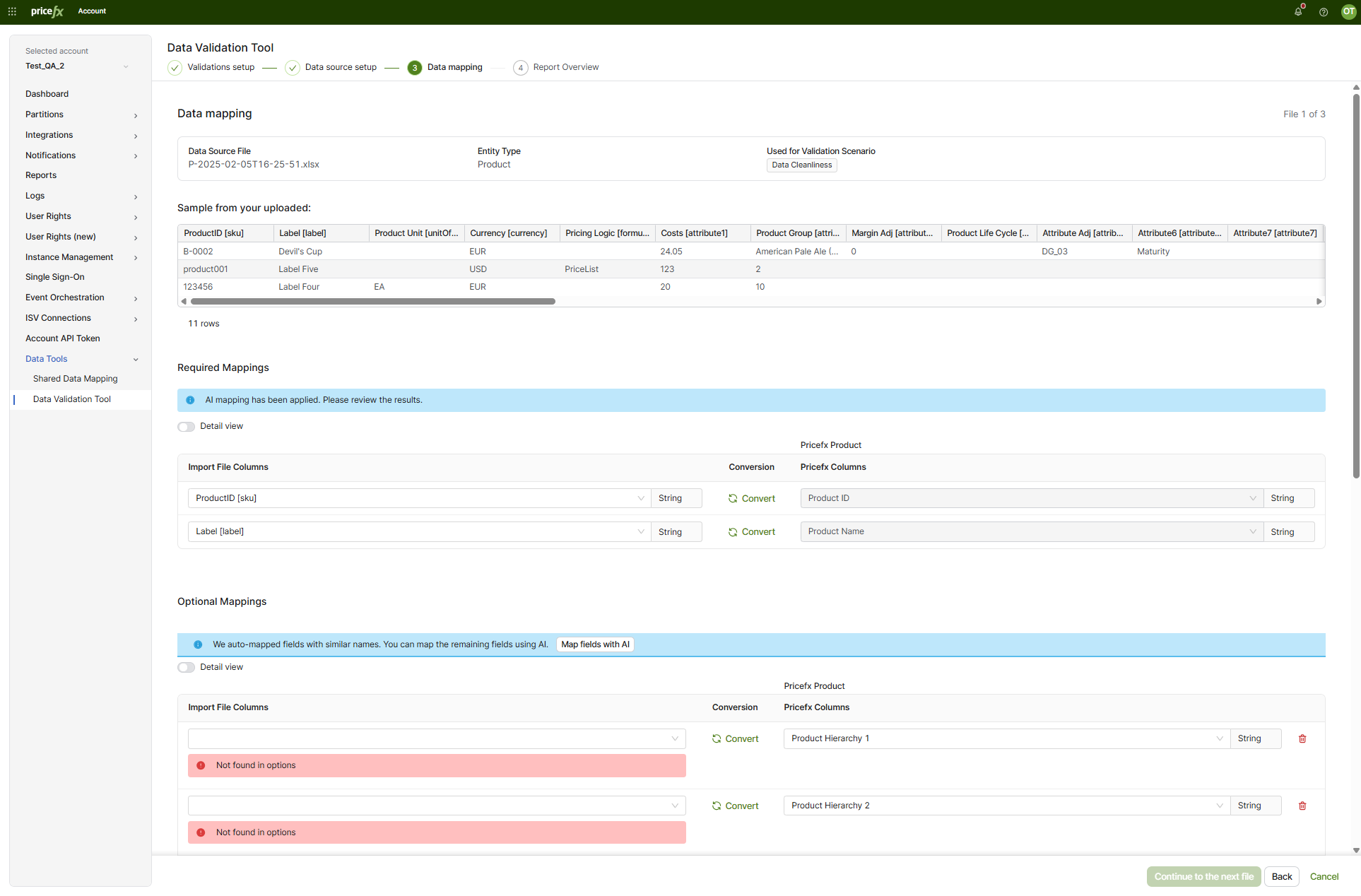
The Data Validation Tool is available in the Account area of PlatformManager under Data Tools > Data Validation Tool. From the tool landing screen, you select Start new validation to begin. The tool then guides you through a four-step workflow shown at the top of the screen:
-
Validations setup
-
Data source setup
-
Data mapping
-
Report Overview
The tool detects missing values, duplicates, and rule conflicts and presents the results with reports and fix suggestions.
The Problem It Solves
Customer data delivered for a Pricefx implementation is often inconsistent. Common issues include missing mandatory values, duplicate identifiers, incorrect field types, stray leading or trailing whitespace, empty rows, and references that do not resolve across files.
Without an early validation step, these issues surface later during data upload or accelerator deployment, where they are slower and more expensive to correct. The Data Validation Tool moves data quality checks earlier in the process. Its goal is to accelerate the implementation process and reduce the time to value.
Who Uses the Data Validation Tool
The Data Validation Tool serves two primary audiences:
-
Implementation teams: Pricefx implementation staff who validate customer-provided data to speed up onboarding.
-
Partition data uploaders: Users who validate data before uploading it to a partition.
Validation Scenario Types
The Data Validation Tool organizes its checks into validation scenarios. In the Validations setup step, you select Add more scenarios to open the Add validation scenarios dialog and choose the scenarios that apply to your data. The dialog includes a Type to find search field and a list of scenarios with descriptions, confirmed with the Confirm button.
The scenarios fall into three conceptual types.
Accelerator Readiness
Accelerator readiness validates data for a particular accelerator, for example Sales Insights. This type confirms that the data meets the structural and business requirements of the target accelerator. Typical checks include:
-
Mandatory fields: Confirms that required fields contain values.
-
Optional fields: Reviews optional fields where relevant.
-
Field types: Confirms that values match the expected data type.
-
Cross-file references: Confirms that references resolve across files. For example, the transaction file does not contain a Product ID that is absent from the product file.
-
Basic calculations: Confirms expected relationships between values. For example, Cost plus Margin equals List Price.
-
Data cleanliness: Confirms the data is free of common quality issues.
Whether a field is treated as mandatory (for empty-value detection) or as a key (for duplicate detection) is determined per entity from the partition. As a result, an empty value is reported only when it occurs in a field that is mandatory for the target entity; an empty value in a non-mandatory field is intentionally not reported.
Partition Upload Readiness
Partition upload readiness validates files against the existing data structures on the partition. This type confirms that a file matches the target partition before upload. Typical checks include:
-
Key fields: Confirms that key fields are present and valid.
-
Field types: Confirms that values match the expected data type.
-
Data cleanliness: Confirms the data is free of common quality issues.
File Cleanliness Only
File cleanliness only validates the file itself, primarily independent of Pricefx structures. This type is useful when you want to assess a file without committing to a target accelerator. You can optionally select a partition; when a partition entity is linked to an added file, the tool fetches the entity metadata (such as data types and mandatory flags) from the partition, so the scenario is not strictly file-only. Typical checks include:
-
Data cleanliness: Detects issues such as duplicates, empty rows, and trailing spaces.
-
Field types: Confirms data types based on the definition you provide.
Validation Scenarios Reference
The Add validation scenarios dialog presents the following named scenarios, which map to the Accelerator Readiness, Partition Upload Readiness, and File Cleanliness Only types. This table is the single reference for the available validation scenarios.
|
Scenario Name |
Description |
|---|---|
|
Whitespace in key columns |
Finds hidden spaces before or after ID values. |
|
Whitespace in all columns |
Finds hidden spaces before or after values in every column, not just IDs. |
|
Comprehensive data quality |
Runs the baseline set in one go: required fields, duplicate IDs, broken links, negative amounts and price order, across customers, products and transactions. |
|
Valid currency codes |
Checks that each transaction’s currency is a real, supported code (e.g. EUR, USD). |
|
Required fields filled in |
Checks that the fields Pricefx needs, IDs and key business fields, are not empty. |
|
No negative amounts |
Checks that quantities, prices and costs are not below zero. |
|
Price levels in the right order |
Checks that prices stack correctly on each transaction: net ≤ invoice ≤ list. |
|
Revenue / Price / Quantity Consistency |
Validates that invoicePrice * quantity is always strictly positive whenever both fields are populated and quantity is positive. |
|
Valid customer & product links |
Checks that every transaction points to a customer and product that exist in your data. |
|
Enough data to analyze |
Checks that every file has records and that the transaction file has enough volume to analyze. |
|
No duplicate IDs |
Checks that each ID appears only once. |
|
Basic file check (any file) |
Checks a file’s structure and data types without tying it to a standard Pricefx type. You can optionally select a partition; when a partition entity (Entity Type and Entity Name) is linked to an added file, the metadata (data types, mandatory flags) is fetched from the partition. For each field you can select the validation to apply (mandatory, uniqueness, notNull). |
|
Extended Field Detection |
Classifies numeric transaction fields as quantity-extended vs per-unit. Informational, non-blocking. |
ISO currency codes are the standardized three-letter codes for currencies, for example EUR and USD.
Each scenario is shown in the dialog and in the report with its version, for example v0.0.3, so a result can be traced back to the exact set of checks that produced it.
Extended Field Detection applies only to the transaction file. It checks whether each numeric field in that file already holds a quantity-extended value (unit price multiplied by quantity) or a per-unit value. The Insights model expects certain numeric fields to be quantity-extended; if a per-unit field is treated as extended, the waterfall and dashboards aggregate incorrectly. Running the check here surfaces the mismatch before the accelerator is deployed rather than during model configuration afterwards.
The scenario requires the transaction file to be uploaded and mapped, and Quantity must be mapped. It does not run for other entity types such as Products or Customers. Its findings are informational: they never block you from continuing.
Data Source Setup and Data Mapping
After you select validation scenarios, the Data source setup step prompts you to provide a file for each required entity or data source. You can upload a new file or reuse a file you uploaded recently. In the Data mapping step, you align the columns in your file with Pricefx columns, set the parsing options (such as separator, quote character, and date format), and review the required and optional mappings, including AI-assisted suggestions.
For the full step-by-step procedure, see How to Run Data Validation Tool.
Usage Modes
The Data Validation Tool supports two usage modes that share the same validation logic.
-
Standalone mode: You run the tool directly to validate a file independently. The standalone mode supports validation selection, file selection, and data mapping driven by the selected validation types. See How to Run Data Validation Tool.
-
Accelerator-embedded mode: The validation capability is plugged into accelerators, so validation runs as part of an accelerator workflow. See Data Validation Tool: Accelerator Deployment.
The two modes relate by reusing the same scenarios and checks. Once you have corrected any reported issues, you can reuse the same file in other processes, such as Data Upload or accelerator deployment, by selecting it from your recently uploaded files instead of uploading it again.
Trade-Offs and Considerations
The Data Validation Tool front-loads data quality work. The benefit is fewer failures during upload and deployment. The trade-off is an additional preparation step before data enters a partition. Selecting more scenarios increases coverage but also increases the number of files and mappings you must provide and review.
Related Pages
-
How to Run Data Validation Tool — Step-by-step procedure for the standalone wizard.
-
Data Validation Tool: Accelerator Deployment — Using the embedded Data Validation step during accelerator deployment.