This step needs to be performed in every project after every upgrade of the project partition to a newer pricefx release. It updates the latest Pricefx API JavaDoc documentation and library with API used in auto-completion in your currently open project:
-
in IntelliJ IDEA, open the project that should be upgraded to a newer version of API.
-
Open pom.xml and check that you have the expected version (default is RELEASE for the latest version):
<studio-sdk.version>RELEASE</studio-sdk.version> -
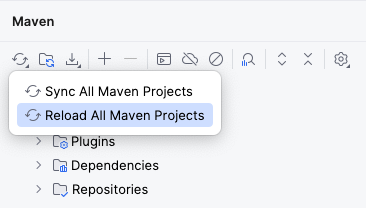
Open the Maven tool window and click the Reload button > Reload All Maven Projects.
This will add Maven: net.pricefx:pricefx-studio-sdk library in External libraries.