
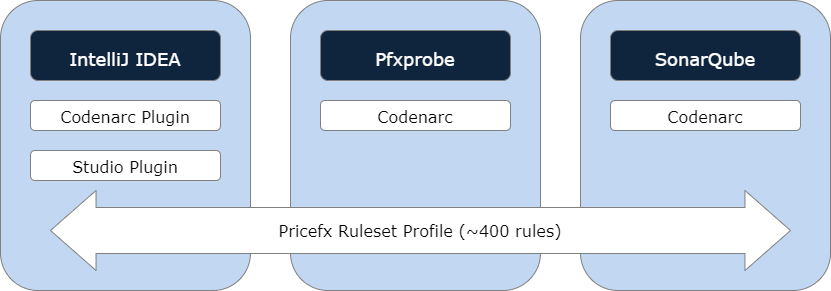
Code quality of a configuration is supported by multiple tools: IntelliJ IDEA, Gitlab and SonarQube. All of these tools are internally using CodeNarc which is a standard tool for static analysis for Groovy language. CodeNarc provides more than 400 rules that can be used for quality check. We reviewed each rule and determined which ones should be enabled or disabled. As a result, we formulated a standardized ruleset for each of the tools.
IntelliJ IDEA
IntelliJ IDEA is used by Configuration Engineers during development. CodeNarc setup and usage in Studio are described at Code Quality in IDEA.
Pfxprobe
pfxprobe is a static analysis tool that may be run through the CLI and can be plugged into your deployment pipeline tool of choice. Right now, it only supports CodeClimate format, but there is development in progress to support SARIF as well.
It was originally designed to be executed as part of the GitLab deployment pipeline, facilitating the evaluation of merge request quality. Internally, we employ pfxprobe in our projects, primarily enabling Solution Architects to gain insights into the delivered code quality. Naturally, the configuration team may also find this tool beneficial.
Setup for a project is easy: generate pom.xml and .gitlab-ci.yml files in Studio project by right-clicking the root folder in Studio > Pricefx > Create pom.xml and .gitlab-ci.yml and commit these files to the repo.
The tool is available as docker image pricefx/pfxprobe at the Docker Hub and can be used for a setup at a customer’s Gitlab instance (or other CI/CD service). You can check the Gitlab pipeline configuration in the ‘pfxprobe’ section of our standard .gitlab-ci.yml file.
SonarQube
To provide an overview of the project's code quality for Solution Architects, Configuration Engineers and management, we use SonarQube internally. It is executed as Gitlab pipeline and the setup is the same as for pfxprobe.
Generate pom.xml and .gitlab-ci.yml files in Studio project by right-clicking the root folder in Studio > Pricefx > Create pom.xml and .gitlab-ci.yml and commit these files to the repo.
If the customer or partner run their own SonarQube instance, the standard ruleset for Pricefx configurations can be downloaded from: https://developer.pricefx.eu/studio/codenarc/Sonar_Pricefx_Configuration.xml
To see how SonarQube is set up in our pipeline, see the ‘sonarqube’ section of our standard .gitlab-ci.yml file.
Update: the groovy plugin for Sonar is unfortunately not maintained anymore.
GitLab - Code Climate report
pfxprobe outputs a Code Climate formatted JSON report, which is supported by GitLab to display it in the Merge Request itself:

Other Tools - SARIF report
To enable the usage of pfxprobe output by other tools, there is a ticket in progress, PFAUT-1253, to support SARIF (Static Analysis Results Interchange Format) report. Once released, it’ll unlock the integration with SonarCloud and any other tools that work with SARIF.