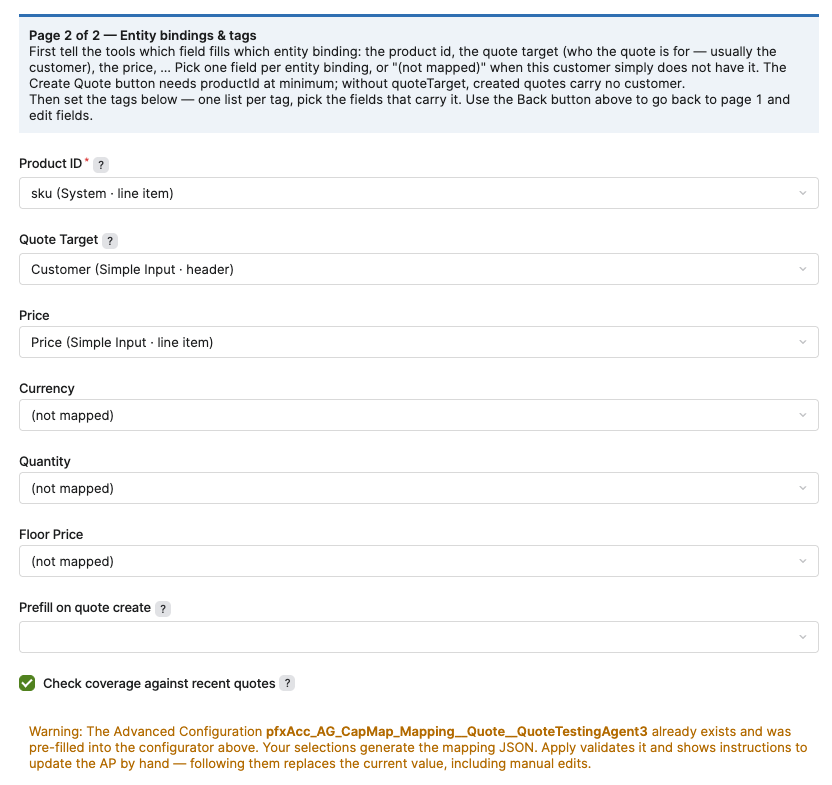
This feature is available starting with Agents 1.8.
The Quote Creation Action Task is an Agents feature that lets an Action directly create a Quote. Capability Mapping links the fields required by the Quote Creation Action Task to the actual fields defined on a Quote Type, using a guided configurator called Capability Mapping: Quote Discovery. This reference describes the fields available in the Action Task section of the Action Definition step and in the Capability Mapping: Quote Discovery wizard.
Action Task Section
The Action Task section appears within the Action Definition step of the Agent configuration wizard. Action Tasks enable you to directly act on actions, like creating a Quote or updating a list price. The fields in this section define the configuration required for the Quote Creation Action Task.
|
Field |
Description |
|---|---|
|
Task Name |
Specifies the action task to configure. |
|
Quote Type |
Specifies the Quote Type that the action task uses when it creates a Quote. This field is required. |
|
Quote Field: Product Id |
Maps the action task's product identifier to the corresponding field on the Quote Type. This field is required. |
|
Quote Field: Customer field |
Maps the action task's customer identifier to the corresponding field on the Quote Type, for example Customer Id. This field is required. |
|
Quote Field: Price |
Maps the action task's price field to the corresponding field on the Quote Type, for example ∑Invoice Price. |
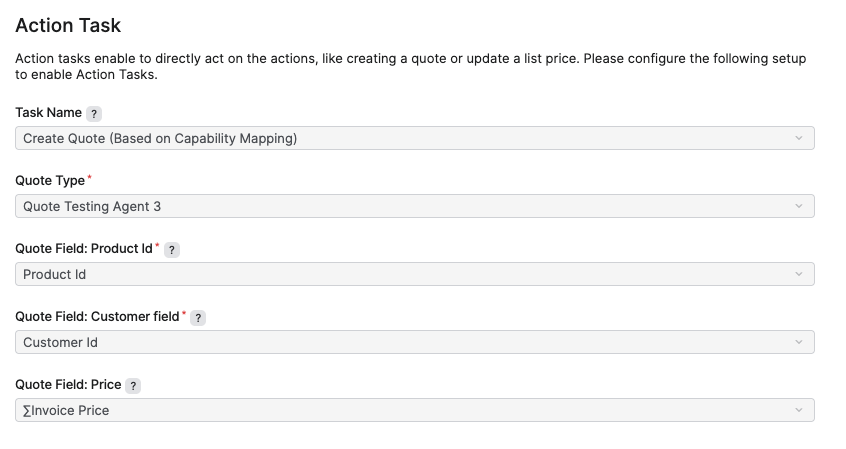
Fields marked with a red asterisk in the Action Task section are required before you can enable the Quote Creation Action Task.
Capability Mapping: Quote Discovery Wizard
The Capability Mapping: Quote Discovery wizard (Company Processes > Configuration Wizards) reads a sample Quote of the selected Quote Type and shows the Capability Mapping as a configurator. An existing mapping Advanced Configuration Option (Administration > Configuration > System Configuration > Advanced Configuration Options) is loaded and pre-fills the configurator in edit mode. Your selections generate the mapping JSON. Apply validates the mapping, generates the corresponding mapping JSON, and provides instructions for updating the Advanced Configuration.
Selecting a sample Quote generates mapping template fields for the input and output fields available in that Quote.
Wizard Entry Fields
|
Field |
Description |
|---|---|
|
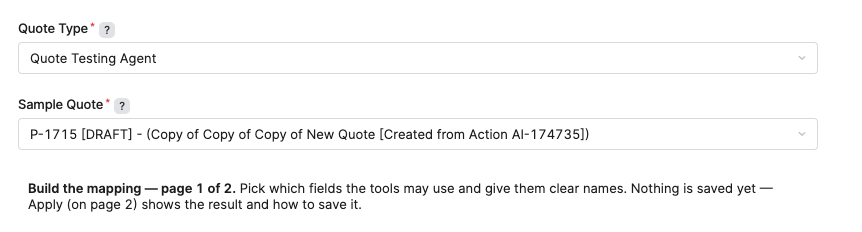
Quote Type |
Specifies the Quote Type for which you build the Capability Mapping. This field is required. |
|
Sample Quote |
Specifies an existing Quote of the selected Quote Type that the wizard reads to discover available fields, for example P-1757 [DRAFT] - (New Quote [Created from Action AI-451342]). This field is required. |
Page 1 — Field Selection
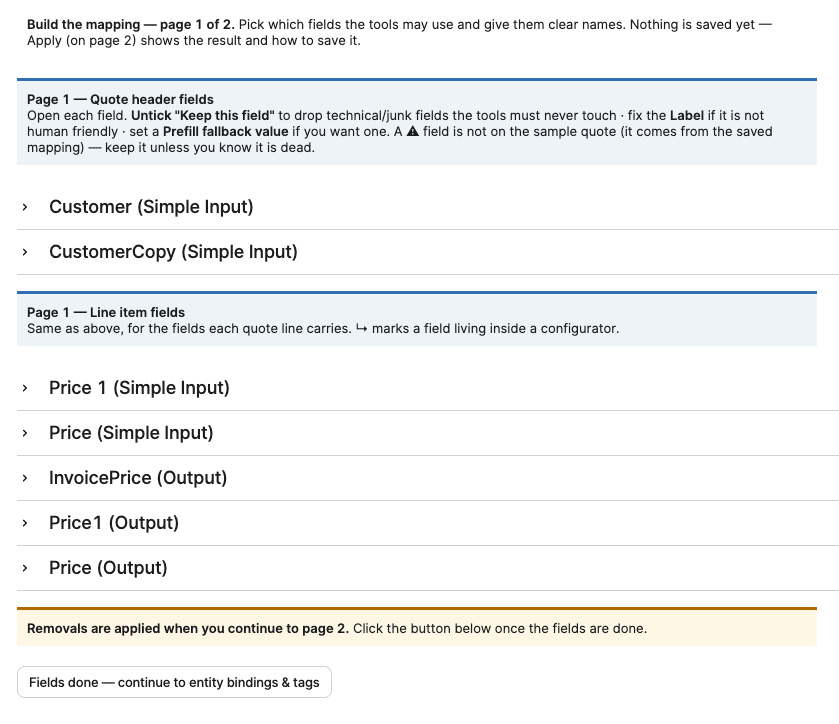
Page 1 lists the header-level and line-level fields discovered from the sample Quote. It defines which fields are included in the mapping and their displayed labels. Changes made on Page 1 are not saved until the mapping is applied on Page 2.
-
Quote Header Fields – Lists header-level fields discovered on the sample Quote.
-
Line Item Fields – Lists line-level fields discovered on the sample Quote.
The following options define how each field is included in the mapping.
-
Keep This Field – Specifies whether the field is included in the mapping. A cleared option excludes the field from the mapping.
-
Label – Specifies the display label for the field.
-
Prefill Fallback Value – Specifies a fallback value used to prefill the field when no other value is available.
A warning triangle indicates that the field exists in the saved mapping but is not present on the sample Quote. The field remains available in the mapping so that existing configuration is not removed unintentionally.
-
Fields Done — Continue to Entity Bindings & Tags – Applies the Page 1 field selections and proceeds to Page 2.
Page 2 — Entity Bindings and Tags
Page 2 maps Quote fields to the entity bindings used by the Quote Creation Action Task. Each entity binding can be mapped to one field or set to (not mapped) when no field is assigned to the binding.
|
Field |
Description |
|---|---|
|
Product ID |
Binds the field that supplies the product identifier, for example sku (System · line item). This binding is required. A Product ID is required to create a Quote Line Item. |
|
Quote Target |
Binds the field that identifies the Quote target, usually the customer, for example Customer (Simple Input · header). Set to (not mapped) when no Quote Target field is assigned. |
|
Price |
Binds the field that supplies the price, for example Price (Simple Input · line item). Set to (not mapped) when no Price field is assigned. |
|
Currency |
Binds the field that supplies the price currency, for example Currency (Simple Input · line item). Set to (not mapped) when no Currency field is assigned. |
|
Quantity |
Binds the field that supplies the quantity, for example Quantity (Simple Input · line item). Set to (not mapped) when no Quantity field is assigned. |
|
Floor Price |
Binds the field that supplies the floor price, for example Floor Price (Simple Input · line item). Set to (not mapped) when no Floor Price field is assigned. |
|
Prefill on quote create |
Binds an optional field used to prefill values when a Quote is created from the action. |
-
Check Coverage Against Recent Quotes – Validates the mapping against recent Quotes of the selected Quote Type before the mapping is applied.
If the pfxAcc_AG_CapMap_Mapping__Quote_ Advanced Configuration exists, the wizard loads its current mapping into the configurator. Applying the mapping generates the corresponding mapping JSON. Updating the Advanced Configuration with the generated JSON replaces its current value, including any manual changes.