|
Aim of this article |
Shows how to create a new Offer, i.e. custom offering which has no setup or configuration in PlatformManager, it is only a link in Marketplace which redirects users to a given service or website. |
|---|---|
|
Related sections |
Offers (Reference Manual) |
|
Required permissions |
Offers - Create/Edit |
Steps:
-
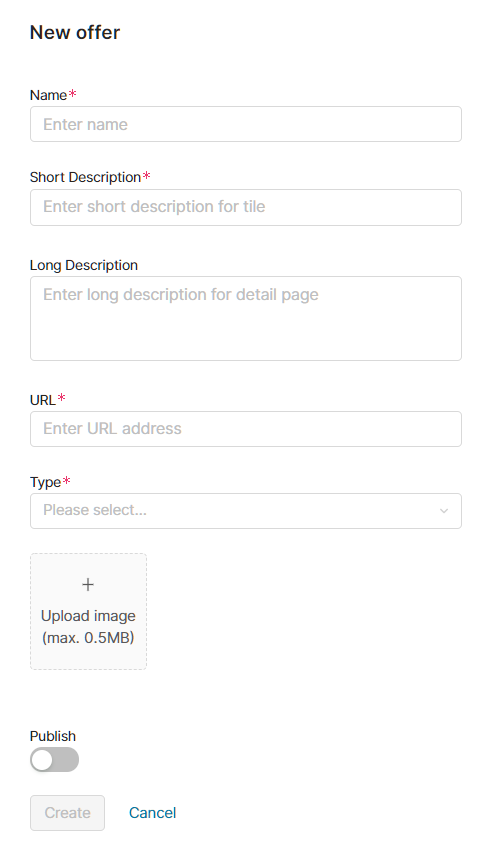
In Marketplace > Offers click the New Offer button at top right.
-
Fill in the following fields:
-
Name – Main title on the tile in Marketplace.
-
Short description – Description of your Offer to be displayed in the Marketplace tile.
-
Long description – Extra details displayed after users click the Details button on the tile.
-
URL – Link to your Offer.
-
Type – Can be one of the following:
-
Accelerators (SOLUTIONS)
-
Accelerator Packages (PACKAGES)
-
Integration Templates (INTEGRATIONS)
-
Non Approved (NON_APPROVED)
-
-
Logo – You can upload a logo for your Offer (up to 0.5 MB).
-
Publish – Allows you to make your Offer visible in Marketplace.
-
-
Click Save.