|
Aim of this article |
Explains how to create a filter which is used by routes to fetch or delete data from a partition. |
|---|---|
|
Related sections |
Filters (Reference Manual) |
|
Required permissions |
Integration Instance - Edit |
Steps:
-
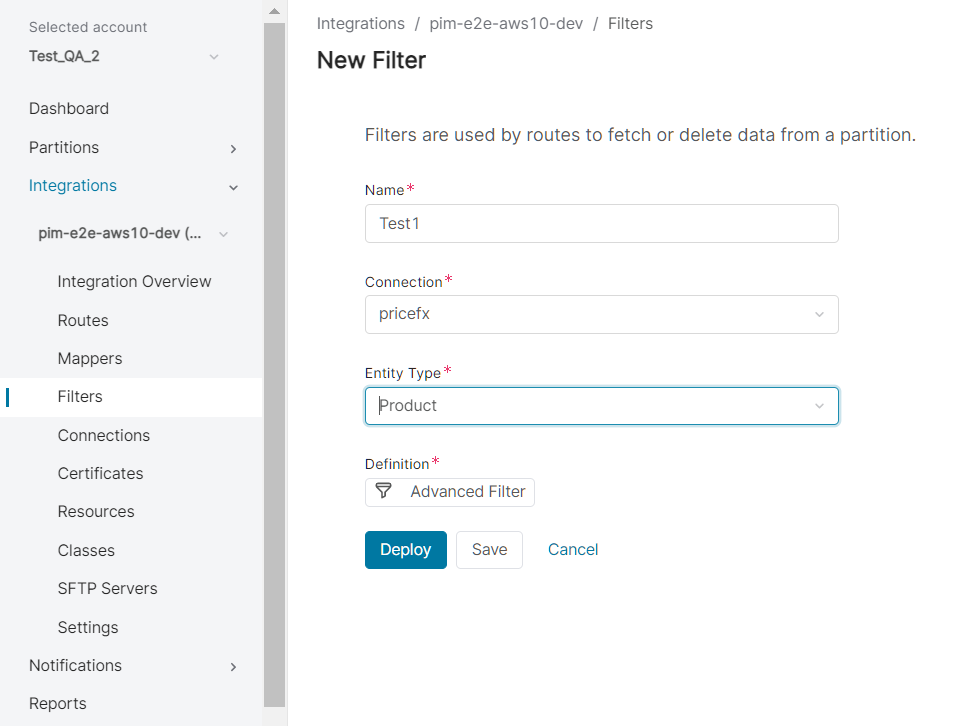
Go to Account > Integrations > Filters.
-
Click New Filter.
-
Fill in:
-
Name – Enter name of your choice.
-
Connection – Select from the available connections.
-
Entity Type
-
If pricefx connection is selected, you can select here one of the following values: Customer, Customer Extension, BoM Data, Data Source, Product, Product Extension, Company Parameters, Product Competition.
-
If other connection type is selected, you need to select
filter configurationfor the given connection (IM REST endpoint) (IMHttpClient methodgetFilterConfigurations()).
-
-
Entity Name – For some of the entities, you can select here from values found at the partition.
-
Definition – Allows you to build the filter condition using Advanced Filter. For details on using advanced filters, see Filtering (Unity documentation).
-
-
Click Save.