
This recipe is outdated
Business Scenario
If the built-in strategy engines do not meet your requirements, you can easily “plug in” a custom strategy engine to be used in the Price Setting Package. In this section you will learn how to build your own strategy engine and connect it to the Price Setting Package. The custom engine can be used the same way as the built-in strategies. There is no difference in how they are used in PL/LPG afterwards.
In addition, you will learn how to wrap a built-in engine with your custom engine. This can be good when you want to use the results of the built-in engine and perform some additional operations.
As a business example, we use “Capped Price Increase”. It is a price increase strategy with some fixed limit, for example: Actual Price + 5%, but not more than 50 € of an absolute price increase. In this use case only relative price increase is supported because capped increase does not make sense with absolute increase.
Accelerator Package as Solution
|
Accelerator |
Accelerate Price Setting Package |
|---|---|
|
Mandatory Data |
Deployed and configured Price Setting Accelerator Package |
Deployment
Deploy the Accelerate Price Setting Package through PlatformManager. This will also deploy the standard pre-configuration which will make it easier to get started.
Create Library Function
You need to create a library function that can be used as a custom strategy engine. You should add it to your own Groovy Library separately from the built-in engines.
The library needs to follow very simple format.
BigDecimal sampleEngine(BigDecimal cost){
  return cost + 5
}
In this use case we want to create PriceIncrease Strategy with relative price increase and absolute maximum increase.
So, in this example, we create a Groovy library “CustomEngines”. In this library, we create an element “CappedPriceIncrease”. It has the following parameters:
-
basePrice – Actual valid price for the SKU
-
productAdjustment – Price increase for the SKU
BigDecimal calculatePrice(BigDecimal basePrice, BigDecimal productAdjustment) {

}
To set up this strategy in the Strategy Definition PP:
-
Create an entry for “CappedPriceIncrease”.
-
Set up the same parameters as in “normal” PriceIncrease Strategy.
-
BASE_PRICE – Actual price of the SKU
-
PRICE_INCREASE – Price increase, looked up in the PriceIncrease PP in %
-

The defined parameters will be passed in this order to the custom engine.
Now we want to use the out-of-the-box Price Increase Engine. So we just call it from our custom engine:
BigDecimal calculatePrice(BigDecimal basePrice, BigDecimal productAdjustment) {
  strategyConfigFromPP = ["Calculation Mode" : "Percentage"]
  def lib = libs.PriceListManagement
  BigDecimal productAbsoluteAdjustment = 0

  def increasedPrice = lib.AdjustmentEngine.calculatePrice(basePrice, productAdjustment, productAbsoluteAdjustment strategyConfigFromPP)
    return increasedPrice
  }
Now, we want to limit the maximum price increase to a fixed value:
BigDecimal calculatePrice(BigDecimal basePrice, BigDecimal productAdjustment) {
  strategyConfigFromPP = ["Calculation Mode" : "Percentage"]
  def lib = libs.PriceListManagement
  BigDecimal productAbsoluteAdjustment = 0

  def increasedPrice = lib.AdjustmentEngine.calculatePrice(basePrice, productAdjustment, productAbsoluteAdjustment, strategyConfigFromPP)
  def maxIncrease = 6
  def resultPrice = increasedPrice > basePrice + maxIncrease ? basePrice + maxIncrease : increasedPrice

  return resultPrice
}
In a last step, we want to make the maxIncrease a parameter.
We can use the PriceIncrease PP (the same that is used to store PriceIncrease % in the out-of-the-box functionality). We just can use attribute2 for this. So the setup can look like this:
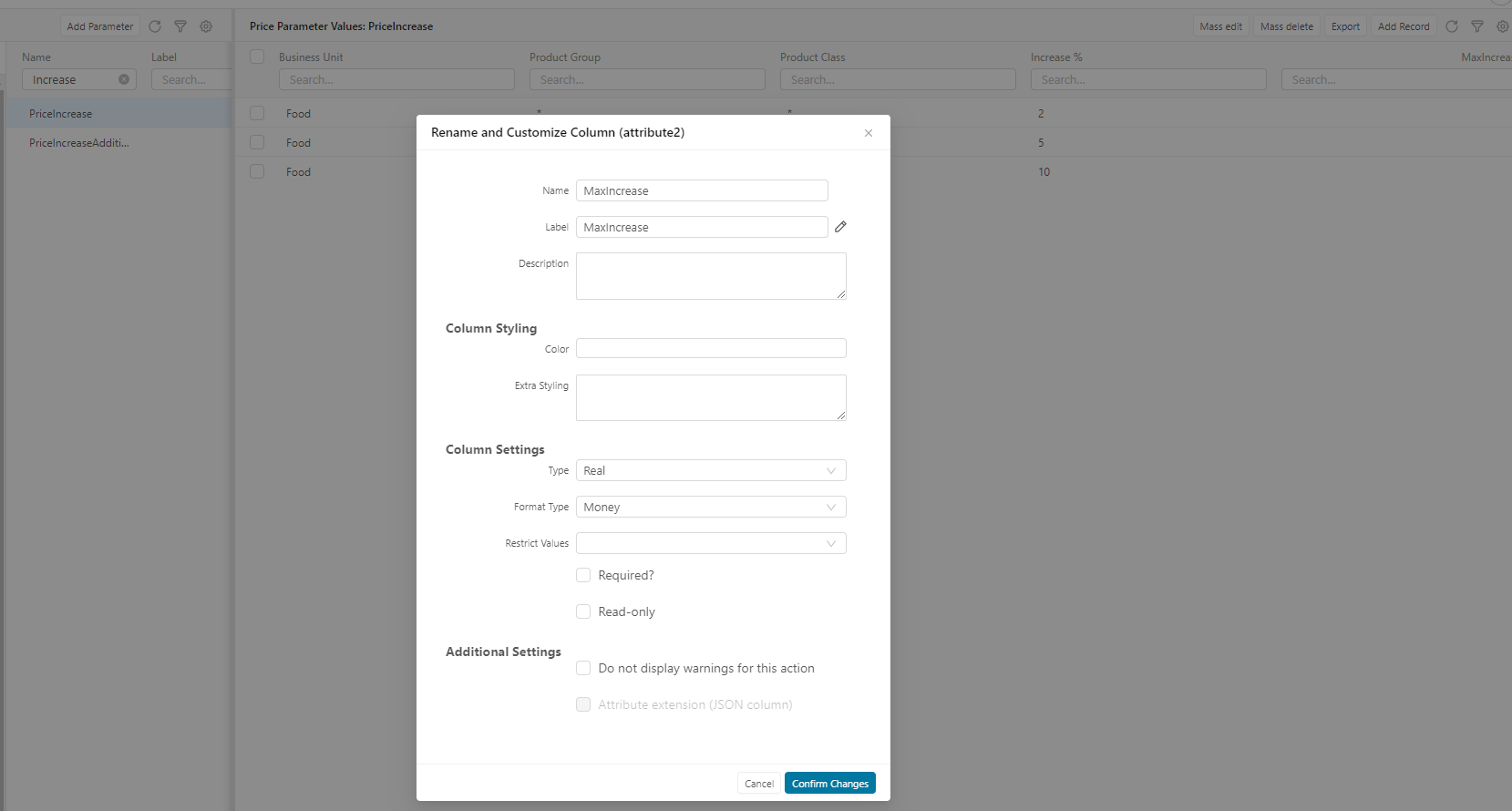
Once the PP table is adjusted, we can inject it in the price calculation dispatcher. First we need this code to look up the maxIncrease parameter:
def attributeId = "attribute2"
def ppTableName = "PriceIncrease"
def productDimensionalLookupKeys = api.getElement("DimensionalLookupKeys").Products
boolean useCache = api.getElement("CacheLookupKeys")


List parameterResult = libs.PriceBuilderCommonElementUtils.PriceParameterUtil.vLookupHierarchic(ppTableName, productDimensionalLookupKeys, useCache)
BigDecimal maxIncrease = parameterResult?.getAt(0)?.("${attributeId}" as String) as BigDecimal

api.trace(parameterResult)
api.trace(maxIncrease)

return maxIncrease
To inject it, we have the element “AdditionalCalculatorParameters” in the PL Logic (IndependentPriceListLogic & DependentPriceListLogic). It looks like this:
/**
 * These maps should be used to pass additional parameters that will be used for 3rd party calculations.
 *
 * Each key-value pair of additionalParameters will be passed on to calculator object. The value will be passed as an argument to calculation
 * method if its key is defined in "StrategyDefinition" Price Parameter.
 *
 * Each key-value pair of additionalOptionalParameters will be passed on to calculator object. The value is Closure which will be
 * evaluated and its result passed as an argument method when all conditions are met:
 * - its key is defined in "StrategyDefinition" Price Parameter
 * - said strategy is used
 * - there is no argument with the same name passed in additionalParameters.
 *
 * Initially these maps are empty.
 */
return api.getElement("WarningManager").tryToExecuteElement("AdditionalCalculatorParameters") {
    return [:]
}
We just add it to the provided map:
/**
 * These maps should be used to pass additional parameters that will be used for 3rd party calculations.
 *
 * Each key-value pair of additionalParameters will be passed on to calculator object. The value will be passed as an argument to calculation
 * method if its key is defined in "StrategyDefinition" Price Parameter.
 *
 * Each key-value pair of additionalOptionalParameters will be passed on to calculator object. The value is Closure which will be
 * evaluated and its result passed as an argument method when all conditions are met:
 * - its key is defined in "StrategyDefinition" Price Parameter
 * - said strategy is used
 * - there is no argument with the same name passed in additionalParameters.
 *
 * Initially these maps are empty.
 */
return api.getElement("WarningManager").tryToExecuteElement("AdditionalCalculatorParameters") {
    BigDecimal maxIncrease = getMaxIncrease()

    return ['MAX_INCREASE': {return maxIncrease}]
}

BigDecimal getMaxIncrease() {
  def attributeId = "attribute2"
  def ppTableName = "PriceIncrease"
  def productDimensionalLookupKeys = api.getElement("DimensionalLookupKeys").Products
  boolean useCache = api.getElement("CacheLookupKeys")

  List parameterResult = libs.PriceBuilderCommonElementUtils.PriceParameterUtil.vLookupHierarchic(ppTableName, productDimensionalLookupKeys, useCache)
  BigDecimal maxIncrease = parameterResult?.getAt(0)?.("${attributeId}" as String) as BigDecimal

  return maxIncrease
}
After this, our “MAX_INCREASE” is available as a parameter in the calculation dispatcher and it can be passed to the engine:

The last thing to do is to add this to our custom engine:
BigDecimal calculatePrice(BigDecimal basePrice, BigDecimal productAdjustment, BigDecimal maxIncrease) {
  strategyConfigFromPP = ["Calculation Mode" : "Percentage"]
  BigDecimal productAbsoluteAdjustment = 0

  def increasedPrice = lib.AdjustmentEngine.calculatePrice(basePrice, productAdjustment, productAbsoluteAdjustment, strategyConfigFromPP)

  def resultPrice = increasedPrice > basePrice + maxIncrease ? basePrice + maxIncrease : increasedPrice
  return resultPrice
}