
This recipe is outdated
Business Scenario
The business scenario is to calculate prices for a product depending on competition prices. The base for price calculation is the competition data and a rule how the competition price should influence our price setting.
In this scenario we want to set our own list price as an average of all the competition prices. It can then be easily changed to the minimum or maximum competition price.
Accelerator Package as Solution
|
Accelerator |
Accelerate Price Setting Package |
|---|---|
|
Mandatory Data |
Competition data per SKU |
Deployment
Deploy the Accelerate Price Setting Package through PlatformManager. This will also deploy the standard pre-configuration making it easier to get started.
Package Configuration
To learn about the basic setup and working with the package, see the .
Configure Competition Based Strategy
The package comes with pre-configured pricing strategies. If you want to use only the Competition Based Strategy, you need the following line in the PP “Strategy Definition”:

This tells the calculation logic to use “CompetitionEngine” with the parameter COMPETITION_PRICES.
To apply it in a Price List to all products, you can configure it in the PP “Base Strategies” or PP “Strategy Selection”.
If you want to use only the Competition Based Calculation, you can configure it for every lookup key in the PP “Base Strategies”.
If this never changes and you do not need different pricing strategies at all, you can adjust this in the calculation logic in the following elements:

You can change Price Strategies to:
return ["Competition"]
and change Base Strategies to:
return []
In this case, the PP Steered Strategy selection will not be applied.
In the calculation logic, it is possible to pass additional parameters to the calculation dispatcher.
Perform Additional Configuration
Some strategy engines will need additional configuration to work properly. This is passed to the calculation engine in the StrategyDefinition PP.

This is the name of the PP containing the configuration. In this example it is called “CompetitionAdditionalConfig”.
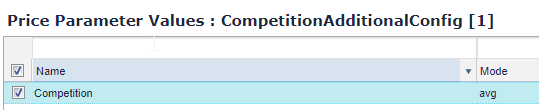
There is just one configuration option:
-
The Key is “Competition”. (You can collect different additional configurations for different strategies in one PP.)
-
The Mode can be set to “avg”, “min”, or “max”. We select avg because we want to calculate based on an average competition price.
Prepare Data
If the data is not in the partition yet, upload them into Product Competition. You can easily upload it with the Excel Client.
Change Source of Competition Data
The Accelerator Package is configured to look up in the Pricefx built-in PCOMP table. You can change the lookup to some e.g. PX. This has to be done in the price list logic (GlobalPriceListLogic or LocalPriceListLogic).
You can achieve this in two different ways. You can simply override our built-in lookup for Competition Data or you can pass your own data to the calculator.
Override Lookup of Competition Data
You can simply adjust it in the “RawCompetitionData” logic element. Make sure you return a list, containing prices and competitor names, like this:
[
  [competitor: "competitor2", price : 5.99],
  [competitor: "competitor1", price : 9.50],
]
Check our Library Functions for Lookups.
Add Additional Parameter
Instead of overwriting the built-in Competition Data lookup, you can pass other parameter to the engine. In you have the competition prices in a simple list, you can just pass it.
def myPrices = [5.99, 9.50]
First, you have to add a custom parameter in the price list logic, in the “AdditionalCalculationParameters” element.
/**
 * These maps should be used to pass additional parameters that will be used for 3rd party calculations.
 *
 * Each key-value pair of additionalParameters will be passed on to calculator object. The value will be passed as an argument to calculation
 * method if its key is defined in "StrategyDefinition" Price Parameter.
 *
 * Each key-value pair of additionalOptionalParameters will be passed on to calculator object. The value is Closure which will be
 * evaluated and its result passed as an argument method when all conditions are met:
 * - its key is defined in "StrategyDefinition" Price Parameter
 * - said strategy is used
 * - there is no argument with the same name passed in additionalParameters.
 *
 * Initially these maps are empty.
 */

def myCompetition = [5.99, 9.50]

Map additionalParameters = [OWN_COMPETITION_DATA : myCompetition]
Map additionalOptionalParameters = [:]

return [standardParameters: additionalParameters,
        optionalParameters: additionalOptionalParameters]
Then you can pass this list as competition prices in the Strategy Definition PP.

Create Price List
Now you can create your PL/LPG and there will be calculated competition based prices. You are free to configure the rest of the package. If you do not need the other parts (e.g. transaction data, other strategies, …), you can remove them from the calculation logic.
Accelerator Library as Solution
|
Mandatory Data |
Competition data per SKU, definition of calculation stragegy |
|---|
If you use only the Library part, you are free to handle all surrounding implementation on your own. Check the other parts of this cookbook to get an idea what else can be combined, e.g. Library functions for lookups.
You can find the Library function in the Groovy Library “PricelistManagementLibrary” in the element CompetitionEngine.
There is the following public function:
/**
 * Calculate competition based price
 * @param competitorPrices List of prices taken into consideration
 * @param strategyConfigFromPP : must be a Map of values with such keys:
 * - "competitionMode" with possible values "avg", "min", "max".
 * @return calculated result as BigDecimal
 *
 *  @throws XExpression The custom calculation exception
 */
BigDecimal calculatePrice(List competitorPrices, Map strategyConfigFromPP)