
This article describes how SAP Integration Suite can enable data synchronization from S/4HANA to Pricefx by using events. These steps apply to all entities, such as Products or Customers.
In this section:
SAP S/4HANA Event Listener
You should build your own integration flow to listen for SAP S/4HANA events and perform appropriate actions. You can refer to “Listen SAP S/4HANA Product events from SAP Event Mesh” from the “Pricefx Price Management with SAP S/4HANA” package as the example. You might need to have one integration flow for each SAP entity. This integration flow makes use of the AMQP adapter, which is available in SAP Integration Suite.
Step 1: Aggregate Messages from SAP S/4HANA and Write to Pricefx
This integration flow aggregates the events from SAP S/4HANA and makes them available to next integration flow in batch. This flow is copied from “Aggregate Messages from SAP S/4HANA and Write to Pricefx” from the “Sample artifacts for SAP S/4HANA Integration with Pricefx” package.
For explanation and configuration of this integration flow, see Aggregate Messages from SAP S/4HANA and Write to Pricefx.
Step 2: Get Updated Entities from SAP S/4HANA from Entity IDs List
You should build your own integration flow to get updated entities from the list of entity IDs if event aggregation flow and batching is used. You can refer to “Get updated products from SAP S/4HANA from a list of product IDs” from the “Pricefx Price Management with SAP S/4HANA” package as the example. You might need to have one integration flow for each SAP entity. You should also add any logic after the OData call if you want to filter away unwanted records or enrich any records.
Before calling OData service of SAP S/4HANA, the flow has to retrieve OData connection properties and Application Interface Register (AIR) from Pricefx a. See Get AIR key from Pricefx and SAP Connection Properties.
Step 3: Multicast Response to All Entities in Pricefx
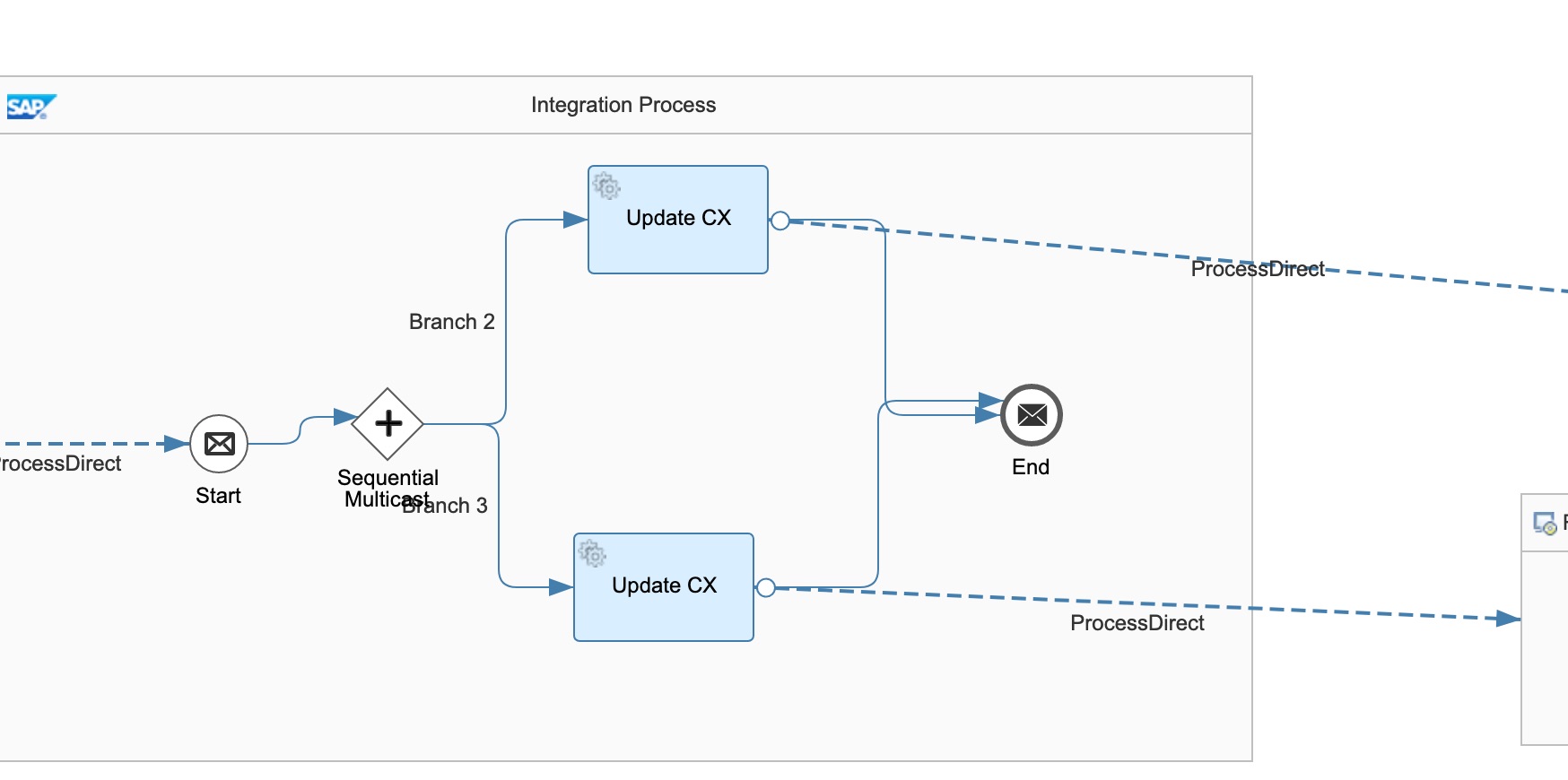
You should build your own integration flow to multicast the SAP S/4HANA response message to every integration flow which writes records to Pricefx tables. You should build this integration flow to either point it to the “end” if there is no other table to be updated, or multicast to multiple tables with one branch per Pricefx table.
A sample “Multicast Customer response from SAP S/4HANA to processing flows” is provided in the “SAP S/4HANA Customer Master Integration with Pricefx” package. The customer updates would be written to two Customer Extension tables.
Step 4: Write Records to Pricefx Tables
This integration flow can be found in “Reusable Artifacts for SAP S/4HANA Integration with Pricefx” package. Configure the necessary information for writing to any Pricefx tables such as mappings, table names, etc.
The integration flow transforms the response from SAP S/4HANA and writes the records to Pricefx.
For explanation and configuration of this integration flow, see Reusable Artifacts for SAP S/4HANA Integration with Pricefx | Write Records to Pricefx Tables
Logging
All the logs are forwarded to Send Log to email by default. You can configure your own log handling process by configuring the parameters of Log receivers and Error receivers in the integration flows.