
Message Mappings and Value Mappings
Message Mapping Flatten Pricefx Company Parameter - Sample
This message mapping shows how a Pricefx Company Parameters Upsert Request can be converted to a list of xml element for building bulk data load request
Message Mapping Pricefx Company Parameter Upsert Request - Sample
This message mapping shows how a Pricefx Company Parameters Upsert Request can be built.
Value Mapping SAP S4HANA Connection
This value mapping shows how configuration for SAP S/4HANA connection of different environment is stored for dynamic property retrieval
Value Mapping Pricefx Connection
This value mapping shows how configuration for Pricefx connection of different environment is stored for dynamic property retrieval
Process Quote Events from Pricefx
This integration flow is a template for processing Pricefx quote events and performing appropriate actions. You can have different actions for different Quote Types.
Configuration
-
Sender – The process direct incoming path of this integration flow.
-
Transaction handling
-
XPaths to locate the quote ID and Quote Type
-
Main receiver – The integration flow which processes the quote event.
-
Pricefx connection properties
Listen to Pricefx Rabbit MQ Events - Using Condition Record Events
This integration flow is a template for listening to Pricefx events and performing appropriate actions. You should modify this flow based on the events you will listen to.
You need to have one integration flow for each Pricefx partition.
This sample contains example of below integrations:
-
Reload Customer Hierarchy
-
Payout Records
-
Reload Product Hierarchy
-
Condition Record
-
Polling
-
Quote
See Listen to Pricefx RabbitMQ Events for a configuration example.
Aggregate Messages from SAP S/4HANA and Write to Pricefx
This integration flow waits for multiple messages from the previous process and aggregates them together for another flow to process. This can reduce the number of calls to downstream applications. The aggregated message contains a list of IDs from a series of events.
Configuration
-
Sender – The process direct incoming path of this integration flow.
-
Main receiver – The integration flow which processes the aggregated events.
-
Error receiver – The error handling integration flow.
-
Transaction handling
-
Aggregator properties – Defines how the product events should be aggregated.
-
Message header properties
Get Latest Updated Data by Polling at Intervals
This integration flow runs periodically at the configured timer interval to synchronize data between SAP S/4HANA and Pricefx. It provides an example to synchronize billing documents. You need to modify this process if you synchronize different data types.
You need to have one integration flow for each Pricefx partition.
Configuration
-
Scheduler properties
-
Environment properties
-
Message header properties
-
Main receiver – The integration flow which processes the billing documents
-
Update token receiver - The integration flow which updates token
-
Update Schedule receiver - The integration flow which updates polling schedule
-
Error receiver – The error handling integration flow.
Get Latest Updated Entities from SAP S/4HANA and Write to Pricefx
This integration flow is a template for retrieving updated entities from SAP S/4HANA by OData in pages and for writing to Pricefx.
You need to have one copy of this flow per each Pricefx entity.
Configuration
-
Sender – The process direct incoming path of this integration flow.
-
Main receiver – The integration flow which writes updates to Pricefx
-
Error receiver – The integration flow which writes error to error handler
-
Log receiver - The integration flow which writes error to log
-
AIR and SAP connection properties receiver – The integration flow which retrieves and SAP connection properties and AIR from Pricefx.
-
Transaction handling
-
Message header properties
-
OData connection properties
Consume requests from JMS and invoke another process
This integration flow shows a sample on how JMS consumer should be configured. You can copy and modify it when you need to build a JMS consumer for retry purposes.
Configuration
-
JMS incoming queue and properties
-
Error receiver – The integration flow which writes error to error handler
-
Main receiver – The integration flow which processes the message.
-
Transaction handling
Publish requests to JMS
This integration flow shows a sample on how JMS publisher should be configured. You can copy and modify it when you need to build a JMS publisher for retry purposes.
Configuration
-
Sender – The process direct incoming path of this integration flow.
-
Error receiver – The integration flow which writes error to error handler
Multicast product response to all product entities in Pricefx - Updated Example
This integration flow is a template for multicasting product response to common product extensions. It also shows how headers for invoking “Write Records to Pricefx Tables” are configured.
Configuration
-
Sender – The process direct incoming path of this integration flow.
-
Error receiver – The integration flow which writes error to error handler
-
PFX receiver - The integration flow which writes records to Pricefx
-
Mappings and headers for all the product extensions
-
Transaction handling
-
Message header properties
Write Records to Pricefx Company Parameter - Sample
This integration flow shows how headers for invoking “Write Records to Pricefx Tables” are configured when writing records to Pricefx Company Parameter
Configuration
-
Sender – The process direct incoming path of this integration flow.
-
Error receiver – The integration flow which writes error to error handler
-
PFX receiver - The integration flow which writes records to Pricefx
-
Mappings and headers for the company parameter
-
Transaction handling
-
Message header properties
Refresh Pricefx JWT Token
This integration flow shows how JWT token can be used in authentication.
Configuration
-
Sender – The process direct incoming path of this integration flow.
-
Error receiver – The integration flow which writes error to error handler
-
Pricefx integration adapter connection properties
-
Transaction handling
Refresh Pricefx JWT Token and Test Connection
This integration flow shows how JWT token can be used in authentication. It invokes test connection operation to test if the connection is successful.
Configuration
-
Sender – The process direct incoming path of this integration flow.
-
Error receiver – The integration flow which writes error to error handler
-
Pricefx integration adapter connection properties
-
Refresh token receiver - The integration flow which refreshes JWT token
-
Transaction handling
-
Message header properties
Refresh Pricefx OAuth Token
This integration flow gets or refreshes the access token and stores the tokens in the global variables for Pricefx connections in your environment. You will need to duplicate this integration flow for each Pricefx partition. This is run periodically at the configured interval.
-
Get the stored tokens from global variables.
-
Check if the token creation or token refresh is required.
-
Get the tokens via Pricefx Integration Adapter.
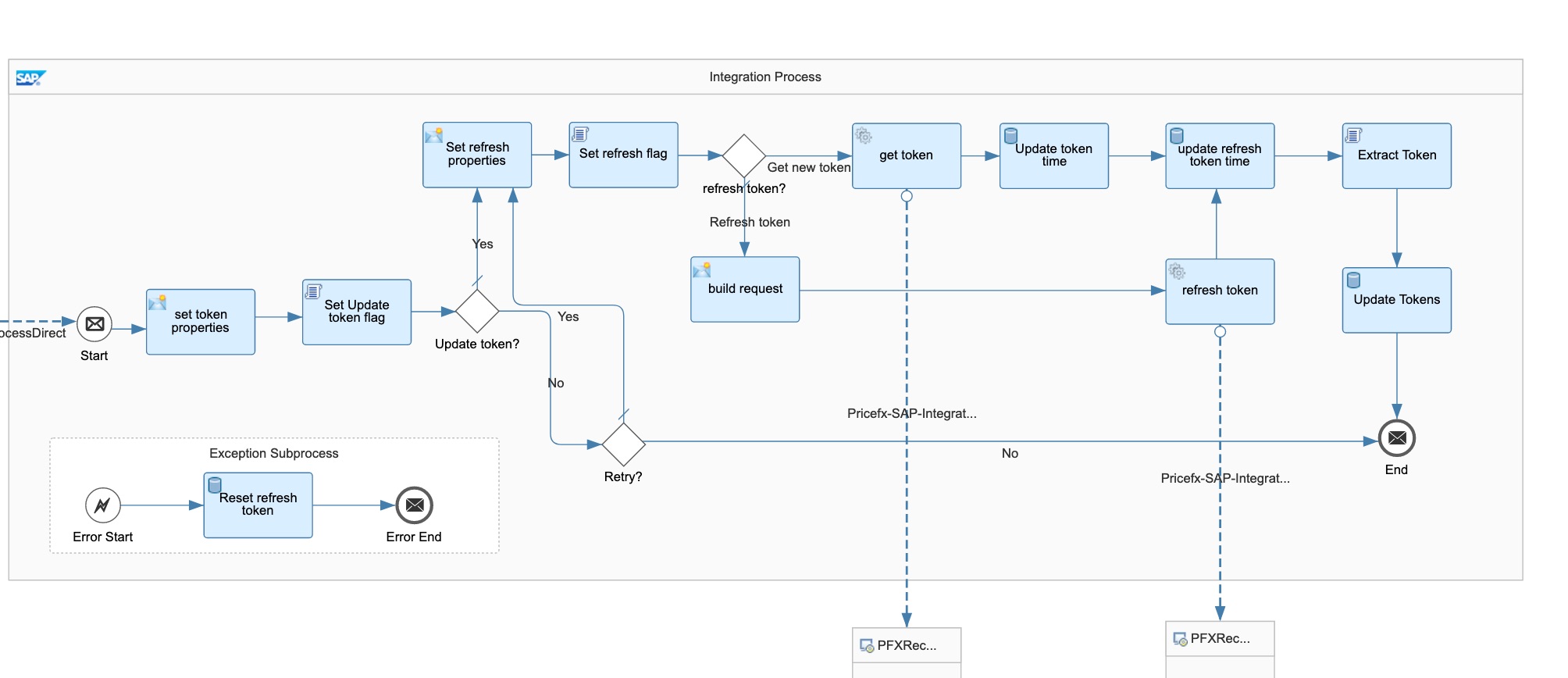
Sample JSON response from the get token operation:
{ "access-token": "03D43F56-xxxx-xxxx-xxxx-xxxxxxxxxxx", "refresh-token": "CE1F7DE5-xxxx-xxxx-xxxx-xxxxxxxxxxx", "token-type": "Bearer", "expires-in": 3600 } -
Extract the token from the JSON response message by a Groovy script and write to global variables.
import com.sap.gateway.ip.core.customdev.util.Message;
import groovy.json.*
def Message processData(Message message) {

    //Body
    def body = message.getBody(String.class);

    def jsonSlurper = new JsonSlurper()
    def json = jsonSlurper.parseText(body)

    message.setProperty("access-token", json.attribute13)
    message.setProperty("refresh-token", json.attribute14)

    return message
}
For details see Pricefx SAP Integration Adapter - Authentication.
Configuration
-
Pricefx connection properties
-
Sender – The process direct incoming path of this integration flow.
-
Transaction handling
-
Refresh intervals
Refresh SAP S/4HANA OData Cookie and CSRF Token
This integration flow gets the cookie and CSRF token from SAP S/4HANA fetch token operation and stores them in global variables for all token protected SAP OData connections in your environment. The fetch token operation can be any OData GET operation with x-csrf-token=”Fetch” header.

Configuration
-
OData connection properties
-
Variable name of the S/4Hana access token and cookie token