
Message Mappings and Value Mappings
Message Mapping Build Pricefx Polling Schedule Price Parameter Upsert Request
This message mapping builds Pricefx polling schedule Price Parameter Upsert request.
Message Mapping Set Unique Name to property
This message mapping set unique name of a Pricefx entity to uniqueName property
Enrich Polling Schedule
This integration flow converts date to date timestamp for both start date and end date.
Configuration
-
Sender - The process direct incoming path of this integration flow.
-
Error Receiver - The integration flow that writes error to error handler
-
Timestamp conversion receiver - The integration flow that converts date to timestamp format
-
Transaction handling
Sample Request Message
<record>
    <lastUpdateByName>SAPIntegrationBackup</lastUpdateByName>
    <createdByName>username</createdByName>
    <createDate>2022-11-09T16:15:24</createDate>
    <lastUpdateDate>2025-08-23T02:19:59</lastUpdateDate>
    <attribute1>2025-08-17T14:17:54</attribute1>
    <attribute2>2025-08-23T02:19:58</attribute2>
    <name>SALES_ORDER</name>
</record>
Sample Response Message
<record>
    <endDate>2025-08-23T00:00:00</endDate>
    <endDateTime>PT03H38M34S</endDateTime>
    <startDate>2025-08-23T00:00:00</startDate>
    <startDateTime>PT02H53M41S</startDateTime>
    <name>SALES_ORDER</name>
</record>
Update Polling Schedule
This integration flow updates polling schedule for the next call. The polling schedule is stored at the Pricefx partition.
Required Headers
-
pfxEnv - Environment key to get Pricefx connection properties from value mapping
Configuration
-
Sender - The process direct incoming path of this integration flow.
-
Error Receiver - The integration flow that writes error to error handler
-
Pricefx connection properties Receiver - The integration flow that retrieves Pricefx connection properties from value mapping
-
Enricher receiver - This integration flow converts date to date timestamp for both start date and end date
-
Transaction handling
-
Pricefx integration adapter properties
-
Pricefx available tokens
-
Message header properties
Sample Request Message
SALES_ORDER
Sample Response Message
{
    "endDate": "2025-08-23T00:00:00",
    "endDateTime": "PT02H53M41S",
    "attribute2": "2025-08-23T02:53:41",
    "startDate": "2025-08-23T00:00:00",
    "startDateTime": "PT02H19M58S",
    "attribute1": "2025-08-23T02:19:58",
    "name": "SALES_ORDER"
}
Get Last Update Time
This integration flow calculates the last update time minus current time by defined polling period. This can be used in the polling integration flow to calculate the last update time for the filter used in SAP S/4HANA OData query.
Configuration
-
Sender - The process direct incoming path of this integration flow.
-
Error Receiver - The integration flow that writes error to error handler
-
Transaction handling
Sample Request Message
10
Sample Response Message
2025-08-23T02:45:22
Convert Date Time to Timestamp
This integration flow converts date time to timestamp. Some SAP S/4HANA OData API require timestamp format in the filter.
Configuration
-
Sender - The process direct incoming path of this integration flow.
-
Error Receiver - The integration flow that writes error to error handler
-
Transaction handling
Sample Request Message
2022-10-22T07:15:48
Sample Response Message
{
  "lastUpdate" : "2022-10-22T00:00:00",
  "lastUpdateTime" : "PT07H15M48S"
}
Access message in temporary Data Store
This integration flow accesses message in data store. This avoid data store operations to be done in main process without proper handling, prompting to design guideline issues. Data store name is coming from header.
Configuration
-
Sender - The process direct incoming path of this integration flow.
-
Error Receiver - The integration flow that writes error to error handler
-
Transaction handling
-
Data store properties
Required Headers
-
action - GET, READ, DELETE
Optional Headers
-
SAPMessageDigest - require for DELETE action
Sample Request Message
<test>
    datastore_name
</test>
Check completion of fetching records from Pricefx
This integration flow calculates the accumulated retrieved records and compares it with the expected total number of records. It determines if fetching should be continued in the loop.
Required Headers
-
currentLoop - current loop count
-
pageSize - page size
-
totalRecords - total no of expected records
-
accumulated - no of records already fetched from previous loops
Configuration
-
Sender - The process direct incoming path of this integration flow.
-
Error Receiver - The integration flow that writes error to error handler
-
Transaction handling
Sample Request Message
[
    {
        "name" : "a"
    },
    {
        "name" : "b"
    }
]
Sample Response Message
<record>
  <accumulated>4</accumulated>
  <endLoop>false</endLoop>
</record>
Flush Records to Data Source in Pricefx
This integration flow flushes data feed to data source in Pricefx. The data feed name comes from the header.
Required Headers
-
pfxEnv - Environment key to get Pricefx connection properties from value mapping
-
table - name of Pricefx data source
-
pfxAccessToken - name of global variable of Pricefx token
-
pfxHost - Pricefx host
-
pfxCredential - name of Pricefx security material
Configuration
-
Sender - The process direct incoming path of this integration flow.
-
Error Receiver - The integration flow that writes error to error handler
-
Transaction handling
-
Pricefx Integration Adapter properties
-
Pricefx available tokens
-
Message header properties
Sample Request Message
{}
Execute a process with default error handling
This integration flow executes a process using data store as error handler.
Required Headers
-
mainPath - the process to be executed
-
errorPath - error handler
-
dsTable - data store to store the error request
Configuration
-
Sender - The process direct incoming path of this integration flow.
-
Error Receiver - The integration flow that writes error to error handler
-
Data store receiver - The integration flow that accesses the writes / reads error to data store
-
Transaction handling
Aggregate Pricefx Flush events
This integration flow groups multiple Flush operations within a certain period to one operation as Flush will be failed in Pricefx if there is a concurrent Flush operation running.
Configuration
-
Sender - The process direct incoming path of this integration flow.
-
Error Receiver - The integration flow that writes error to error handler
-
Main receiver - The integration flow that flushes data feed to data source
-
Transaction handling
-
Message header properties
-
Aggregator properties – Defines how the Flush events should be aggregated.
-
Xpath for getting data feed and Pricefx connection properties
Sample Request Message
<Flush>
    <table>IntegrationTestOnly</table>
    <pfxAccessToken>access-token-boomi</pfxAccessToken>
    <pfxHost></pfxHost>
    <pfxCredential>boomi-token</pfxCredential>
    <pfxEnv>TEST</pfxEnv>
    <id>IntegrationTestOnly-TEST</id>
</Flush>
Write errored polling events to error queue
This integration flow writes all errored polling events to an error queue for reprocessing or logging or manual re-trigger if any.
Required Headers
-
mainPath - the path that the events can be retried.
Configuration
-
Sender - The process direct incoming path of this integration flow.
-
Error Receiver - The integration flow that writes error to error handler
-
JMS queue properties
-
Transaction handling
Get entity by Typed ID from Pricefx
This integration flow gets Pricefx object by Pricefx internal key Typed ID
Required Headers
-
pfxEnv - Environment key to get Pricefx connection properties from value mapping
-
typedId
Configuration
-
Sender - The process direct incoming path of this integration flow.
-
Error Receiver - The integration flow that writes error to error handler
-
Pricefx connection properties Receiver - The integration flow that retrieves Pricefx connection properties from value mapping
-
Transaction handling
-
Pricefx Integration Adapter properties
-
Pricefx available tokens
-
Message header properties
-
Xpath for getting Pricefx connection properties
Get Pricefx connection properties by environment
This integration flow gets Pricefx connection properties from value mapping. Pricefx environment comes from header.
Required Headers
-
pfxEnv - Environment key to get Pricefx connection properties from value mapping
Configuration
-
Sender - The process direct incoming path of this integration flow.
-
Error Receiver - The integration flow that writes error to error handler
-
Pricefx connection properties Receiver - The integration flow that retrieves Pricefx connection properties from value mapping
-
Transaction handling
-
Value mapping keys
-
Message header properties
Sample Response Message
<pfxConnection>
  <AccessToken>access-token-demo-eu-dev</AccessToken>
  <Host></Host>
  <Credential>demo-eu-dev-token</Credential>
</pfxConnection>
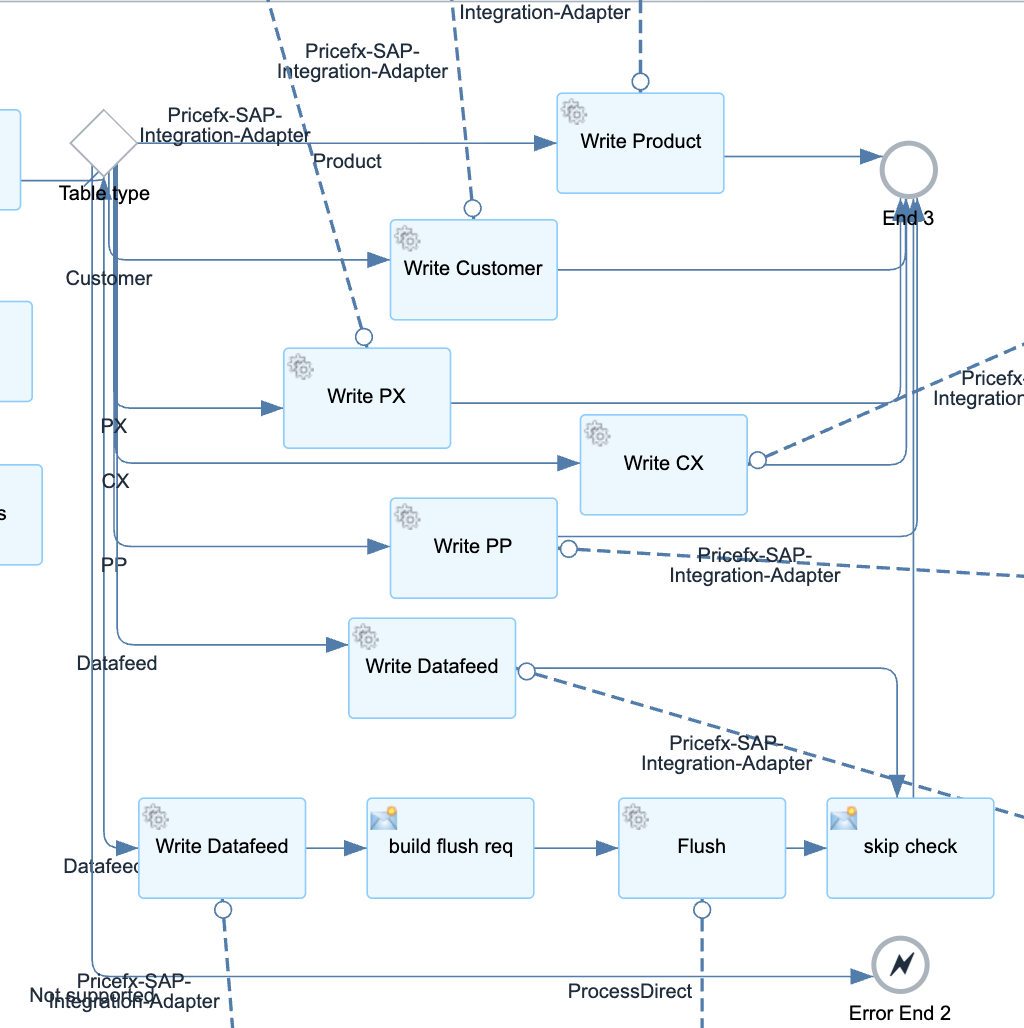
Write Records to Pricefx Tables
This integration flow writes records to Pricefx Tables. Supported table types:
-
Product
-
Customer
-
Product Extension
-
Customer Extension
-
Company Parameter
-
Datafeed with/without Flush
Required Headers
-
pfxEnv - Environment key to get Pricefx connection properties from value mapping
-
tableType - type of table to be updated
-
headers - comma delimited list of column names to be updated
Optional Headers
-
flattenMapping - required if the incoming message has to be converted from upsert request to load data request
-
mapping - required if the incoming message has to be converted to upsert request
-
targetDate - required if tableType is Company Parameter
-
table - required if tableType is Product Extension, Customer Extension, Company Parameter, Datafeed with/without Flush
Configuration
-
Sender - The process direct incoming path of this integration flow.
-
Error Receiver - The integration flow that writes error to error handler
-
Flush Receiver - The integration flow that flushes data feed to data source
-
Json XML converter receivers - The integration flow that converts Json to/from XML
-
Pricefx connection properties Receiver - The integration flow that retrieves Pricefx connection properties from value mapping
-
Pricefx Integration Adapter properties
-
Transaction handling
-
Message header properties
-
Flush request
-
Splitter properties
-
Available Pricefx tokens