
The Rebate Agreements page displays the list of Rebate Agreements that you are entitled to see.
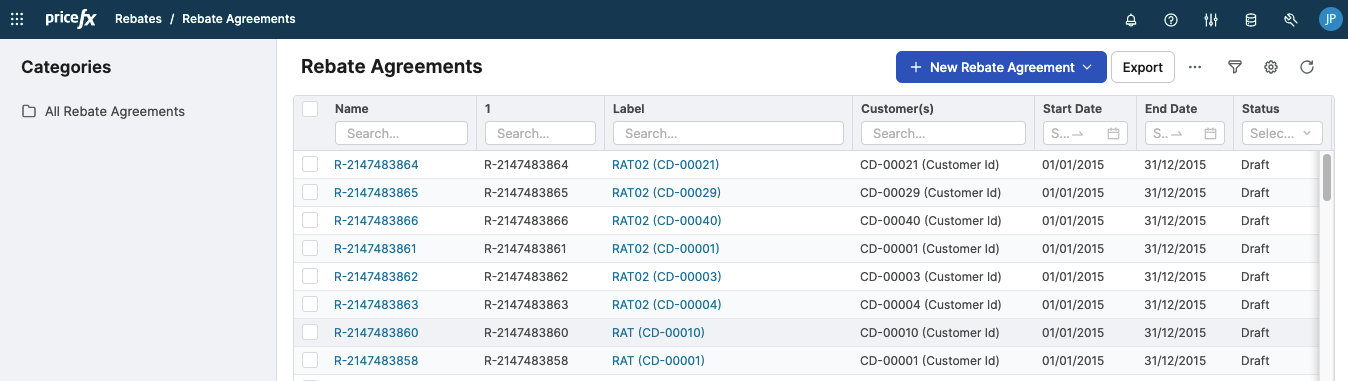
On this page, you can:
-
Create a new Rebate Agreement.
-
Export to XLS, DOCX or PDF – Select an agreement and click one of the options:
-
Export XLS option to export data to Excel.
An Excel template can be predefined in the Publishing Templates section. It can provide the agreement with a predefined structure and format for viewing the data. Without a template, the raw data is downloaded to MS Excel and can be reformatted there. -
Export DOCX option to export data to the DOCX format.
The DOCX template can be predefined in the Publishing Templates section. -
Export PDF option to export data to PDF (if PDF publishing is enabled).
For this export either XLS or DOC template is used. For details see Publishing Templates.
-
-
Duplicate a Rebate Agreement. This action creates a new Rebate Agreement with the same data and saved filters. Unlike a revision, a duplicated Rebate Agreement is created as an independent object and does not use revision-style version tracking. In the Details panel, however, there is a hyperlink to the original Rebate Agreement; this is only a reference link and does not establish a revision relationship.
By default, attachments are not copied to the duplicated Rebate Agreement (this can be changed by adding a parameter to the Rebate Agreement Type configuration). A Rebate Agreement cannot be duplicated while it is being recalculated.
-
Delete one or more Rebate Agreements.
-
Revoke a Rebate Agreement.
-
Create a new revision of a Rebate Agreement. See How to Make Rebate Agreement Revisions.
-
Move the selected Rebate Agreement to a different folder in the Categories tree.
-
View and add attachments.
-
Unlock locked Rebate Agreements (administrator rights required).
It is possible to customize the structure and content of the Rebate Agreements table to suite your needs. You can:
-
Organize Rebate Agreements into folders in the Categories tree
-
Sort the table
-
Use a simple filter
-
Add/remove fields (columns)
-
Create advanced filters
-
Save your customized layout and filters as a preference
See the Common Table Actions section for details.
Rebate Agreement Status
Rebate Agreements can have the following states:
-
DRAFT – Newly created Rebate Agreement.
-
APPROVED – When the Rebate Agreement went successfully through the workflow (or when there is none).
-
REVOKE – When the user clicked the Revoke button.
-
SUPERSEDED – When the user created a new version of the Rebate Agreement.
-
OPEN and CLOSED – These states are no longer used.
-
INVALIDATED – Used as indication of the Rebate Agreement level status on the Rebate Record level. It is not a status of the Rebate Agreement itself. A Rebate Record has fields for both the Rebate Agreement status and the actual record status. When a Rebate Agreement revision is created, the Agreement Status field on the Rebate Records for that Rebate Agreement (not the status of the Rebate Agreement) is set to either:
-
Invalidated – When the Rebate Agreement was not yet (fully) approved.
or -
Superseded – When that revised Rebate Agreement was submitted but not yet (fully) approved.
-
Diagrams describing actions and workflow/document statuses can be found at Workflow Life Cycle.