
This page shows how to integrate Pricefx Unity to the MS Dynamics Account/Opportunity page using IFrame.
Please carefully review and modify the script below, ensuring that you follow all the comments provided within the script.
-
Go to MS Dynamics > Opportunity > Form to start customizing (or MS Dynamics > Account > Form).
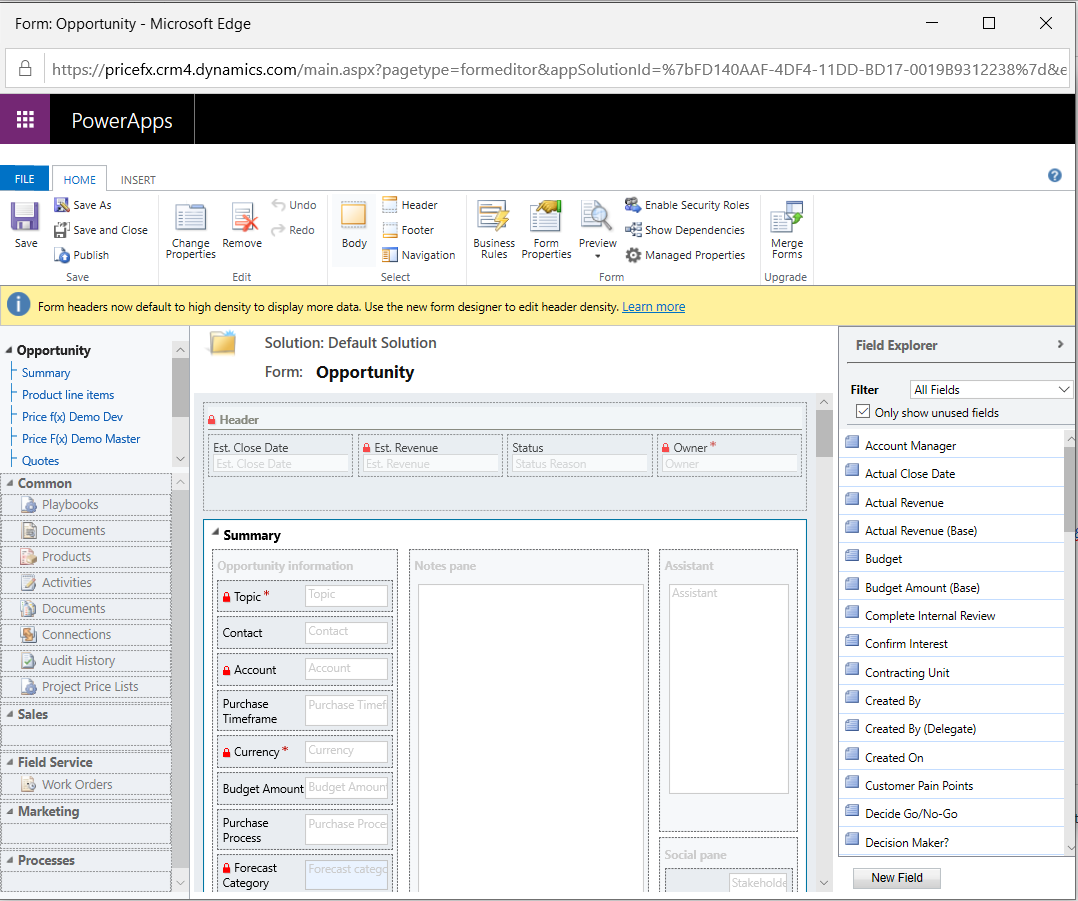
(In some MSD versions, the Form button is not there. Alternatively, go to Settings > Customizations > Customize the System > Entities > Account / Opportunity.) -
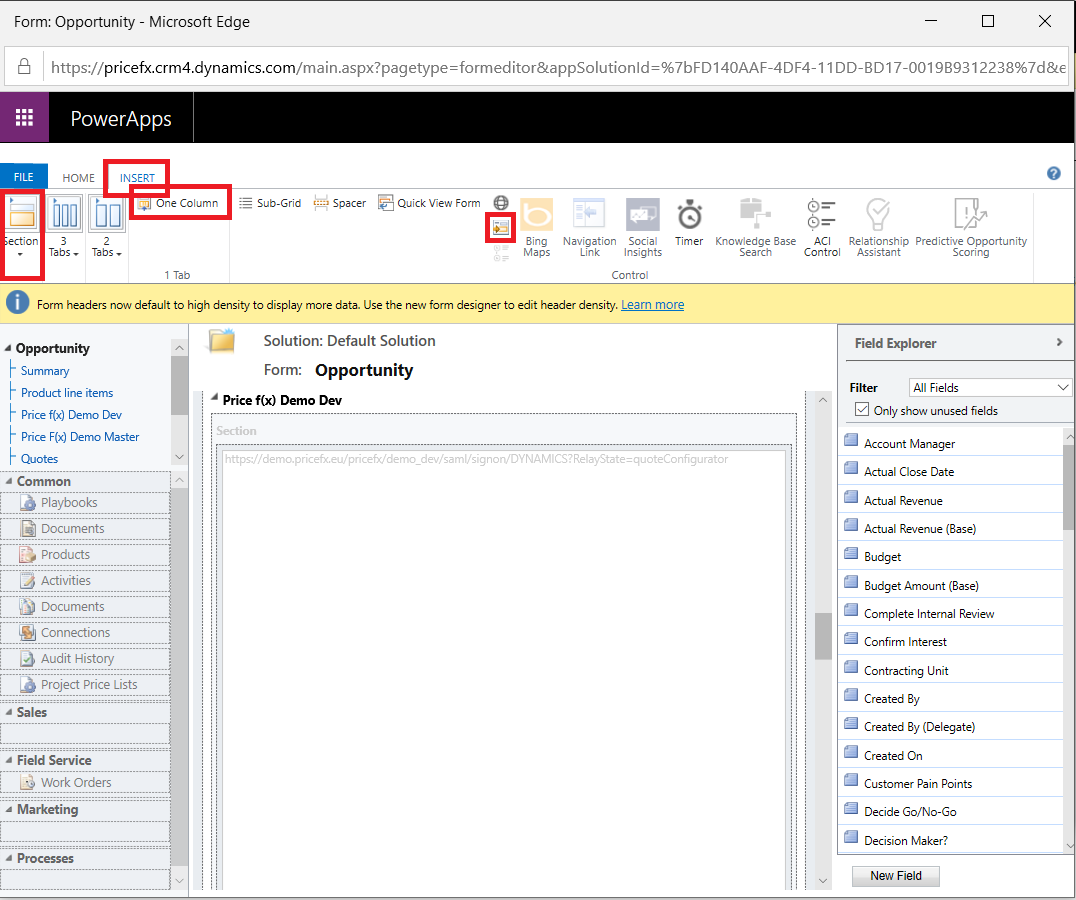
Add a Tab, a Section and an iframe to the desired place (using the Insert tab of the ribbon).
-
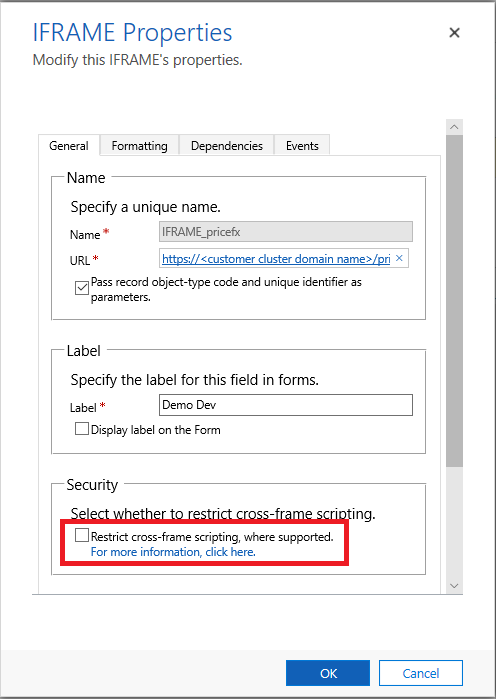
Configure the iframe’s properties as below:
-
General tab:
-
Name (iframe name should be unique): IFRAME_<iframe name>
-
URL: https://<customer cluster domain name>/pricefx/<partition name>/saml/consume?RelayState=<Relay State Name>
-
Restrict cross-frame scripting, where supported: unchecked
-
Click OK to create it, then double click it to continue editing its properties.
-
-
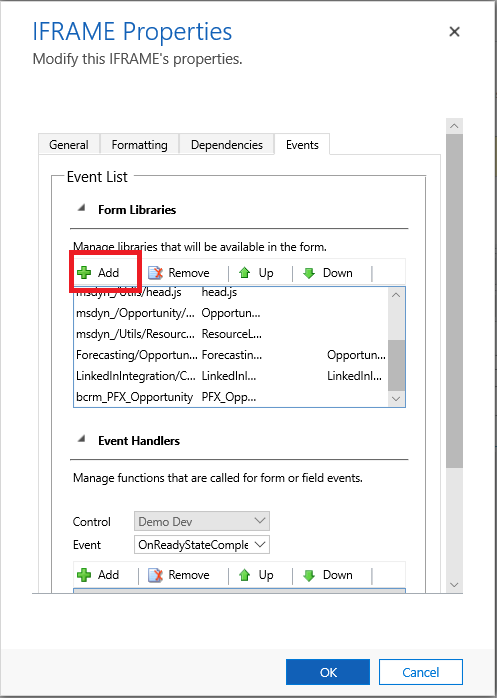
Switch to the Event tab:
-
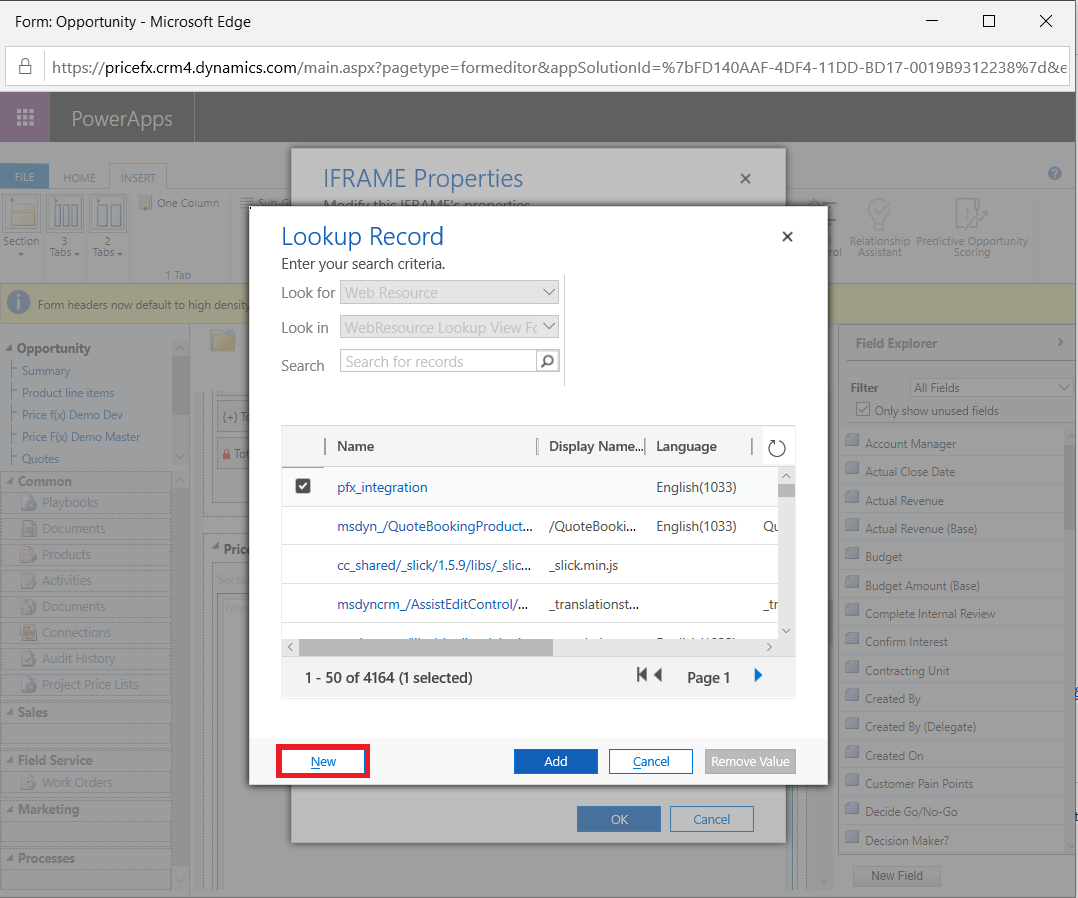
In Form Library, add a library with the script in the attached file.
-
Choose New to create a JS library.
-
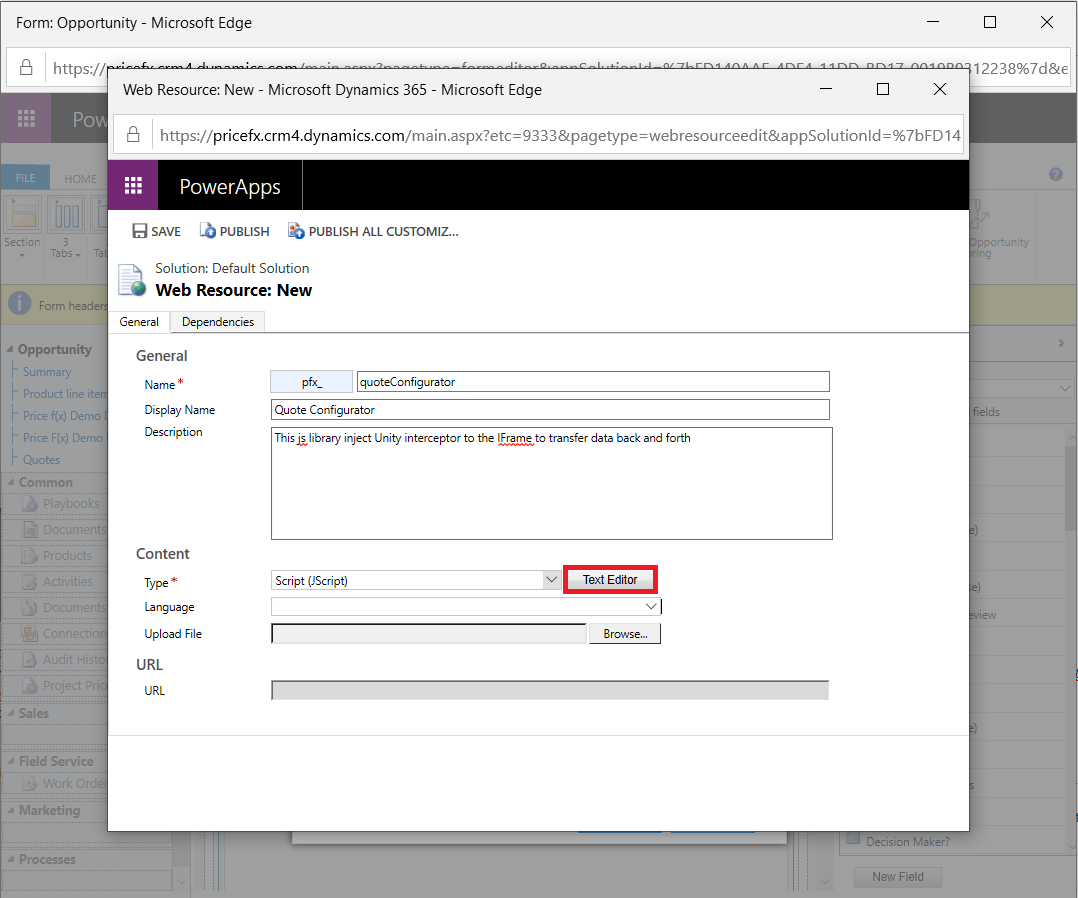
Enter Name, Display Name, Description and select Script (JScript) Type for this web resource, then click the Text Editor button to add this script.
-
Add the following scripts as JavaScript web resource and save it.
JavaScriptvar PFXRegisterListener = function () { //TODO: change to unique name if (window.XMLHttpRequest) { //for browsers other than ie window.parent.parent.addEventListener("message", PFXInputsLookup, false); //TODO: change PFXInputsLookup } else { window.parent.parent.attachEvent("onmessage", PFXInputsLookup); //TODO: change PFXInputsLookup } window.parent.document.getElementById("IFRAME_<iframe name>").style.height = "1000px"; // TODO: edit height if needed }; var PFXInputsLookup = function (event) { //TODO: change to unique name and update all occurrences if (event.origin != "https://<customer cluster domain name>") { //TODO: add customer cluster domain name return; } var jsonData = JSON.parse(event.data); var action = jsonData.action; var data = jsonData.data; var entity = parent.window.Xrm.Page.data.entity; switch (action) { case "getEntityInfo": console.log("..DYNAMICS.eventHandler getEntityInfo", action); var response = {}; response.entityName = entity.getEntityName(); response.id = entity.getId(); response.accountnumber = entity.attributes .get("accountnumber") .getValue(); event.source.postMessage(JSON.stringify(response), event.origin); break; case "setDashboardInputs": console.log("..DYNAMICS.eventHandler setDashboardInputs", action); var id = entity.getId(); data.fields.forEach(function (fieldName) { var attribute = entity.attributes.get(fieldName); if (attribute) { data[fieldName] = attribute.getValue(); } }); var response = {}; response.id = id; response.data = data; response.entityName = entity.getEntityName(); event.source.postMessage(JSON.stringify(response), event.origin); break; case "getPayload": console.debug("DYNAMICS - message received from PRICE FX", jsonData); var payload = {}; entity.attributes.forEach(function (attribute) { var attributeName = attribute.getName(); payload[attributeName] = attribute.getValue(); }); response.action = action; payload.id = id; payload.entityName = entity.getEntityName(); response.data = payload; event.source.postMessage(JSON.stringify(response), event.origin); break; case "getAccount": { console.log("..DYNAMICS.eventHandler getAccount", action); var account = parent.window.Xrm.Page.data.entity.attributes .get("parentaccountid") .getValue()[0]; if (account) { Xrm.WebApi.retrieveRecord( "account", account.id, "?$select=name,accountnumber" ).then((result) => { console.info("Successful get account", result); var accountNumber = result.accountnumber; if (!data.lineItemFields) { var entity = { id: id, data: data, action: action, accountnumber: accountNumber, entityName: parent.window.Xrm.Page.data.entity.getEntityName(), lineItems: [], customerName: result ? result.name : null, }; event.source.postMessage(JSON.stringify(entity), event.origin); } }); } break; } case "findOpportunities": console.log("..DYNAMICS.eventHandler findOpportunities", action); var xmlhttp = new XMLHttpRequest(); xmlhttp.onreadystatechange = function () { if (xmlhttp.readyState == 4 && xmlhttp.status == 200) { var opportunities = []; var response = JSON.parse(xmlhttp.responseText); for (var i = 0; i < response.value.length; ++i) { var opportunity = response.value[i]; opportunities.push({ Id: "{" + opportunity.opportunityid + "}", Name: opportunity.name, }); } event.source.postMessage( JSON.stringify({ id: "1", data: opportunities }), event.origin ); } }; xmlhttp.open( "GET", "/api/data/V8.0/opportunities/?$select=name&$top=10&$filter=contains(name,'" + data.searchText + "')", true ); xmlhttp.send(); break; case "createNewQuote": console.log("..DYNAMICS.eventHandler createNewQuote", action); var id = entity.getId(); data.fields.forEach(function (item) { const foundItem = entity.attributes.get(item.id); if (foundItem) { item.value = foundItem.getValue(); } }); var account = parent.window.Xrm.Page.data.entity.attributes .get("parentaccountid") .getValue()[0]; if (account) { Xrm.WebApi.retrieveRecord( "account", account.id, "?$select=name,accountnumber" ).then((result) => { console.info("Successful get account", result); var accountNumber = result.accountnumber; if (!data.lineItemFields) { var entity = { id: id, data: data, action: action, accountnumber: accountNumber, entityName: parent.window.Xrm.Page.data.entity.getEntityName(), lineItems: [], customerName: result ? result.name : null, }; event.source.postMessage(JSON.stringify(entity), event.origin); } }); } response.id = id; response.data = data; response.entityName = entity.getEntityName(); response.accountnumber = entity.attributes .get("accountnumber") .getValue(); response.customerName = entity.attributes.get("name").getValue(); response.action = action; event.source.postMessage(JSON.stringify(response), event.origin); break; } return; };Please note the condition that checks the event origin and updates the right URL. Here is a sample for the demo cluster:
if (event.origin != 'https://demo.pricefx.eu') {
return;
}Depending on the MS Dynamics entity, you have to complete the TODO in the script to pass the needed value to Pricefx. For details you can refer to https://docs.microsoft.com/en-us/previous-versions/dynamicscrm-2016/developers-guide/gg328474(v=crm.8).
-
Save and publish this web resource, then get back to the iframe properties / Events tab.
-
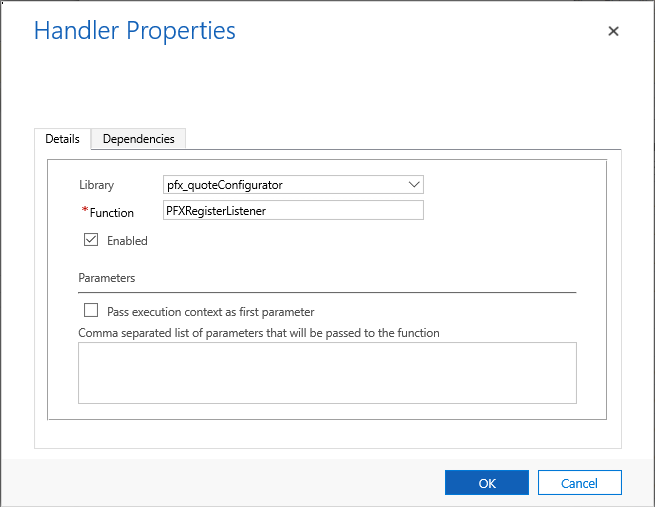
In the Event Handler section, select OnReadyStateComplete UI Event and add an item which is:
-
Library: Library name that you have just added in Step iii
-
Function: PFXRegisterListener
-
Select the Enabled option.
-
-
-
-
Finally, save and publish your change. You will see Pricefx integrated to the Opportunity detail page.