
Price parameters configuration in the Pricing Potential Dashboard allows the users to map a database, set up simulations, configure essential variable values. To make these settings, go to Price Parameters > PricingPotentialConfig.
We use two simulations:
-
Simulation Analysis to group and also analyze the data.
-
Simulation Display to show the data on the chart
The configuration is for both Simulation and Dashboard.
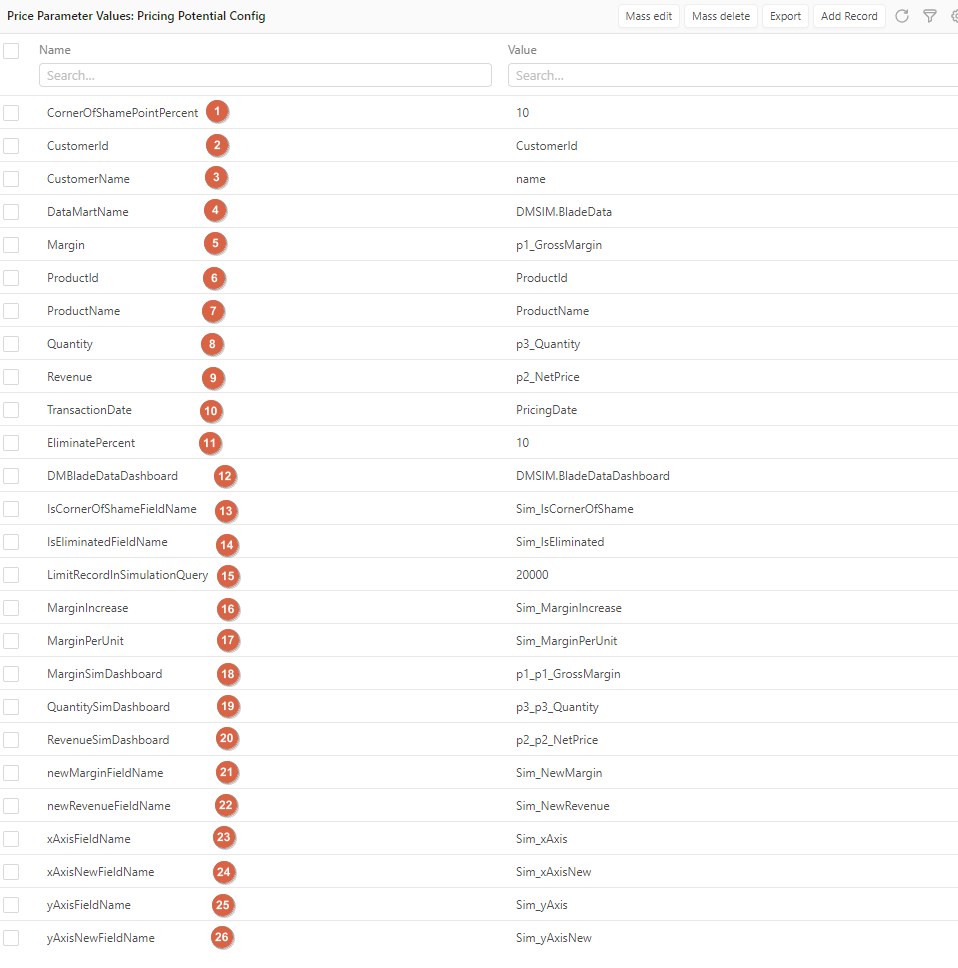
Legend:
-
CornerOfShamePointPercent – The percentage of revenue and margin to determine which customers are in the corner of shame.
-
CustomerId – Mapping attribute in Simulation Analysis.
-
CustomerName – Mapping attribute in Simulation Analysis.
-
DataMartName – Mapping simulation that used for data analysis.
-
Margin – Mapping attribute in Simulation Analysis.
-
ProductId – Mapping attribute in both Simulations.
-
ProductName – Mapping attribute in both Simulations.
-
Quantity – Mapping attribute in Simulation Analysis.
-
Revenue – Mapping attribute in Simulation Analysis.
-
TransactionDate – Mapping attribute in both Simulations.
-
EliminatePercent – The percentage of revenue to determine which customers are eliminated.
-
DMBladeDataDashboard – Mapping to Simulation that is used for displaying data.
-
IsCornerOfShameFieldName – Mapping attribute in Simulation Display.
-
IsEliminatedFieldName – Mapping attribute in Simulation Display.
-
LimitRecordInSimulationQuery – The record limit to analyze in Simulation Analysis at the same time.
-
MarginIncrease – Mapping attribute in Simulation Display.
-
MarginPerUnit – Mapping attribute in Simulation Display.
-
MarginSimDashboard – Mapping attribute in Simulation Display.
-
QuantitySimDashboard – Mapping attribute in Simulation Display.
-
RevenueSimDashboard – Mapping attribute in Simulation Display.
-
newMarginFieldName – Mapping attribute in Simulation Display.
-
newRevenueFieldName – Mapping attribute in Simulation Display.
-
xAxisFieldName – Mapping attribute in Simulation Display.
-
xAxisNewFieldName – Mapping attribute in Simulation Display.
-
yAxisFieldName – Mapping attribute in Simulation Display.
-
yAxisNewFieldName – Mapping attribute in Simulation Display.