
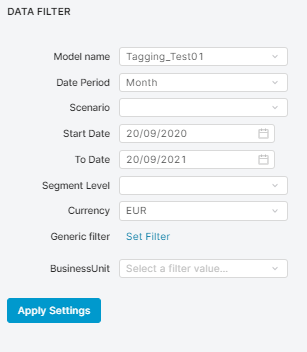
Data shown to users will differ, depending on what has been set in InputConfigurator:
-
Model name – Name of the model for which calculation has been done.
-
Date Period – For what time period the data should be aggregated.
-
Scenario – Which price scenario from POP_TargetPriceRealizationScenarios is being used.
These scenarios (A, B or C) correspond to the percentage of realization we assume to achieve. The scenarios are defined in the Company Parameters table “TargetPriceRealization”. Currently, there are three: Scenario A = Target Price Realization Percent = 90% (What if we succeed to optimize 90% of our prices?), Scenario B = 60%, Scenario C = 30%. -
Start Date – Transactions before this date will be ignored.
-
To Date – Transactions after this date will be ignored.
-
Segment Level – Several portlets show data only for chosen segment.
-
Currency – In which currency values should be displayed. Remember that Datamart has already converted prices to its currency. Conversion from the model’s source to this currency is applied.
-
Generic filter – Allows you to put any Filter on transactions.
-
Dynamic list of filters – Allows you to choose which segment to analyze.