
This article describes how to configure the integration flows which are relevant to Product Master Management in this package. For more information about the process, refer to Event-driven Process (Product Integration).
In this section:
Listen to SAP S/4HANA Product Events from SAP Event Mesh
The integration flow listens to product change events from SAP S/4HANA via SAP Event Mesh. The product ID is extracted and a timestamp is appended for aggregating all product events within a minute to enable small batch processing.

Below parameters have to be configured:
-
AMQP adapter – The connection properties of SAP Event Mesh and the name of the event queue.
Below parameters can be configured but default values are provided:
-
Main receiver – The integration flow which aggregates the product events.
-
Error receiver – The error handling integration flow.
-
Transaction handling
-
Message Log Identifier properties
-
XPaths for extracting product ID and building event information.
Aggregate SAP S/4HANA Product Events from SAP Event Mesh
The integration flow aggregates product change events from SAP Event Mesh. The aggregated events are forwarded to next integration flow to get the product details from SAP S/4HANA. Any events which cannot be processed successfully will be written to the log by email.

Below parameters can be configured but default values are provided:
-
Sender – The process direct incoming path of this integration flow.
-
Main receiver – The integration flow which processes the aggregated events.
-
Error receiver – The error handling integration flow.
-
Headers of next process
-
Message Log Identifier properties
-
Transaction handling
-
Aggregator properties – Defines how the product events should be aggregated.
-
Message header properties
Get Updated Products from SAP S/4HANA from Product IDs List
The integration flow gets the product details by the list of distinct product IDs in the aggregated message. Before calling OData service of SAP S/4HANA, the flow has to retrieve Application Interface Register (AIR) from Pricefx. See Get AIR key from Pricefx.
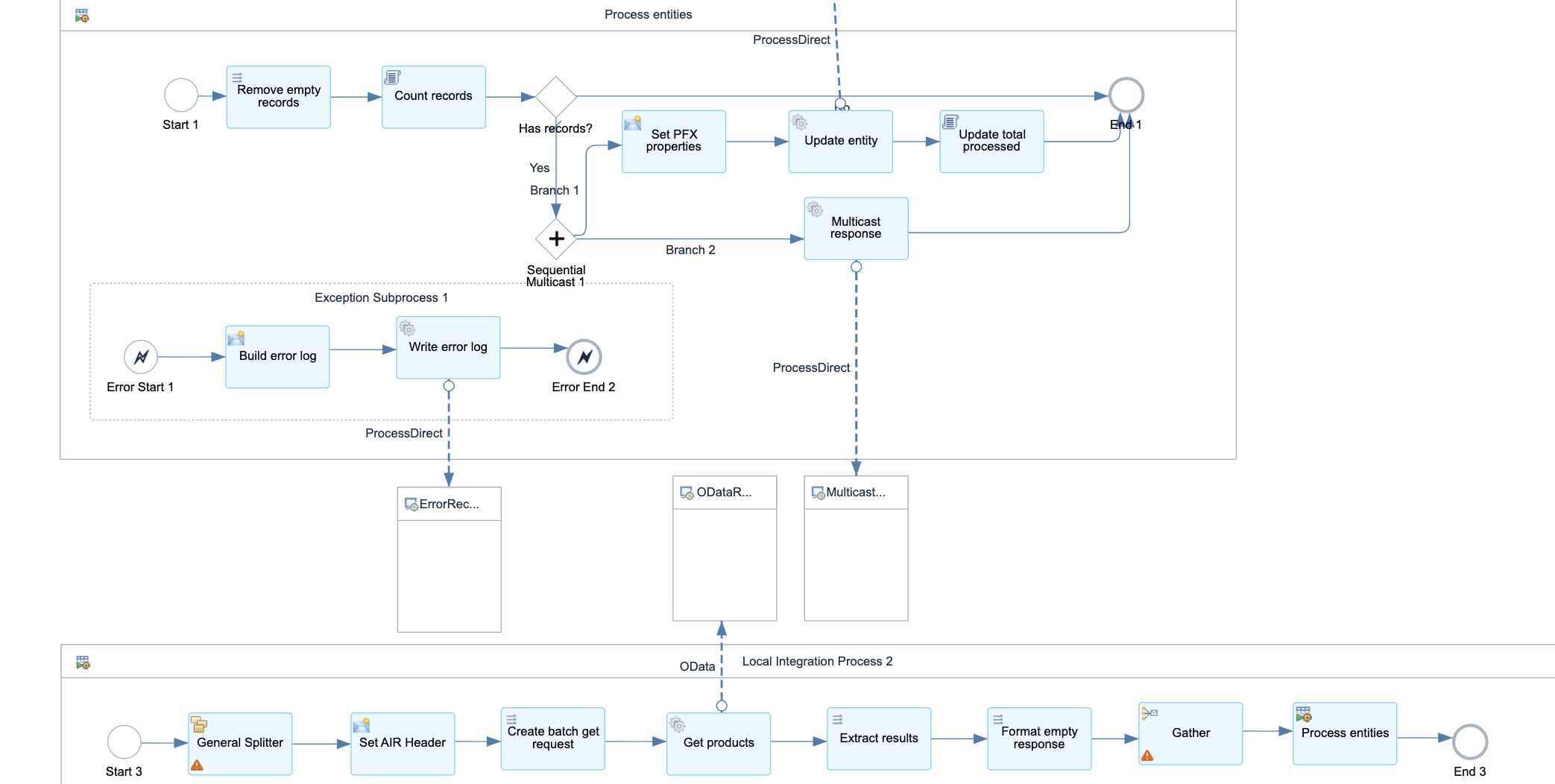
Major steps carried out by this integration flow include:
-
Remove duplicates.
-
Initialize properties and SAP AIR key.
-
Call to another mapping to build a batch GET request message by the distinct IDs.
-
Call SAP S/4HANA OData batch GET service to get the list of updated SAP S/4HANA products.
-
Multicast the list of updated SAP S/4HANA products to integration flows to write to different Pricefx tables.
Below parameters can be configured but default values are provided:
-
Sender – The process direct incoming path of this integration flow.
-
Main receiver – The integration flow which writes Product response to Pricefx Product Master.
-
Multicast receiver – The integration flow which writes Product response to other Pricefx tables.
-
Log receiver – The logging integration flow.
-
AIR receiver – The integration flow which retrieves AIR from Pricefx.
-
Transaction handling
-
Message Log Identifier properties
-
Split and Gather properties
-
XPath for extracting product ID
-
Message Mapping to build a batch request to get a list of products
-
Message header properties
-
OData connection properties