
This article describes how SAP Integration Suite can enable sales order synchronization between S/4HANA and Pricefx using polling approach.
Steps:
Step 0: Pricefx Setup
-
Configure the Sales Order Price Parameter table in Pricefx to store the necessary fields from SAP S/4HANA.
Step 1: Build Integration Flow to Poll Updates from SAP S/4HANA
You can either add a branch to the existing timer process or create another timer process for synchronizing billing documents. See Set up Integration Flows - Polling | Step 1: Build an Integration Flow to Poll Updates from SAP S/4HANA.
Step 2: Get Latest Updated Sales Order from SAP S/4HANA and Write to Price Parameter
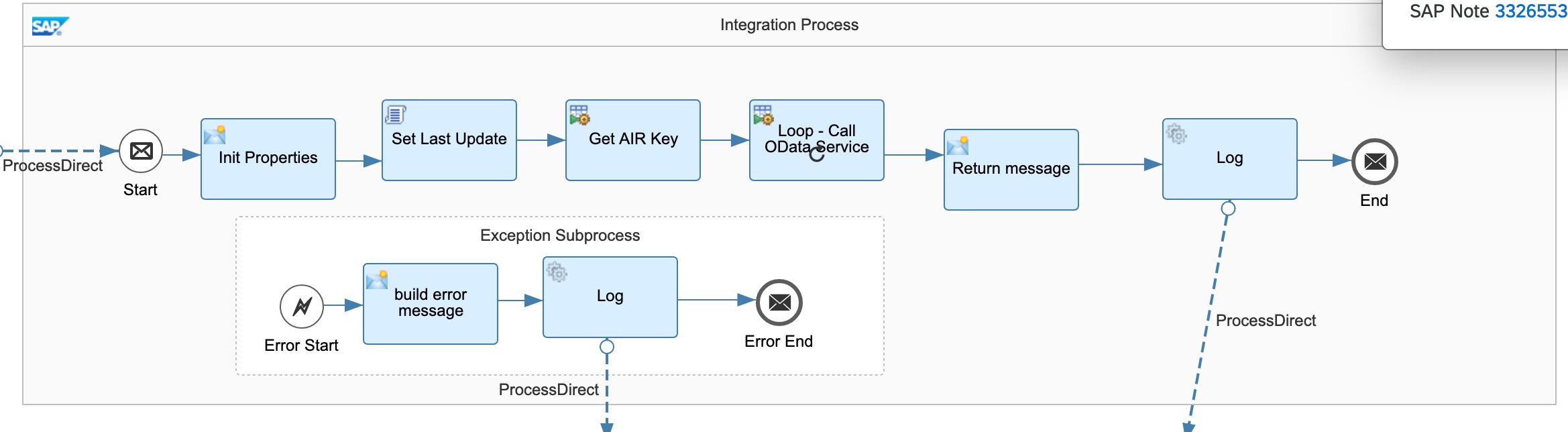
This integration is duplicated and modified from “Get Latest Updated Entities from SAP S/4HANA and write to Pricefx” from “Sample Artifacts for SAP S/4HANA Integration with Pricefx“ package.
Major steps carried out by this integration flow include:
-
Initialize properties and SAP AIR key.
-
Update the next polling schedule in Pricefx.
-
Get updated sales orders by batches: Set up Integration Flows - Polling | Step 2: Get Latest Updated Entities from SAP S/4HANA.
Step 3: Write Records to Pricefx Tables
Set up Integration Flows - Polling | Step 4: Write Records to Pricefx Tables