
The Events page lists all events generated by the Pricefx server. For example, when a price is approved, ITEM_APPROVED_PGI event is generated.
Events are an important part in integration between Pricefx and external systems. The Pricefx server either sends (pushes) events to a specified URL (or email address) where IntegrationManager (IM) listens and then IM performs actions based on a specific implementation. Or IntegrationManager fetches (pulls) events from the server and then performs actions based on the specific implementation. Pricefx also publishes every generated event to RabbitMQ. RabbitMQ delivery happens independently of the event table described below and is the channel used by the SAP BTP Plugin and by PlatformManager Workflow Orchestration.
In this section:
See also:
-
Complete list of event types at
-
IntegrationManager documentation on Events
Events Page
The Events page displays:
-
Name of the event, its creation time and the time of the last update.
-
Message (payload) of the event.
-
Number of retries left: the server attempts delivery up to 5 times (default).
-
HTTP response returned by the destination server.
-
Error message if returned by the destination server.
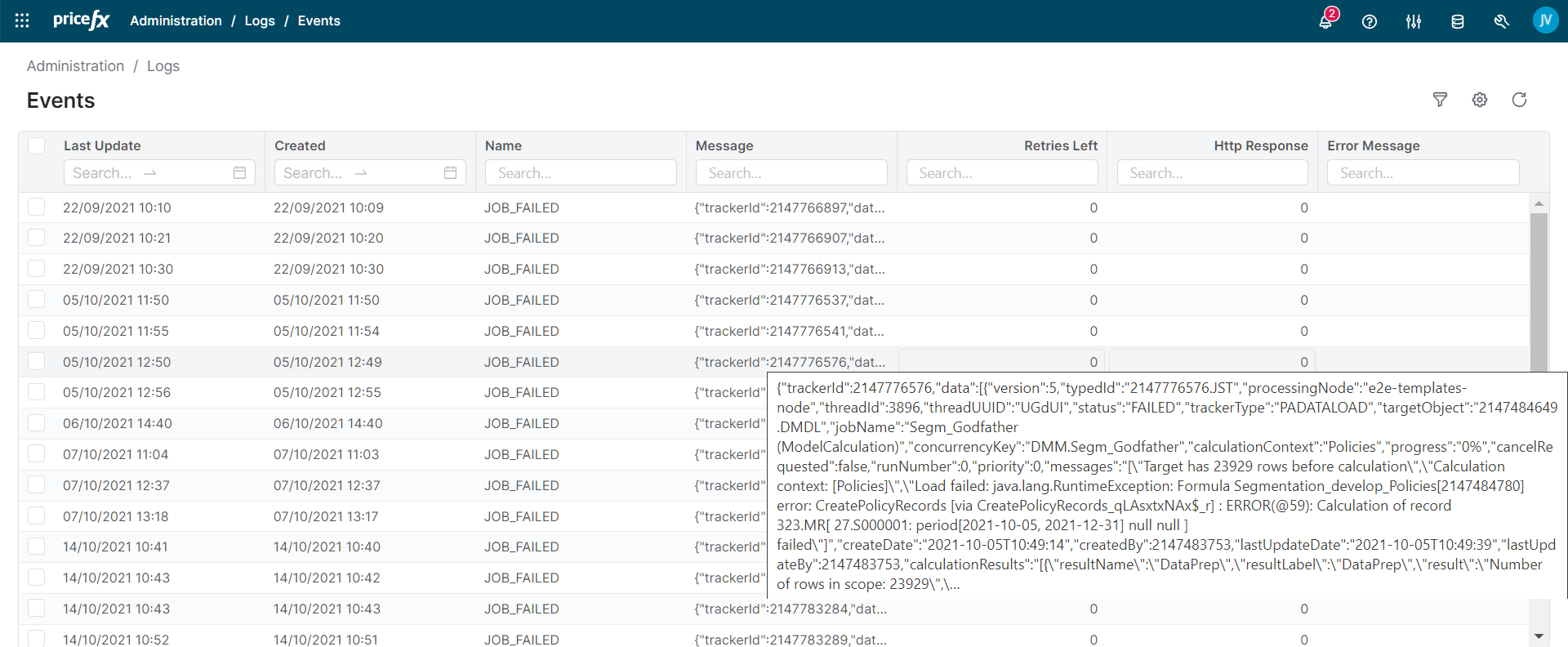
The partition in this screenshot is set up for Pull Events but there is no IntegrationManager to read the events, so they still have Retries Left set to 5. When you move your mouse over the message, its full content is shown.
Configuration
To have events generated, you need to configure two places: system partition and your own partition.
These events can also be configured in PlatformManager.
System Partition Configuration
Here it is defined which events are generated. By default, all event types are generated by Pricefx (when events generating is enabled). But, depending on the project, certain user actions can generate a lot of events (e.g., ITEM_APPROVED_PGI or ITEM_UPDATE_PPV) which you might not need.
If you need changes in this configuration, ask Pricefx Support (this functionality is available only to superadmins).
Partition Configuration
Here you define how and where events are delivered. Events generation is driven by the Event URL field in Administration > Configuration > General Settings.
-
Event URL is an HTTP endpoint to which events from the current partition are published.
-
If it is filled in, events are generated.
-
If you want to use Pull Events or you want Pricefx to generate events without sending them anywhere, use any dummy value here, e.g., "http://dummy_url". In addition, select the Disable sending events through HTTP (PUSH) checkbox.
-
If you want to use Push Events, use the URL of an IntegrationManager endpoint (contact the Integrations team to get a correct URL). Also, make sure the Disable sending events through HTTP (PUSH) checkbox is not selected.
-
With the dummy-value configuration above (a dummy Event URL plus the Disable sending events through HTTP (PUSH) checkbox selected), events are recorded in the event table but never delivered over HTTP. The dummy value is detected by a substring check (the configured value contains the word
dummy), so the HTTP send is skipped, and the Disable checkbox stops the background processor from touching the records at all. The records therefore stay "unprocessed" (Retries Left = 5, Response = 0) and remain in the event table for the full unprocessed retention period (see Additional System Setting below). On a partition that uses this configuration and consumes events only through RabbitMQ, this is the normal cause of a large event table.
-
-
If it is blank, events are still published to RabbitMQ but are not persisted to the event table, so they do not appear on the Events page or in PlatformManager.
-
In addition, generated events can also be sent to an email address.
Additional System Setting
The events are deleted and disappear from the list after a specified time: successful events after 5 days, failed and unprocessed events after 100 days. The three states are defined as follows:
-
Successful events are those delivered with HTTP status 200 (or consumed by IntegrationManager). Removed quickly (default 5 days,
event.retainEventsInDays.successful). -
Failed events are those delivered with an HTTP status other than 200 (default 100 days,
event.retainEventsInDays.failed). -
Unprocessed events are those that still have retries left, including RabbitMQ-only and dummy-URL records. They are kept the longest (default 100 days,
event.retainEventsInDays.unprocessed). Lower this value if the table grows too large.
If necessary, you can change the default settings by adding the following elements to the /var/pricefx/static/<instance_config_file>.xml with the required values:
<event>
 <retainEventsInDays>
  <successful>5</successful>
  <failed>100</failed>
  <unprocessed>100</unprocessed>
 </retainEventsInDays>
</event>
Working with Events
An event in Pricefx is often used to trigger an action, for example:
-
A Quote or Price List is exported to an external system immediately on approval.
-
The completion of an Analytics Data Load notifies IntegrationManager.
Typical Flow
The following example of a Price List export after approval illustrates how events are used:
-
Pricing manager creates a Price List and submits it for approval.
-
Approver approves the Price List.
-
Pricefx creates an event (record) and stores it in a table EventTask (type code: EVT).
-
If Push Events is required, it pushes a message with the event to IntegrationManager over an HTTP request.
-
The unsent messages (with Retries Left > 0) are sent regularly (by default every minute) to IntegrationManager. The response status code of that call is stored in the field Response. When IM replies with success (Status 200), Pricefx will set Retries Left to 0, so that it does not try to send it again.
-
-
-
IntegrationManager:
-
If Pull Events is required, it pulls a list of new events from the EventTask table via Pricefx REST API.
-
IM reads events regularly (by default every 60 seconds) and you can filter which events to read.
-
If the processing of the event is successful, IM will update Retries Left (set to 0) and Response in the EventTask table (via Pricefx REST API call).
-
-
Reads the records of the Price List from the PL/PLI tables (via Pricefx REST API).
-
Converts the PLI records as required by the external system (CSV, XML,…).
-
Sends the converted records to the external system (the channel depends on project specification).
-
For more details on Push and Pull methods, see the IntegrationManager documentation.