
On the Jobs & Tasks page, you can see an overview of all jobs/tasks within the partition (e.g., calculation of Price Lists, Calculated Field Sets or LPGs) and the details of their execution.
If the job finishes with a warning or alert, it is indicated in the Warning column (located by default at the beginning of the table) by a yellow triangle .
Click the Detail 
If needed, running (or scheduled) jobs can be canceled. Select a task and click the Cancel button. The task is then marked in the Cancellation Requested column this way:
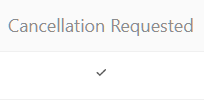
You must have admin or support roles to be able to cancel jobs.
Default Fields
-
Created – (date)
-
Last Update – (date)
-
Start Processing – (date and time)
-
End Processing – (date and time)
-
Node – (node ID)
-
UUID – (universally unique identifier)
-
Status
-
Pending
-
Scheduled
-
Processing
-
Cancelled
-
Error
-
Ready
-
Interrupted
-
-
Type
-
Price List
-
Price List Re-run
-
Simulation
-
Simulation Re-run
-
Price Grid
-
Price Grid Re-run
-
CFS
-
Rebate Record
-
Mass Update
-
Data Export
-
Data Import
-
OBJREF
-
PA Data Load
-
Calculation Flow
-
Price List Merge
-
Data Archive
-
RAT Calculation
-
Move OX
-
Delete Data
-
DB Migration
-
Server Migration
-
Data Cleanup
-
Quotes Mass Update
-
Agreements & Promotions Mass Update
-
IM Change Detection
-
IM Apply Changes
-
Claim
-
Claim Submit
-
Signature
-
Product Images Delete
-
Job Trigger
-
Quote
-
CLIC Mass Edit
-
Mass Action
-
Agreement & Promotion
-
Rebate Agreement
-
Formula
-
Sequence
-
Parallel
-
Compensation
-
Compensation Plan
-
Compensation Record
-
Load Data File
-
DCR Async Submit
-
Calculation Grid
-
Condition Records Processing
-
-
Cancellation Requested (yes, no)
-
Target Object – (Object ID and Type Code combination, e.g.,
2147485082.DMDL) -
Concurrency Key – (e.g.,
2148068499.JST) -
Progress – (e.g., 100%)
-
Calculation Context – (step, task, results, filters, etc.)
-
Name – (job name)
-
Δ – (job duration in seconds)
-
Created By – (username)