
Drop-Down List

A dropdown list lets the user pick one or several alternatives from a fixed set of alternatives.

Single Choice

To restrict the user to picking a single alternative in a drop-down list, use the option input.
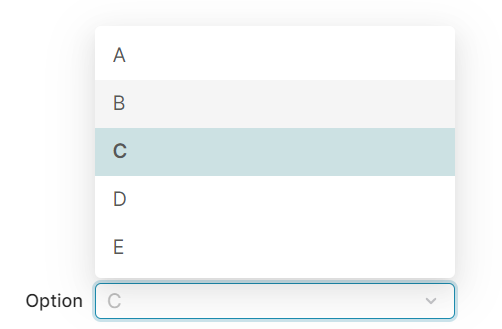
single
Figure 1. A drop-down list for selecting a single alternative, rendered in the browser.
Forms
Groovy
def formFieldSet = api.createConfiguratorEntry()

formFieldSet.inputs = [
    api.inputBuilderFactory()
        .createOptionEntry('option').setOptions('A'..'E')
        .buildContextParameter()
]

return formFieldSet
In input generation mode (input generation mode)
Groovy
api.inputBuilderFactory()
        .createOptionEntry('option').setOptions('A'..'E')
        .getInput()
In header Logics
Groovy
processor.addOrUpdateInput(                 //❶
        'ROOT',
        api.inputBuilderFactory()
                .createOptionEntry('option').setOptions('A'..'E')
                .buildMap()
)

❶ the processor can be one of the quoteProcessor, cProcessor, etc., which references subclasses of the CalculableLineItemCollectionBuilder

Reading input value

Reading input value in a line-item logic

Groovy
def value = input.option as String

Multiple Choice

To allow the user to pick an arbitrary number of alternatives from a drop-down list, use the options entry.

In the examples, note the s at the end of options. This is what distinguishes the multiple choice drop-down from the single-choice drop-down.
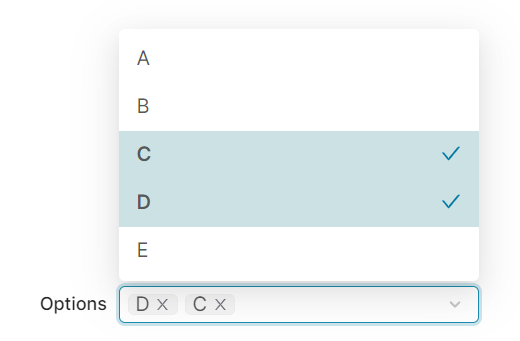
multiple
Forms
Groovy
def formFieldSet = api.createConfiguratorEntry()

formFieldSet.inputs = [
    api.inputBuilderFactory()
        .createOptionsEntry('options').setOptions('A'..'E')
        .buildContextParameter()
]

return formFieldSet
In input generation mode (input generation mode)
Groovy
api.inputBuilderFactory()
        .createOptionsEntry('options', ).setOptions('A'..'E')
        .getInput()
In header Logics
Groovy
processor.addOrUpdateInput(                 //❶
        'ROOT',
        api.inputBuilderFactory()
                .createOptionsEntry('options').setOptions('A'..'E')
                .buildMap()
)

❶ the processor can be one of the quoteProcessor, cProcessor, etc., which references subclasses of the CalculableLineItemCollectionBuilder

Reading input value

Reading input value in a line-item logic

Groovy
def value = input.options as List<String>

Data Source Dimensions

A common use case is when the end user should select a value from a Data Source. For example, the user should be allowed to pick one of the years for which there is data.

DataSource.groovy

Groovy
void buildDimensionInput(
        String inputName,
        String dataMartName,
        String dimensionColumnName
) {
    def datamart = libs.Library_Queries.DataMart
    def uniqueValues = datamart.getUniqueValues(
            dataMartName,
            dimensionColumnName
    )
    api.inputBuilderFactory()
            .createOptionEntry(inputName)
            .setOptions(uniqueValues)
            .getInput()
}

During Input Generation

Groovy
dataSourceInputs.buildDimensionInput(
        'Year',
        'Transaction',
        'InvoiceDateYear'
)