
If a customer requires to be able to add or remove an approval step at any point without touching the code, this can be achieved by creating a pricing parameter table with the following columns:
-
Approval Order – Defines the order in which the approval steps are sequenced.
-
Approver Type – Defines whether approver is a group or an individual user.
-
Approver – Defines either group name (for the Group Approver type) or a user ID (for the User type).
-
Skip – Allows to remove an approver without deleting the record from the table (which later allows to quickly add the approver back to the workflow).
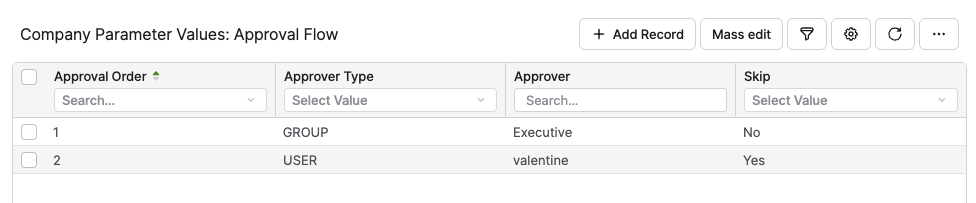
Keep in mind that the Approval Order must be a string, and as such it is recommended to pad single digits with a 0 - to make sure that if there are more than 9 approvers they are sorted correctly. In the unlikely event that there are more than 99 approvers another 0 must be added before the number.
In the Administration > Logics > Workflow Logics > General Workflow Logics > Add Logic.
if (quote?.lineItems == null) return

def ppTable = api.findLookupTable("ApprovalFlow")
def approvers = api.find("MLTV", 0, "name", Filter.equal("lookupTable.uniqueName", "ApprovalFlow"))

for (li in quote?.lineItems){
  if (li.folder) continue
  for (e in li?.outputs)
  {
      for (approver in approvers) {
          if (approver.attribute1 == "GROUP" && approver.attribute3 != "Yes") {
          	workflow.addApprovalStep("Approver" + approver).withUserGroupApprover(approver.attribute2).setReason("Requires " + approver.attribute2 + " approval")

          }else if (approver.attribute1 == "USER" && approver.attribute3 != "Yes") {
          		workflow.addApprovalStep("Approver" + approver).withApprover(approver.attribute2).setReason("Requires " + approver.attribute2 + " approval")
        		}
        }
      break
   }
}