
This article describes how SAP Integration Suite can enable synchronization between Pricefx Condition Records and SAP S/4HANA Price Conditions using event-driven approach. Below example shows how Sales condition record integration is implemented.
Introduction
When condition records are generated in Pricefx, a CONDITION_RECORD_CREATION_FINISHED event can be triggered. SAP Integration Suite listens to this event and triggers the condition record synchronisation process to create Sales Condition or Purchasing Condition in SAP S/4HANA. The event contains the updated condition record sets and the source of the price conditions, which can be either Price List, Price Grid, Quote or Contract.
Listen to Pricefx RabbitMQ Events
This integration flow can be copied and modified from “Sample Artifacts for SAP S/4HANA Integration with Pricefx“ package. Remove any branches which are not relevant to your integration use case. For this use case, only Price Record local integration process is required.
Please raise a support ticket to obtain the RabbitMQ connection properties and enable the required Pricefx events.
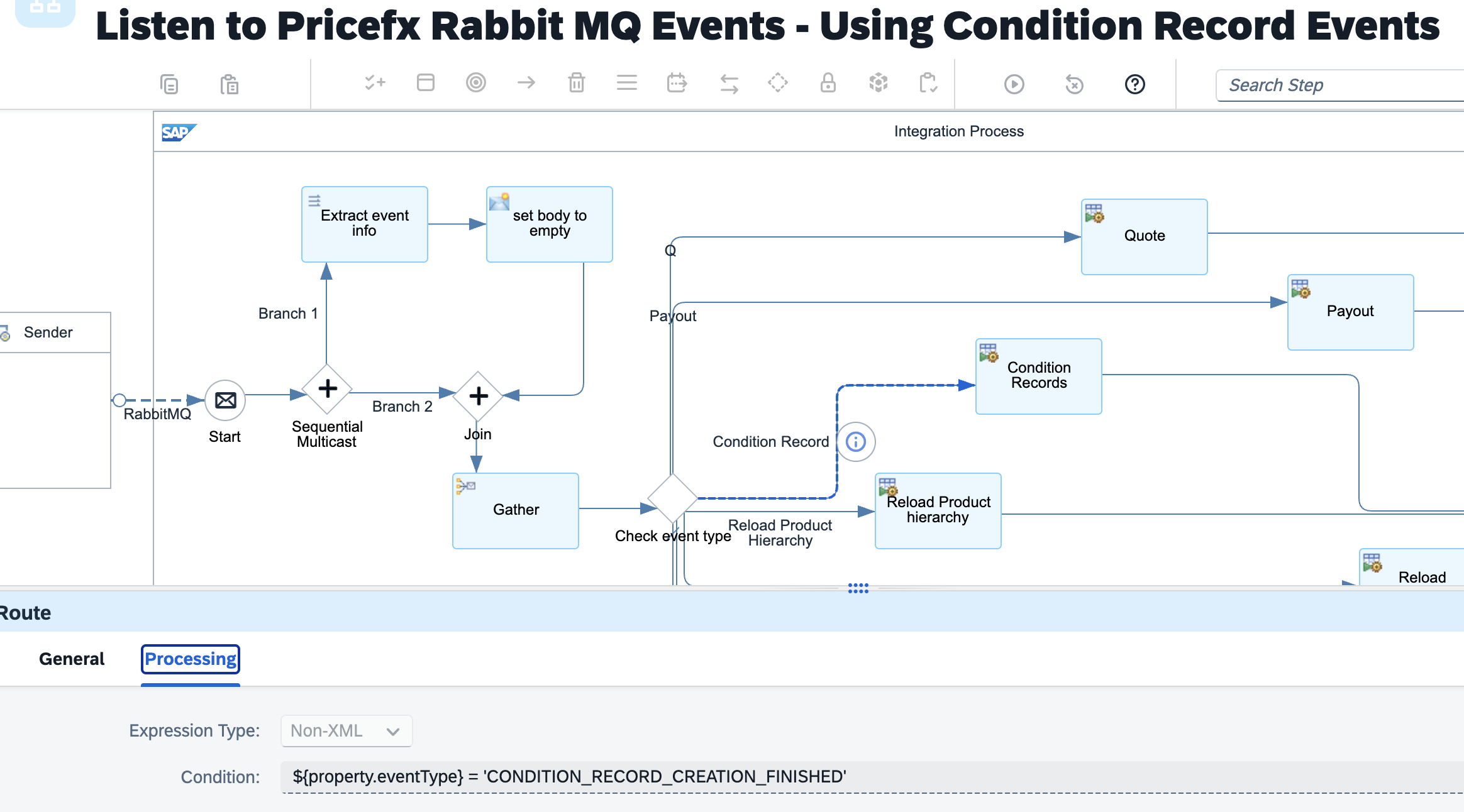
Below parameters have to be configured:
-
RabbitMQ connection properties and the name of the event queue.
Below parameters can be configured but default values are provided:
-
Main receiver – The integration flow which processes the events.
-
Transaction handling
Aggregate Condition Record Events from Pricefx
The integration flow aggregates condition created events from Pricefx. The aggregated events are forwarded to the next integration flow for further processing.
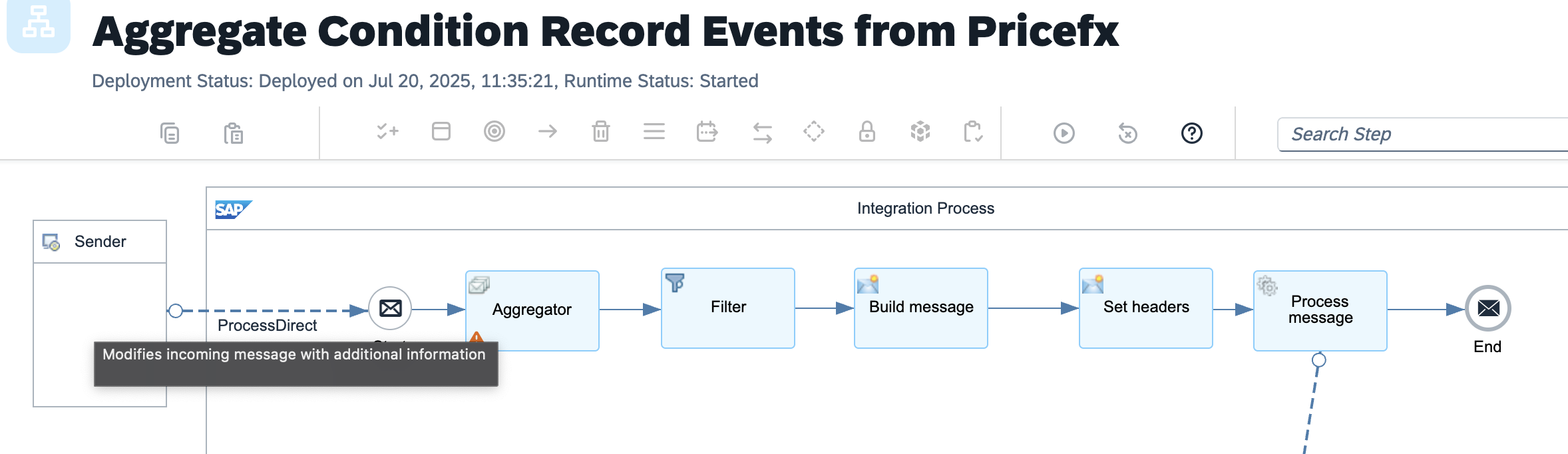
Below parameters can be configured but default values are provided:
-
Sender – The process direct incoming path of this integration flow.
-
Main receiver – The integration flow which processes the aggregated events.
-
Error receiver – The error handling integration flow.
-
Transaction handling
-
Aggregator properties – Defines how the Price Record events should be aggregated.
-
Filter properties - Defines the records to be extracted
-
Message header properties
Process Condition Record Events from Pricefx
This integration flow removes duplicated source IDs and condition record set IDs and retrieves the condition record set information. The records are then published to a JMS queue.
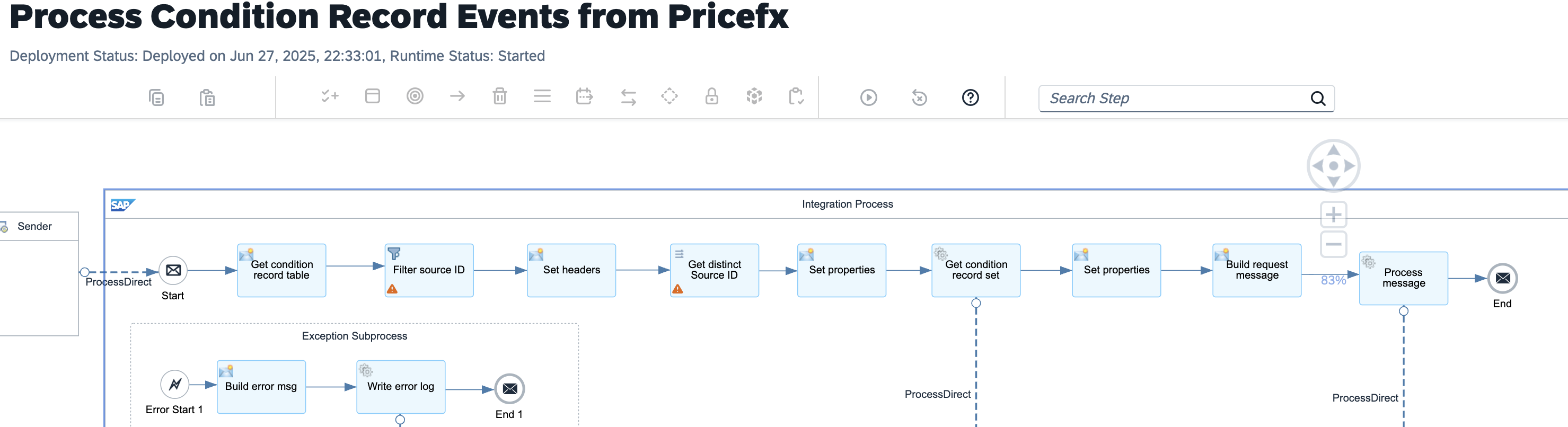
Below parameters can be configured but default values are provided:
-
Sender – The process direct incoming path of this integration flow.
-
Main receiver – The integration flow which publishes the message to a JMS queue
-
Condition record set receiver - The integration flow which retrieves the condition record set details
-
Error receiver – The error handling integration flow.
-
Transaction handling
-
Filter properties - Defines the records to be extracted
-
Message header properties
Get sales price condition records from Pricefx
This integration flow is triggered from a JMS queue. It fetches one batch of condition records from condition record set. It gets any metadata required for the integration from the value mapping. This value mapping is configured per condition record set table. Once the first batch of records are fetched, they will be set to integration status = 1 (or any numeric value you defined in the mapping) to indicate the records are being processed and would not be fetched again in next call. These records are then sent to the next process to create price conditions in SAP S/4HANA. The process would be repeated by putting the message into the JMS queue again until no more records can be fetched from the condition record set.
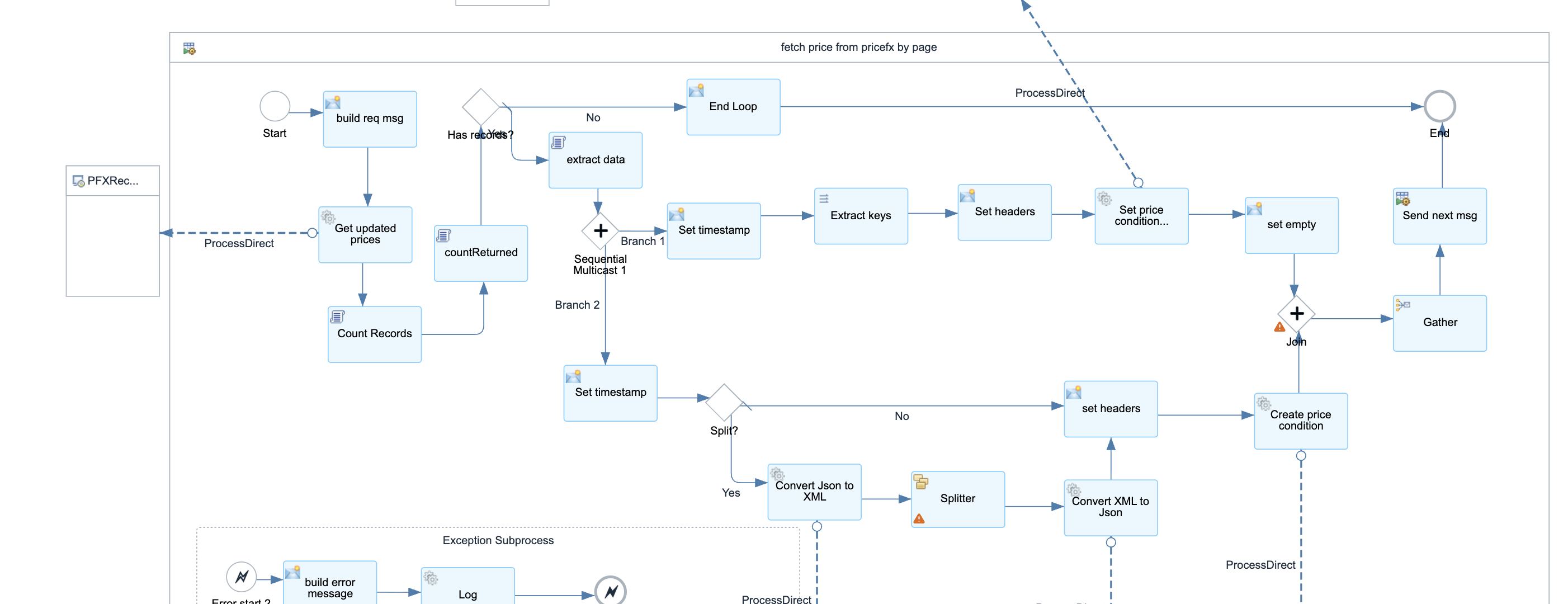
Below parameters can be configured but default values are provided:
-
Sender – The process direct incoming path of this integration flow.
-
Create condition receiver - The integration flow which creates the price conditions in S/4HANA
-
Republish receiver - The integration flow which publishes the message to a JMS queue again for next batch
-
Fetch condition records receiver – The integration flow which fetches the records from Pricefx
-
Update condition status receiver - The integration flow which updates the condition status.
-
JSON array XML receivers - The integration flows which convert JSON array to/from XML
-
Error receiver – The error handling integration flow.
-
Transaction handling
-
Fetch records request message
-
Value mappings keys
-
Page size
-
Splitter properties
-
Message header properties
Update condition records to Pricefx
This integration flow invoke the Pricefx Integration Adapter update operation to update any condition records.
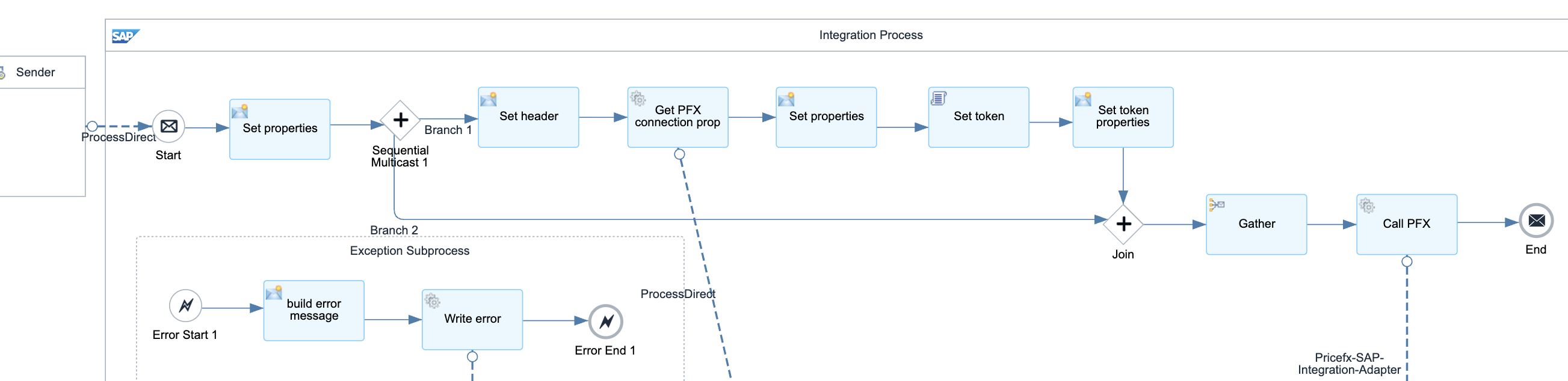
Below parameters can be configured but default values are provided:
-
Sender – The process direct incoming path of this integration flow.
-
Pricefx Integration Adapter properties
-
Error receiver – The error handling integration flow.
-
Pricefx connection properties receiver - The integration flow which retrieves Pricefx connection properties from value mapping by environment
-
Transaction handling
-
Value mappings keys
-
Connection properties xpath
-
Names of all available Pricefx tokens
-
Message header properties
Update Processing Condition Records Status in Pricefx
This integration flow invoke the Pricefx Integration Adapter to update status of the condition records to Processing.
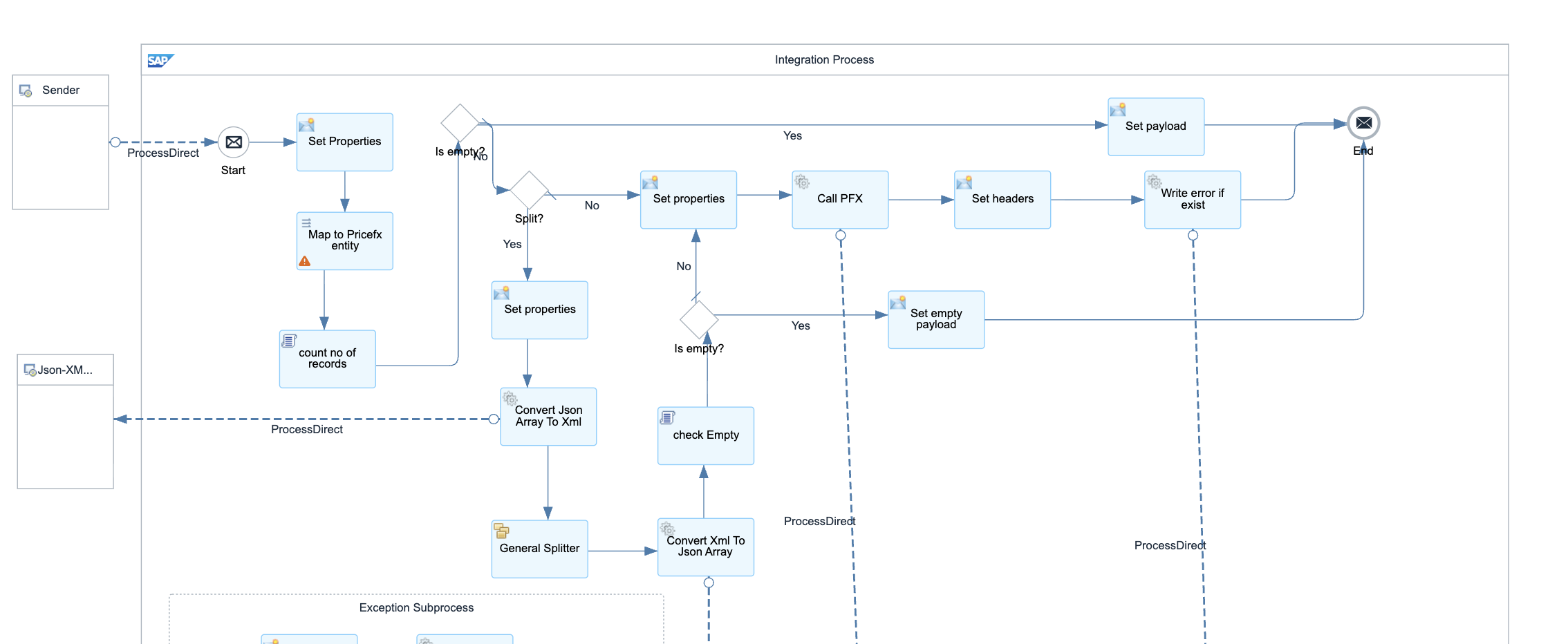
Below parameters can be configured but default values are provided:
-
Sender – The process direct incoming path of this integration flow.
-
PFX receiver - The integration flow which writes the records to Pricefx
-
Error receiver – The error handling integration flow.
-
Error log receiver – The integration flow which reports the error.
-
Transaction handling
-
JSON array XML receivers - The integration flows which convert JSON array to/from XML
-
Message header properties
-
Splitter properties
-
Condition record set xpath
Create sales price condition records in SAP S4HANA
This integration flow creates sales price conditions in SAP S/4HANA by OData API. The results are written back to Pricefx condition records.
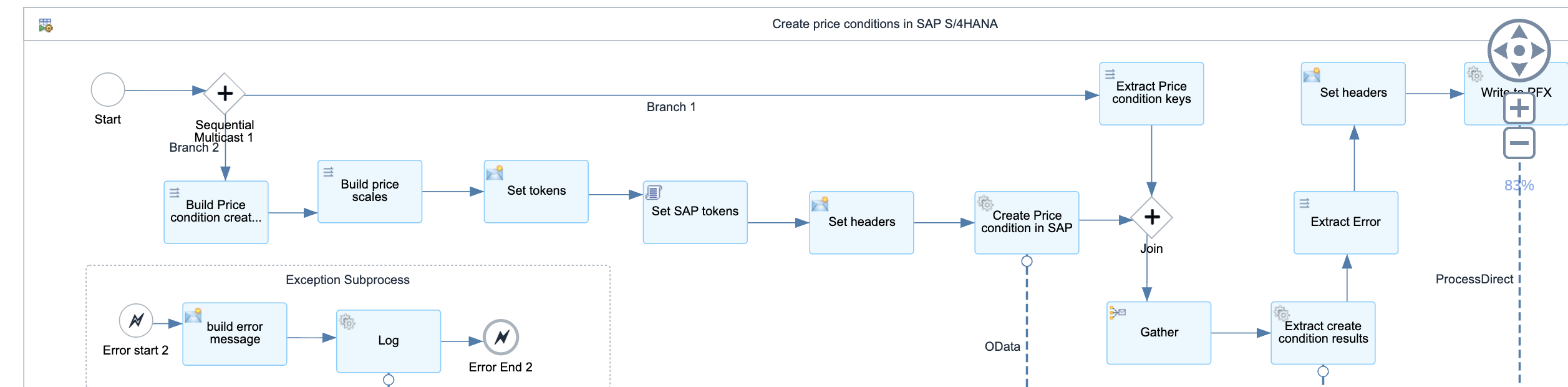
Below parameters can be configured but default values are provided:
-
Sender – The process direct incoming path of this integration flow.
-
SAP Connection properties receiver - The integration flow which retrieves SAP connection properties from value mapping
-
Error receiver – The error handling integration flow.
-
PFX receiver - The integration flow which writes the records to Pricefx
-
SAP result receiver - The integration flow which extracts SAP results from the response
-
PFX result update receiver - The integration flow which writes the results back to Pricefx
-
OData properties
-
Transaction handling
-
Message header properties
-
Connection properties xpath
-
Names of all available SAP tokens
Update S4HANA Condition Records Results to Pricefx Condition Records
This integration flow updates the Pricefx condition records with SAP S/4HANA OData results. The results can be a new condition record generated in SAP S/4HANA or an error message returned by the API. If the Pricefx update is failed due to concurrent update issue, the status would be reset to processing and the record will be re-processed again.
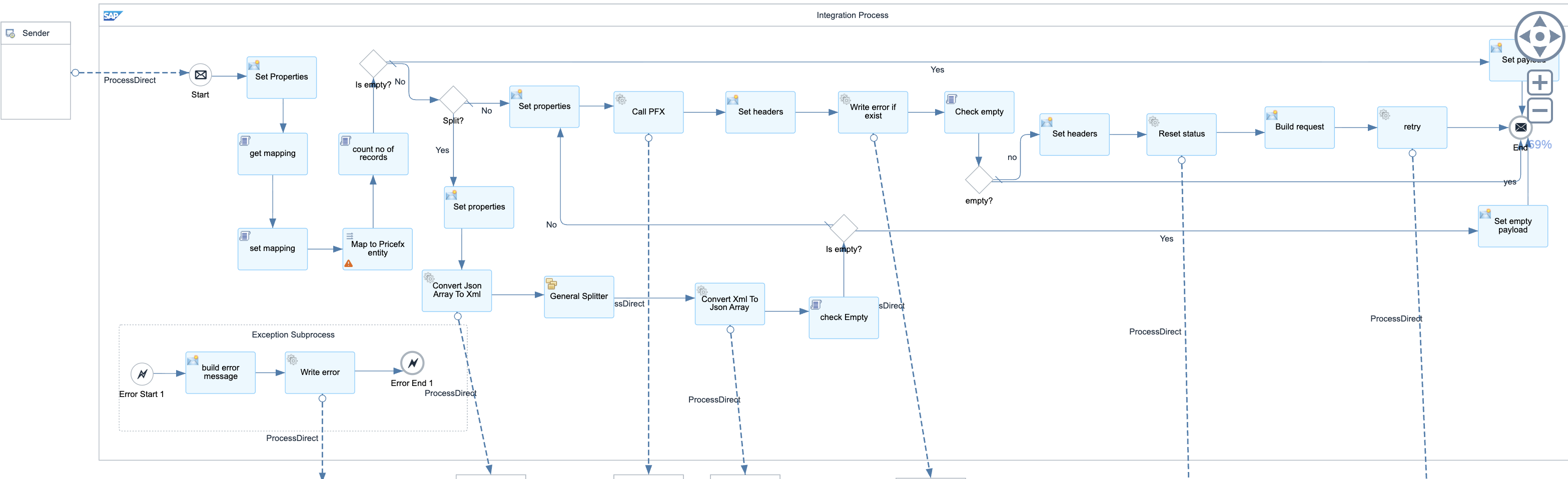
Below parameters can be configured but default values are provided:
-
Sender – The process direct incoming path of this integration flow.
-
Error receiver – The error handling integration flow.
-
Error log receiver – The integration flow which reports the error.
-
JSON array XML receivers - The integration flows which convert JSON array to/from XML
-
Retry receiver - The integration flow which reprocesses the message
-
PFX receiver - The integration flow which writes the records to Pricefx
-
Reset status receiver- The integration flow which resets the status to processing.
-
Transaction handling
-
Message header properties
-
Page size
-
Condition record set xpath
Logging
All the logs are forwarded to Send Log to email by default. You can configure your own log handling process by configuring the parameters of log receivers and error receivers in the integration flows.