
This article describes how SAP Integration Suite can enable synchronization between Pricefx Price Lists and SAP S/4HANA Price Conditions using event-driven approach.
Introduction
When a Price List is approved, each item becomes one or more Price Conditions in SAP S/4HANA. The Price Condition records to be exported to SAP S/4HANA are stored in an Acknowledgement Product Extension table in Pricefx and after the synchronization is completed, the results are written back to this table.
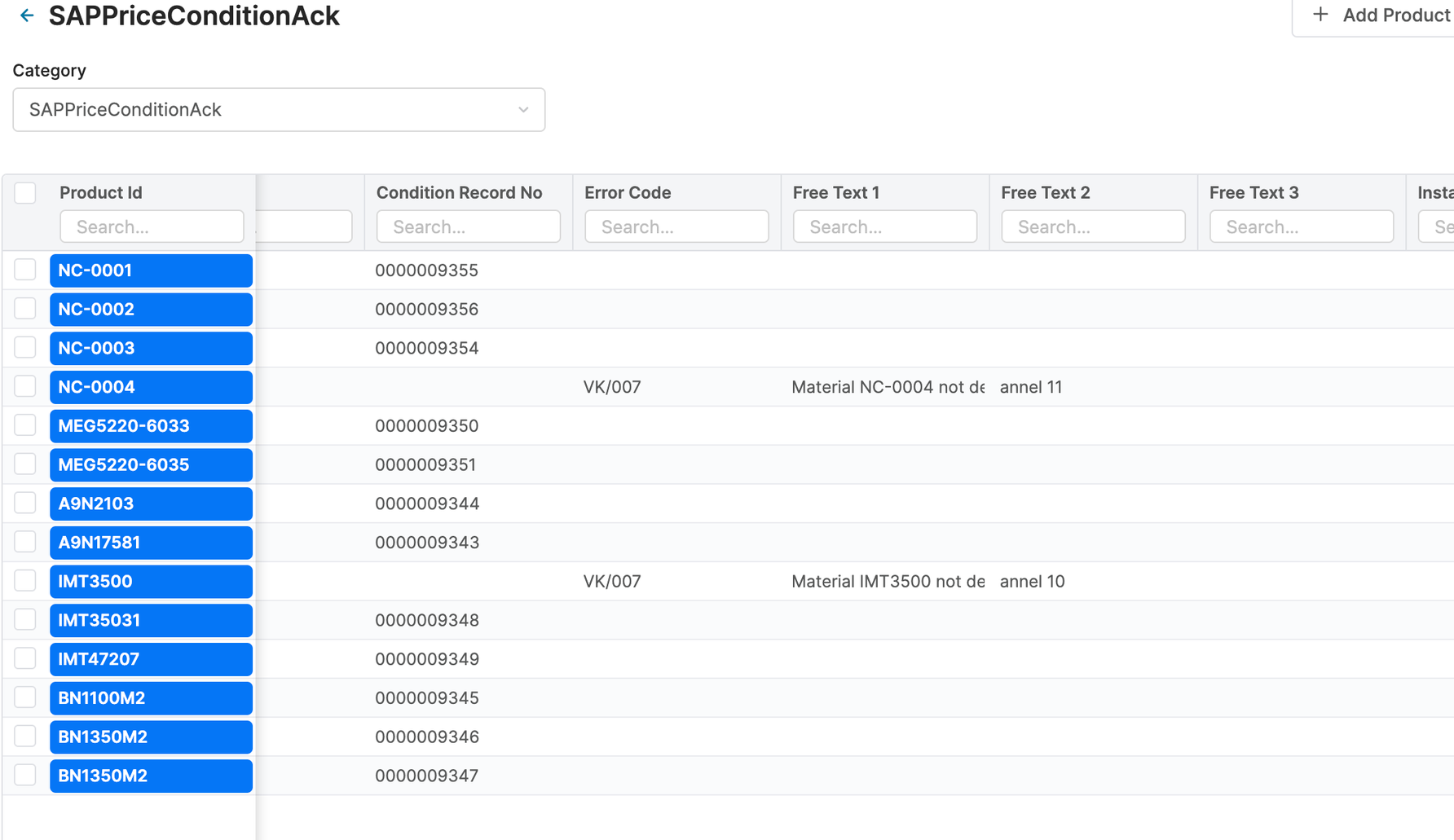
Price Parameters Storing Price Conditions Configuration in Pricefx
When generating Price Conditions from Price List items, extra fields required by SAP S/4HANA have to be provided. These configurations are stored in Price Parameters in Pricefx. You can modify these values according to your needs.
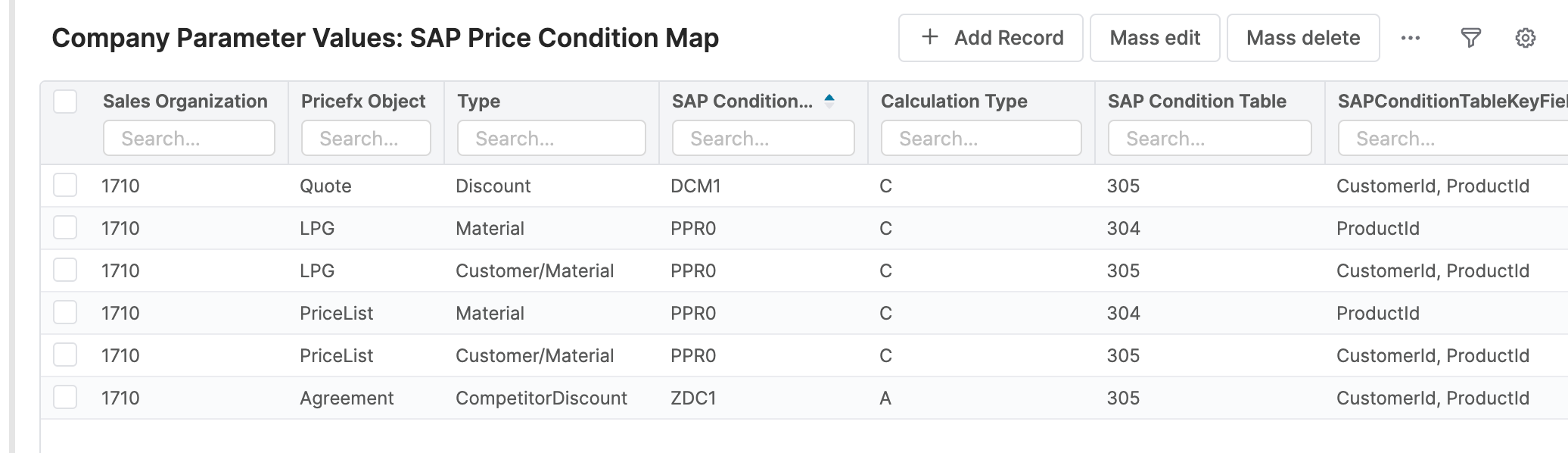
Supported types are: Price List, Matrix Price List, Live Price Grid, Matrix Live Price Grid.
Listen to Pricefx Rabbit MQ Events
The integration flow listens to Price List approval events ('ITEM_APPROVED_PL'). Please raise a support ticket to obtain the RabbitMQ connection properties and enable the required Pricefx events.
The event type, event type code and event object typed ID are extracted by ‘Message Mapping Extract Price List Information’.
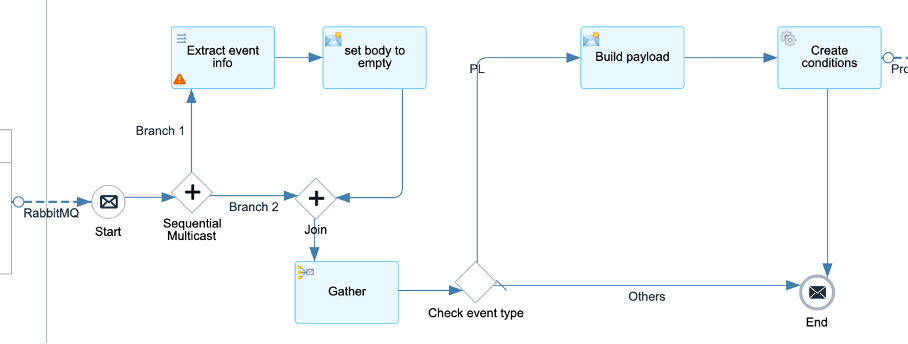
Below parameters have to be configured:
-
RabbitMQ Adapter – Pricefx RabbitMQ connection properties and the name of the event queue.
Below parameters can be configured but default values are provided:
-
Main receiver – The integration flow which processes the events.
-
Transaction handling
Aggregate Pricelist Events from Pricefx
The integration flow aggregates Price List approval events from Pricefx. The aggregated events are forwarded to the next integration flow to get the execute formula to create Price Condition records in Pricefx. Any events which cannot be processed successfully will be written to the log by email.

Below parameters can be configured but default values are provided:
-
Sender – The process direct incoming path of this integration flow.
-
Main receiver – The integration flow which processes the aggregated events.
-
Headers of receiving process
-
Error receiver – The error handling integration flow.
-
Transaction handling
-
Message Log Identifier properties
-
Aggregator properties – Defines how the product events should be aggregated.
Get Pricefx Price List by ID
This integration flow retrieves the price list by the price list ID from the Pricefx event.

Below parameters have to be configured:
-
Pricefx connection properties and operation properties
Below parameters can be configured but default values are provided:
-
Sender – The process direct incoming path of this integration flow.
-
Main receiver – The integration flow which processes the price list.
-
Error receiver – The error handling integration flow.
-
Transaction handling
-
Mapping to extract price list information
-
Message Log Identifier properties
Execute Pricefx Formula to Prepare Price Condition Records in Pricefx from Price List
This integration flow executes a Pricefx formula to create price condition records to be exported to SAP S/4HANA and initiates a request to create price conditions in SAP S/4HANA.. You should contact Pricefx project team to build the formula in Pricefx to transform Price List records to Price Condition records according to your business requirements.


Below parameters can be configured but default values are provided:
-
Sender – The process direct incoming path of this integration flow.
-
Main receiver – The integration flow which processes the generated price condition records.
-
Formula receiver - The integration flow which executes the Pricefx formula to generate the price condition records.
-
Error receiver – The error handling integration flow.
-
Transaction handling
-
Message Log Identifier properties
Execute Pricefx formula to create Price List Price Condition
This integration flow executes a Pricefx formula to format and store price condition records to be exported to SAP S/4HANA in the acknowledgement product extension table in Pricefx from approved price lists.

Below parameters have to be configured:
-
Pricefx connection properties and operation properties
Below parameters can be configured but default values are provided:
-
Sender – The process direct incoming path of this integration flow.
-
Error receiver – The error handling integration flow.
-
Transaction handling
-
Message Log Identifier properties
Get Price Condition Records from Pricefx and Create Price Conditions in SAP S4HANA with Price Scales
This integration flow retrieves Price Condition records from the Acknowledgement Product Extension table in Pricefx.

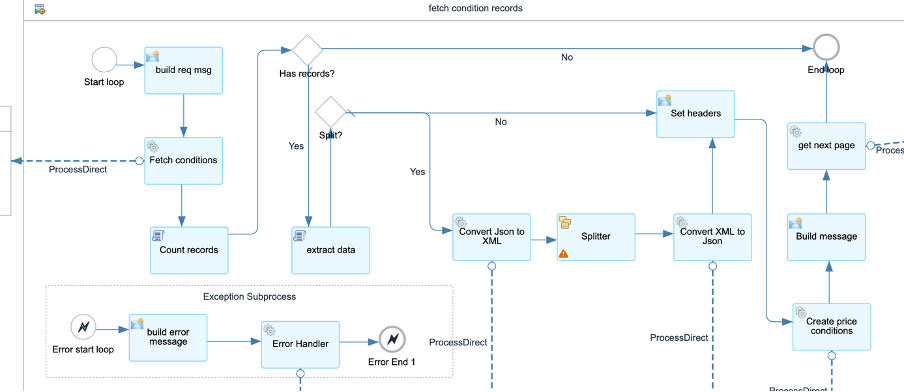
Below parameters can be configured but default values are provided:
-
Sender – The process direct incoming path of this integration flow.
-
Main receiver – The integration flow which creates sales condition records in S/4HANA.
-
Fetch next page receiver – The JMS publisher which publishes message to the fetch price condition record request queue to fetch the next batch of the Price Condition records.
-
Error receiver – The error handling integration flow.
-
Fetch conditions receiver – The integration flow which fetches the price condition records from Pricefx.
-
Transaction handling
-
Splliter properties
-
Message Log Identifier properties
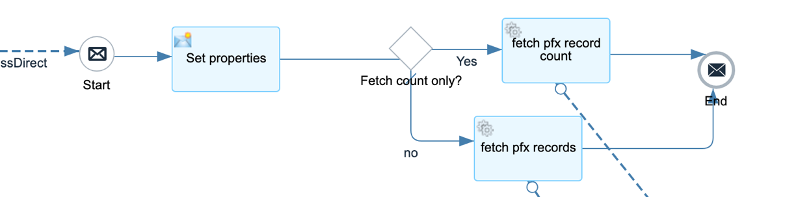
Fetch sales condition records from Pricefx SAP ACK Product Extension
This integration flow fetches sales conditions from Pricefx product extension.
Below parameters have to be configured:
-
Pricefx connection properties and operation properties
Below parameters can be configured but default values are provided:
-
Sender – The process direct incoming path of this integration flow.
-
Error receiver – The error handling integration flow.
-
Transaction handling
-
Message Log Identifier properties
Create Sales Price Conditions in SAP S4HANA from Pricefx SAP ACK Product Extension
This integration flow creates sales price condition in SAP S/4HANA by standard Pricing Condition OData API and returns the formatted response to Pricefx.


Below parameters have to be configured:
-
OData connection properties
Below parameters can be configured but default values are provided:
-
Sender – The process direct incoming path of this integration flow.
-
Main receiver – The integration flow which writes condition record results to Pricefx.
-
Get AIR key receiver - The integration flow which gets the AIR key from Pricefx.
-
Build OData request receiver - The integration flow which builds the OData request.
-
Error receiver – The error handling integration flow.
-
Transaction handling
-
Message Log Identifier properties
Build SAP S4HANA Sales Price Condition Batch Create Request from Pricefx SAP ACK Product Extension
This integration flow converts Pricefx price condition product extension response to SAP S/4HANA Sales Price Condition request.

Below parameters can be configured but default values are provided:
-
Sender – The process direct incoming path of this integration flow.
-
Error receiver – The error handling integration flow.
-
Mapping to build SAP S/4HANA Sales Price Condition request.
-
Transaction handling
-
Message Log Identifier properties
Write Records to Product Extension Tables in Pricefx
The integration flow transforms the response from SAP S/4HANA and writes the records to acknowledgement product extension table in Pricefx.
For explanation and configuration of this integration flow, see Product Master Management | Write Records to Product Extension Tables in Pricefx
Error Handling
Default error handling is handled by JMS retry. See https://pricefx.atlassian.net/wiki/x/AYAwaAE
Logging
All the logs are forwarded to Send Log to email by default. You can configure your own log handling process by configuring the parameters of log receivers and error receivers in the integration flows.