CHEM13: Improve rebate performance with complete financial visibility via analytics KPIs

📽️ Check out a video demonstration for this use case, here.

Use Case Situation Description

The chemical industry is constantly evolving, and it is essential to keep up with the pace. To thrive in this dynamic landscape, optimizing rebate performance and ensuring complete financial visibility are a must. This can be easily achieved by leveraging analytics KPIs, which can unlock a multitude of benefits. With enhanced visibility into rebate performance, chemical industry players can identify areas for improvement, maximize profitability, and mitigate revenue leakage. Real-time data-driven insights allow for informed decisions and proactive strategy adjustments to keep you ahead of the competition. While most pricing practices are currently experiencing hurdles in the way of reaching this goal, with Pricefx you can move ahead of the curve.

User Role(s) and Business Objective

Sales Executive, Manager, or Analyst; Pricing or Product Manager or Analyst 

Business Objective

Businesses establish rebates to incentivise growth or sustain business at targeted accounts.  To achieve the business objectives, sales and business teams need to be able to monitor progress on sales versus the rebate objective throughout the rebate period.  This reminds the customer of progress toward attaining the rebate payment and maintains targeted business levels. 

Complication
  • Difficulty in Monitoring Sales Performance: tracking sales performance data compared to the rebate target becomes a challenge.

  • Data Collection and Update: Sales volume or revenue data for the products associated with the rebate must be collected and updated on a monthly basis.

  • Visualization of Data: Graphs or tables displaying the sales data must also show how the rebate target is distributed over the rebate period's time periods, illustrating progress towards the goal.

  • Automated Metric Calculation: An automated metric needs to be calculated to gauge the effectiveness of sales efforts. This helps sales teams assess if progress towards the goal is consistent or sporadic.

  • Sales Distribution Concerns: There is a preference for even distribution of sales across the rebate period rather than having significant sales volume spikes close to the end of the rebate period. This helps with planning and consistency.

Capability Needed

The ability to generate views of current sales revenue or volume for the rebate time period against the rebate goal for the product(s) covered under the rebate agreement.   

Benefit(s)

Understanding customer performance and enabling higher realization of rebate goal outcomes. 

KPIs

Revenue or volume versus target; rebate effectiveness 

Calculations

Rebate effectiveness = [(Sum of absolute value of (actual – goal) for all time periods in rebate) / number of time periods in rebate] * 100 


Prescriptive Design Requirements

As a [Pricing Manager/Sales Rep], I want to have visibility on the progress of sales versus the rebate objective throughout the rebate period agreements, so I can: 

  • Incentivize customers to achieve the set targets where needed 

  • Understand the likelihood of making the rebate payout at the end of the rebate period 

The overall design requirements are summarized in these articles:

Functional and Non-functional Requirements

The following are the functional requirements for this use case:

  • Have a dashboard available that has the following filter options: 

    • Ability to select a customer or group of customers. 

    • Ability to select a time period. 

    • Ability to select a rebate type. 

  • The dashboard has portlets:  

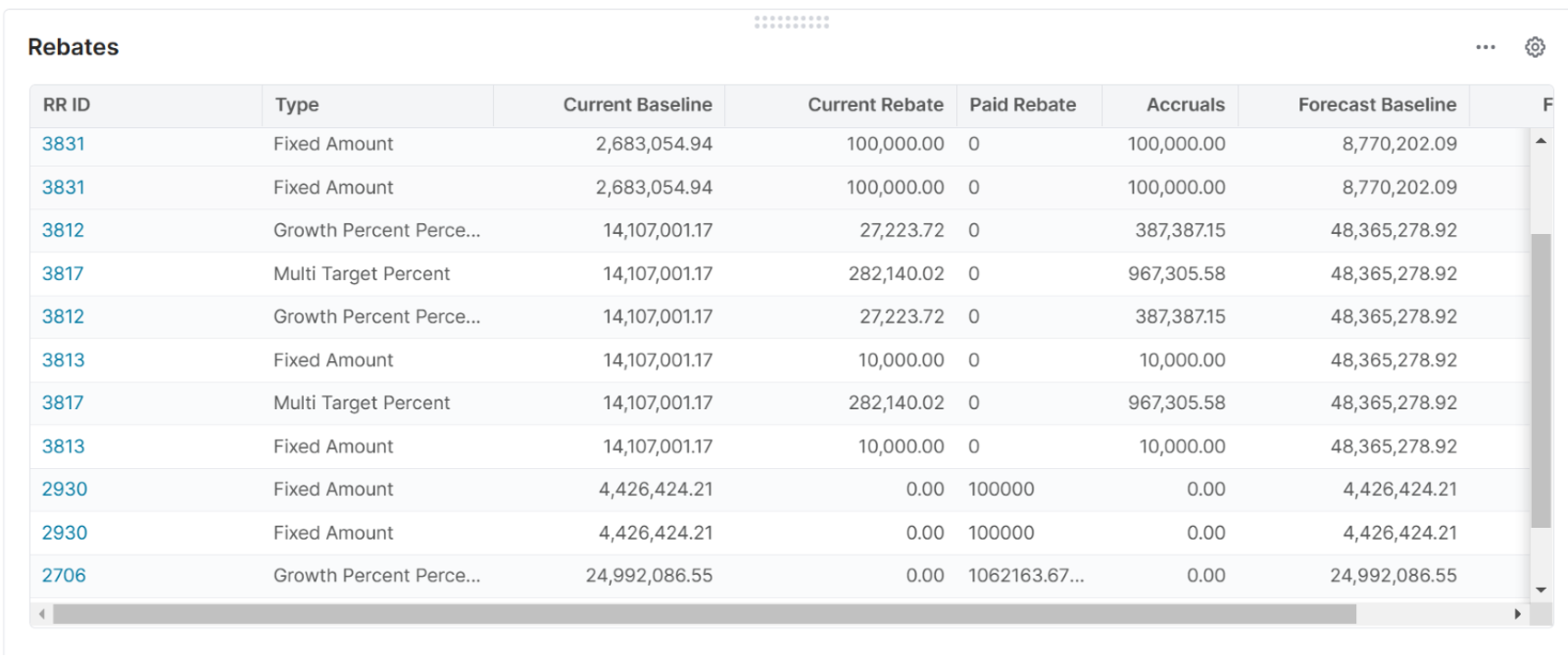
    • Per Rebate Record the targets, the actuals, the accruals and the payouts 

    • The complete price waterfall  

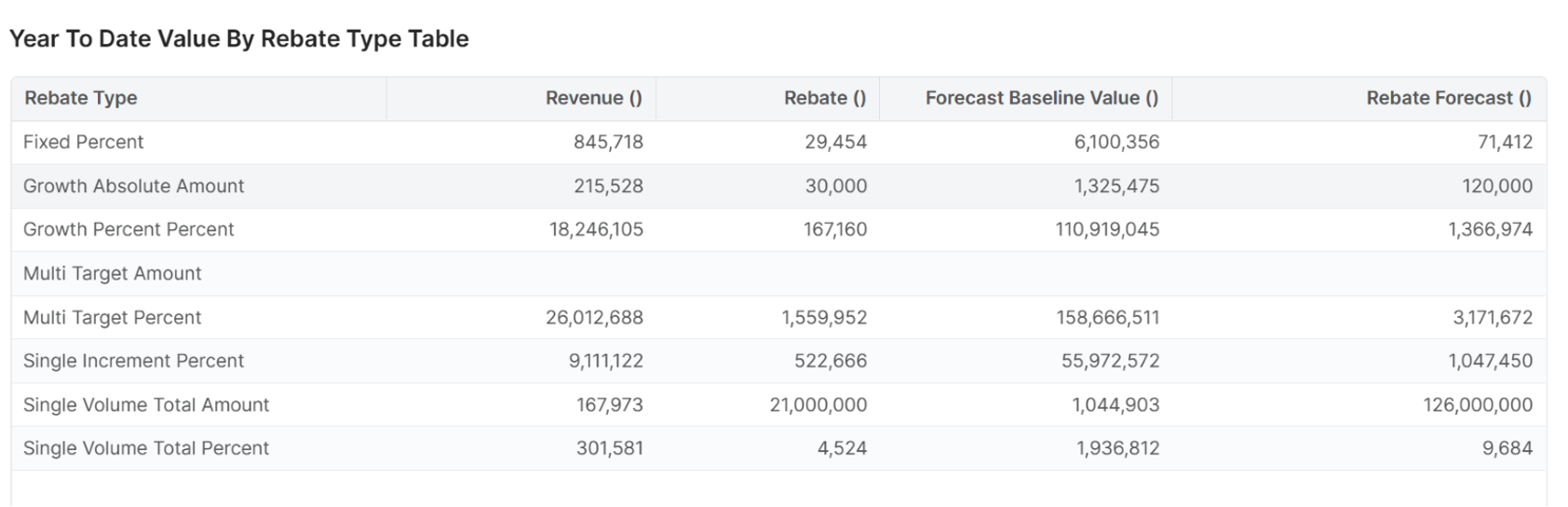
    • Year to date summary table with the values per rebate type 

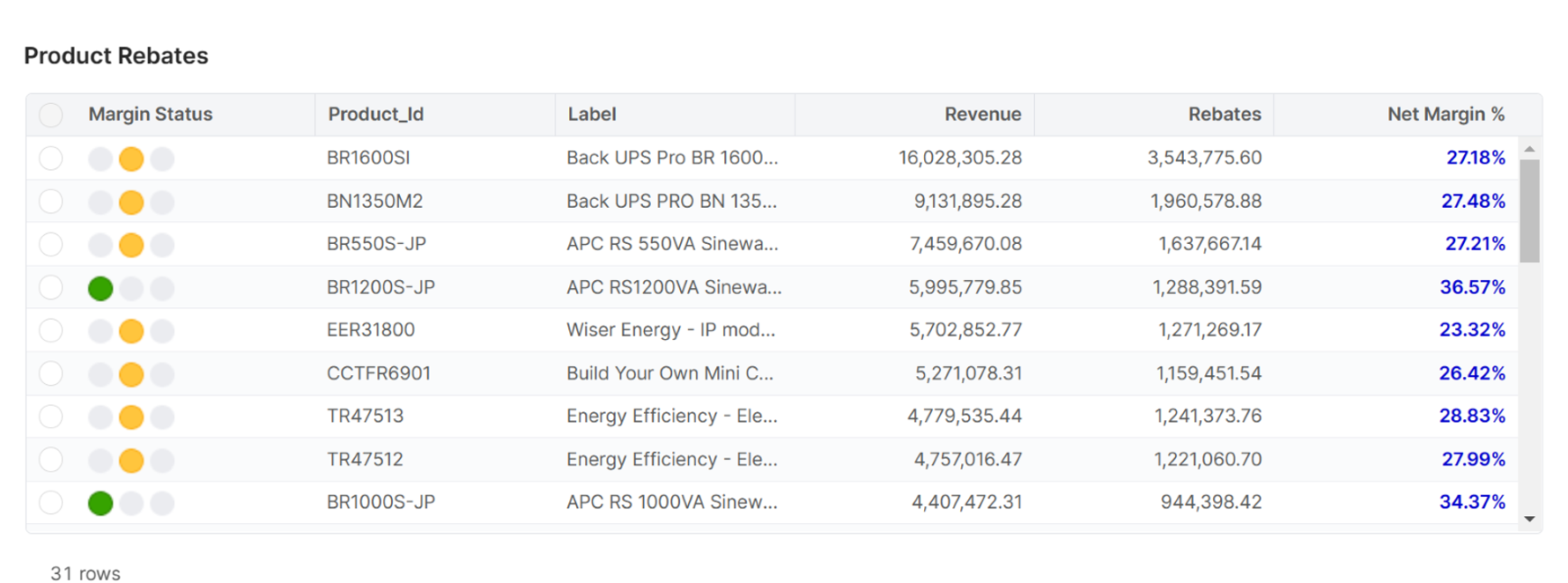
    • Product Rebates portlet that show the revenue, rebates and margin % data summarized by product: 

Non-functional requirements

  • This use case has the prerequisite that use case CHEM12 - Eliminate unearned discounting by utilizing automated rebates with accruals and payouts is implemented 

  • This use case has the prerequisite that Customer Insights and Sales Insights are installed 

Reporting and Dashboards

This use case has the dashboards and reports as described in the functional requirements section. Check them out, here.

Measures, Calculation and Decision-making KPIs

The following are the primary KPIs for this use case:

  • Previous Sales: Revenue for the previous rebate period, based on the waterfall transactions 

  • Forecasted Sales: Forecasted Sales for the rebate period, based on external forecast (input to Pricefx) 

  • Forecasted Baseline value: Forecasted Sales for the rebate period which is eligible for the rebate program, based on external forecast (input to Pricefx) 

  • Forecasted Rebate: the forecasted rebate to be paid out, based on the rebate program conditions and the forecasted baseline value 

  • Revenue: Revenue based on the Price Waterfall data 

  • Rebates: Rebates based on the Price Waterfall data 

  • Net Margin %: Margin % based on the Price Waterfall data 

Scope Validation and Project Readiness

During the scope validation process we are ensuring that the project deliverables are completed according to the agreed scope and quality standard by asking the following questions.

Scope Validation and Project Readiness Workshop – Validation Questions & Answers: 

Q1: Do you have sales forecast available on Customer/Product level? 

A1:

Q2: Do you do your rebate execution in your ERP system? 

A2:


User Stories

These are the epics and user stories that make up this use case.

Epic: Inline analytics

As a Sales Rep/Pricing Manager/Pricing Administrator, when I’m working on my rebate agreement, I want to have inline analytics to view several decision supporting metrics.

User Story Name - Historical Sales 

I want to: See the historical sales of the customer or customer group I’m working on in my rebate agreement 

so I can: Use this to set the proper targets and rebate conditions. 

Acceptance Criteria: With a simple click I can open a bar chart showing per month the historical sales of the customer or customer group I’m working on. 

The data corresponds to the data from the data mart containing the sales transactions.


User Story Name - Calculated metrics in rebate calculation result 

I want to: See, when I’m working on my rebate agreement, calculated metrics in the calculation result of the rebate agreement that show me the historical sales and when present, the forecasted sales 

so I can: Use this to set the proper targets and rebate conditions and understand what the financial impact of my decisions are 

Acceptance Criteria:

Metrics to be shown are: 

  • Previous year sales (for the customer selection) 

  • Forecast sales (based on the forecast, if available) 

  • Forecast rebate (the rebate condition applied on the forecast sales) 

Epic: Visibility of rebate impact

As a Sales Rep/Pricing Manager, I want to have a dashboard available that I can use to show the impact of my rebate agreements.

User Story Name - Dashboard filter 

I want to: Filter my agreements

so I can: Look at the agreements I’m responsible or zoom in to specific customers. 

Acceptance Criteria:

Fields to filter on are: 

  • Customer or group of customers. 

  • Time period. 

  • Rebate type. 


User Story Name - Rebates Portlet 

I want to: See per rebate agreement line what the target and actual is 

so I can: I can act towards customers accordingly to have them reach their target 

Acceptance Criteria:

The portlet shows per rebate agreement line: 

  • Rebate ID 

  • Rebate Type 

  • Current Baseline 

  • Current Rebate 

  • Paid Rebate (if available) 

  • Accruals (if available) 

  • Forecast Baseline 


User Story Name - Year to date summary table with the values per rebate type 

I want to: See per rebate agreement type what the target and actual is 

so I can: I can see the effectiveness and status of each rebate type 

Acceptance Criteria: The portlet shows per rebate agreement line: 

  • Current Baseline 

  • Current Rebate 

  • Paid Rebate (if available) 

  • Accruals (if available) 

Forecast Baseline 


User Story Name - Price Waterfall 

I want to: See the complete price waterfall for my selection 

so I can: So I can see what the impact of my rebate agreement is overall 

Acceptance Criteria: The waterfall and data is filtered on my selection and in line with the waterfall from the transactions data mart 


User Story Name - Product rebates 

I want to: See per product what the revenue, rebates and net margin is 

so I can: So I can see if there is any product below my set margin targets 

Acceptance Criteria: I can set margin targets per product group 

The fields in the portlet are: 

  • Margin Status (traffic light) 

  • Product ID 

  • Product Description 

  • Revenue (coming from the waterfall data) 

  • Rebates (coming from the waterfall data) 

  • Net Margin % (coming from the waterfall data) 

The data is filtered based on the dashboard filter 

The data is aligned with the data mart data.

Epic: Inbound data for vizualization in dashboard

As a Sales Rep/Pricing Manager, I want to have a dashboard with invoice line items available that I can use in several metrics.

User Story Name - Invoice line items 

I want to: I need to have my invoice line items 

so I can: Use this data is several metrics  

Acceptance Criteria: Data to be loaded in Pricefx Data Source table either manually through Pricefx Excel Client, or automatically integrated via using CSV file placed on a Pricefx dedicated SFTP folder on a pre-agreed frequency. 

Must have column definition: Date, Customer-id, Document type, Product-id, quantity, all relevant waterfall elements 


Data Requirements

The following tables can be either manually loaded in Pricefx via Pricefx Excel Client or can be automatically integrated using CSV files in a Pricefx dedicated SFTP folder: 

  • Price Waterfall data (typically based in invoice line items) 

  • If applicable, forecast data on customer/product level 


Out-of-Scope

Out-of-scope business functions and features can be configured, but not included in the Chemical Industry Catalog.

  • Any Reporting and Dashboards, other than the ones explicitly mentioned above 

  • Applying changes to or creating any new Rebate Agreements (this is CHEM12

  • Notifications and alerts 

  • API method integration 

  • Customer-Facing templates with calculated prices 


Solution Design

Filters
  • Have a dashboard available that has the following filter options: 

    • Ability to select a customer or group of customers. 

    • Ability to select a time period. 

    • Ability to select a rebate type. 

    • Ability to select the chart type 

Portlets
  • The dashboard has portlets that show:  

    • Per Rebate Record the targets, the actuals, the accruals and the payouts 

    • The portlet will use data from the Rebate Records and the Price Waterfall Datamart 

    • RR ID – ID of the rebate record 

    • Type – Rebate Type 

    • Current Baseline – Sum of the Base Line of the Rebate Records 

    • Current Rebate – Sum of the Rebate from the Rebate Records which are not approved 

    • Paid Rebate - Sum of the Rebate from the Rebate Records which are approved 

    • Accruals – Sum of Forecast Rebate of Rebate Records - Paid Rebate 

    • Forecast Baseline – Sum of Forecast Baseline of the Rebate Records 

image-20230823-084055.png
Complete price waterfall
  • The portlet uses the data from the Waterfall Datamart to build the chart 
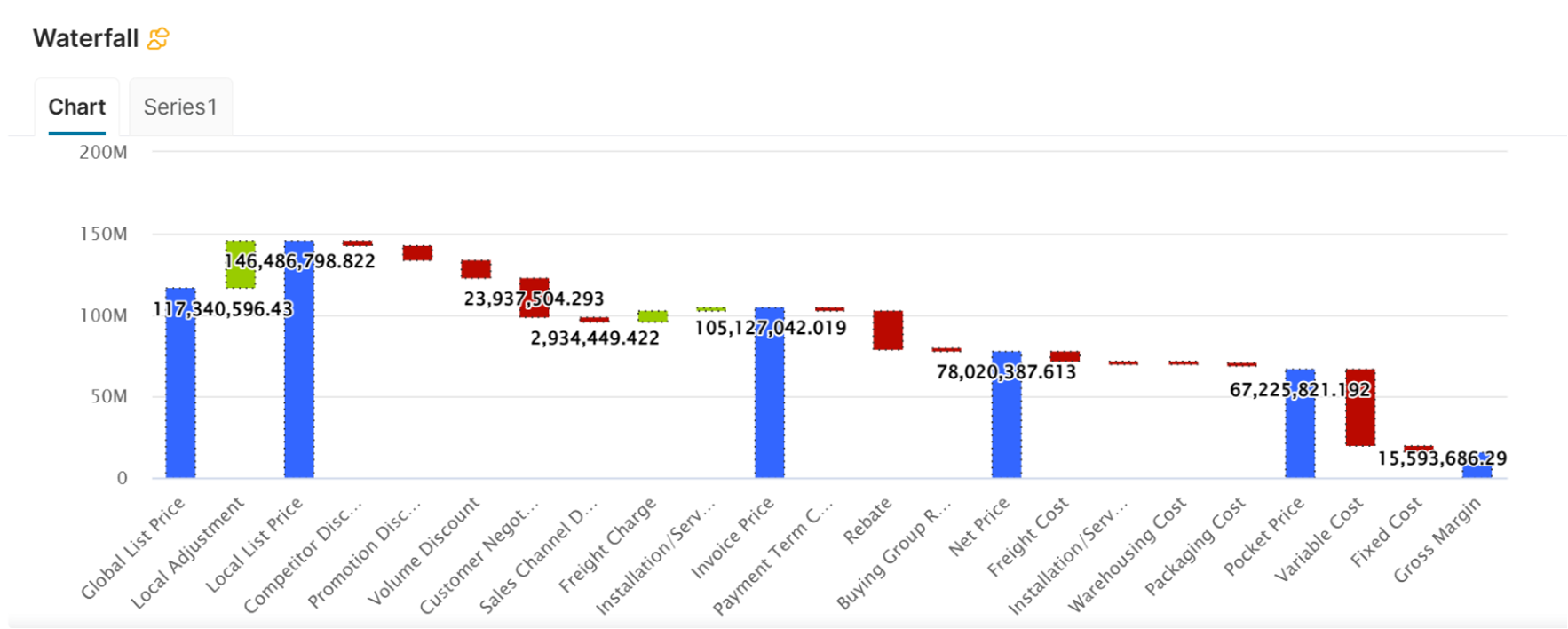
image-20230823-084145.png
  • Year to date summary table with the values per rebate type 

    • The portlet will use data from the Rebate Records and the Price Waterfall Datamart 

      • Rebate Type: Rebate type of the rebates 

      • Revenue: YTD revenue of the Rebate type 

      • Rebate: YTD Rebate of the rebate type 

      • Forecast Baseline Value: YTD Forecast Baseline Value 

      • Rebate Forecast: YTD Rebate forecast 

image-20230823-084334.png
Product rebates
  • Product Rebates portlet that show the revenue, rebates and margin % data summarized by product: 

  • The portlet will use data from the Price Waterfall Datamart 

    • Margin Status: 

    • Red: margin <= 5% 

    • Yellow: margin > 5% and margin <= 30% 

    • Green: margin > 30% 

    • Product_Id: Product Id of the product from the product master 

    • Label: Label of the product from the product master 

    • Revenue: Sum Revenue of the product 

    • Rebates: Sum Rebate of the Product 

    • Net Margin %: Sum margin / Sum revenue 

image-20230823-084538.png