CHEM11: Improve seller performance and governance effectiveness via quoting analytics KPIs

📽️ Check out a video demonstration for this use case, here.

Use Case Situation Description

In this use case we are looking at how leveraging quoting analytics KPIs improves seller performance and governance in selling products or services. Tracking metrics enhances decision-making, optimizes pricing, forecasts sales accurately, and identifies sales opportunities. In Pricefx you can control risk management, efficient resource allocation, and customer insights. Process efficiency, benchmarking, and data-driven accountability will result in improved customer satisfaction and reduced revenue leakage.

User Role(s) and Business Objective

Sales Manager, Team Leader 

Business Objective:

Sales teams leaders have regular checkpoints on performance management with their teams with the goal of coaching individual sales reps.  Regular tracking of performance metrics is a critical element of the sales management role specific to pricing. 

Complication
  • Limited visibility into data 

  • Lack of repeatable process and dashboards 

  • Missing context around underperformance or KPI specific targets 

Capability Needed
  • Robust dashboards and reporting based on win-loss, governance and compliance, and similar KPIs and benchmarks over time 

Benefit(s)
  • Increased margin / improved sales performance / sales team retention and morale / fast resolution of issues of governance or alerting to underlying competitive or pricing issues 

KPIs
  • Cumulative win/loss percentage on quotes 

  • Adherence to guideline / reduction in quotes needing approvals 

  • Sales team retention and improvement in team morale 

Calculations
  • Win/loss percentage = (Total deals won / Total opportunities) * 100 
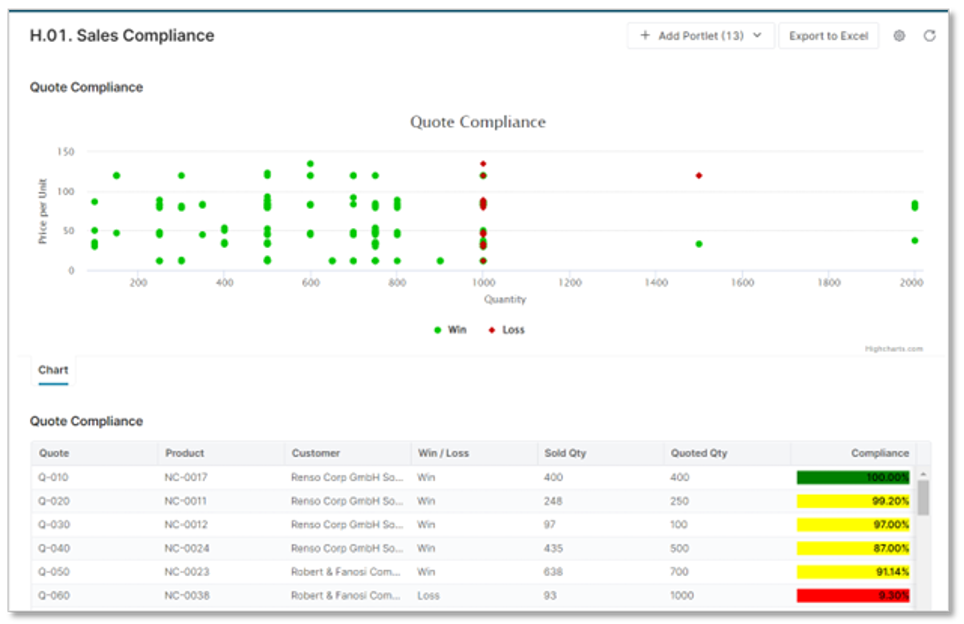
image-20230822-084719.png

Prescriptive Design Requirements

As a Sales Manager, I want to provide to my team direct decisions support in the quote  and access real-time and robust Sales performance indicators to use as support for the regular checkpoints I have with my team,  so I can:   

  • Improve sales confidence, efficiency, and goal achievement 

  • Improve individual sales management coaching and performance visibility 

  • Get higher sales team retention and satisfaction 

  • Improve business contribution margin 

The overall design requirements are summarized in these articles:

Functional and Non-functional Requirements

For this use case, the functional requirements are:

  • Ability to get Sales contextual decisions support from quotes inline analytics  

  • Ability to view time series history of revenue over time compared to guardrails 
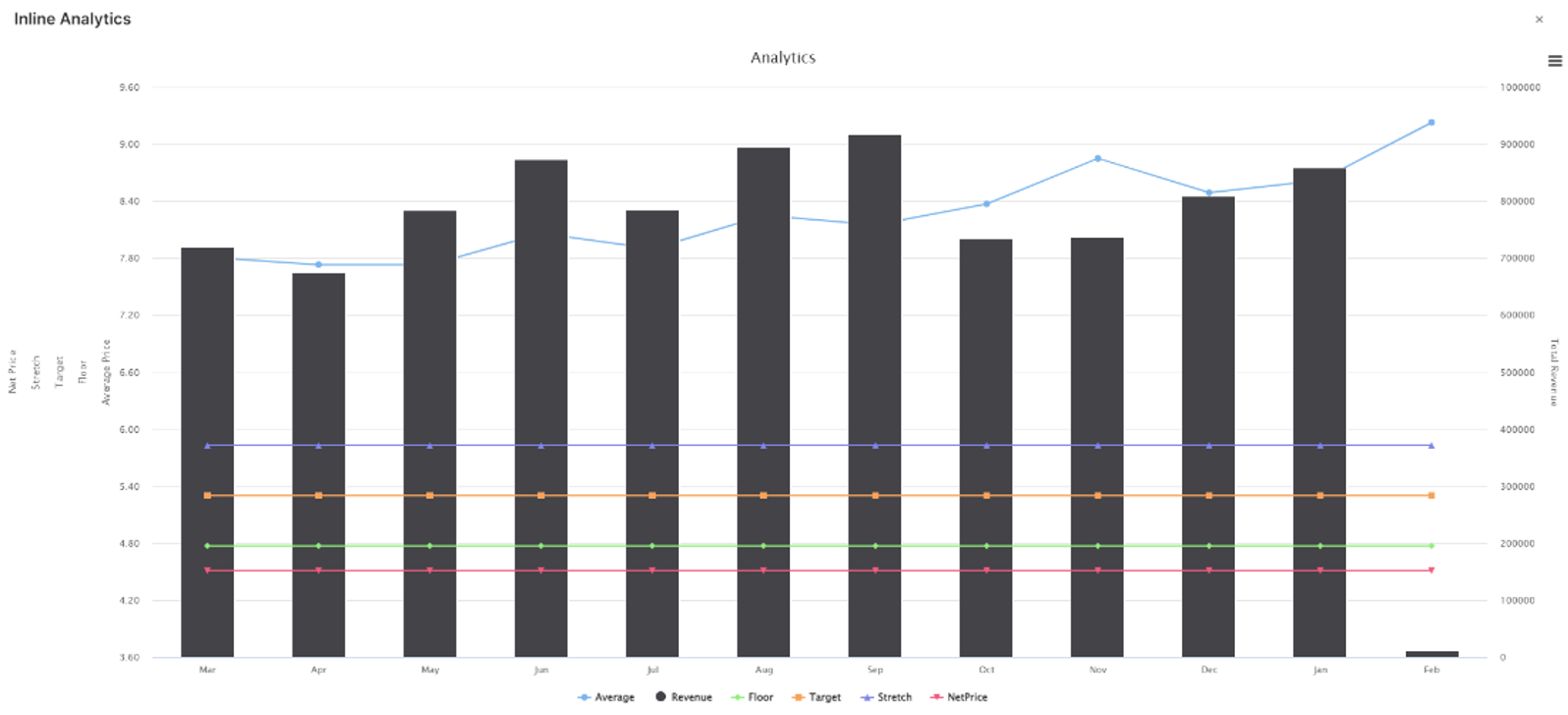
image-20230822-085932.png
  • Ability to get benchmark analysis of quotes compared to recent past transactions versus guardrails 

  • Ability to get revenue and margin break-even analysis 
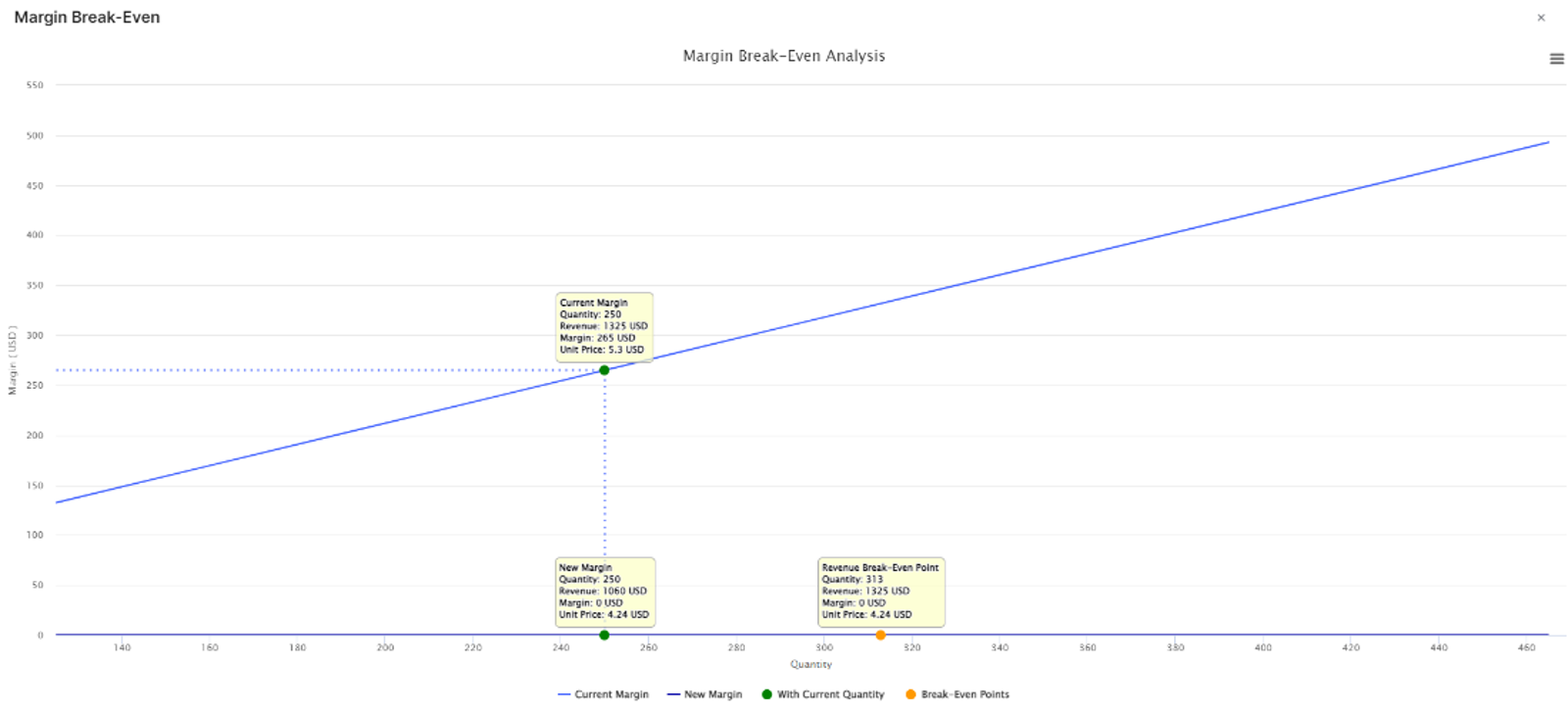
 

image-20230822-090014.png
  • Ability to get a dashboard where up-to-date predefined governance and performance management metrics are collected 

  • Ability to get context on in and out compliance deals
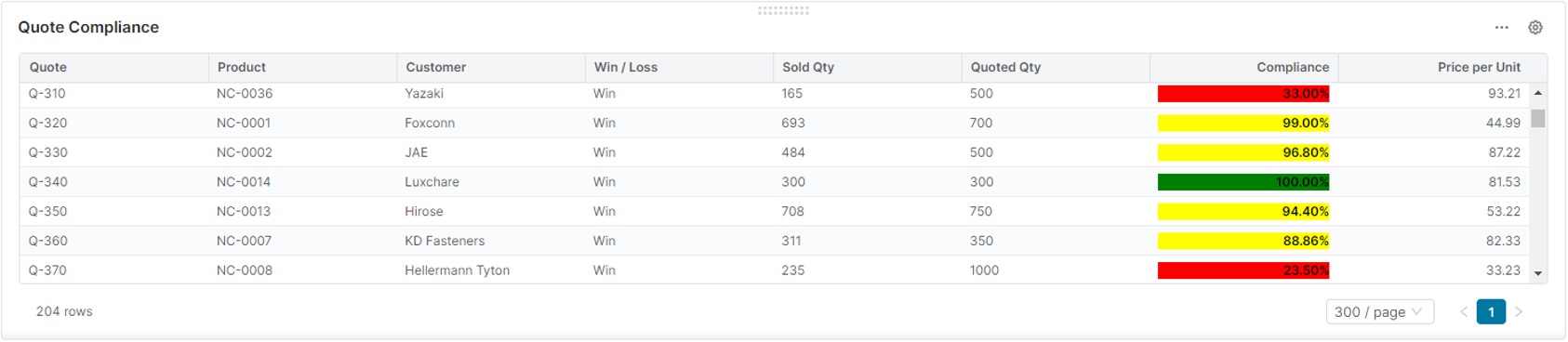
    image-20230822-090111.png


  • Ability to combine compliance analysis with win/loss data
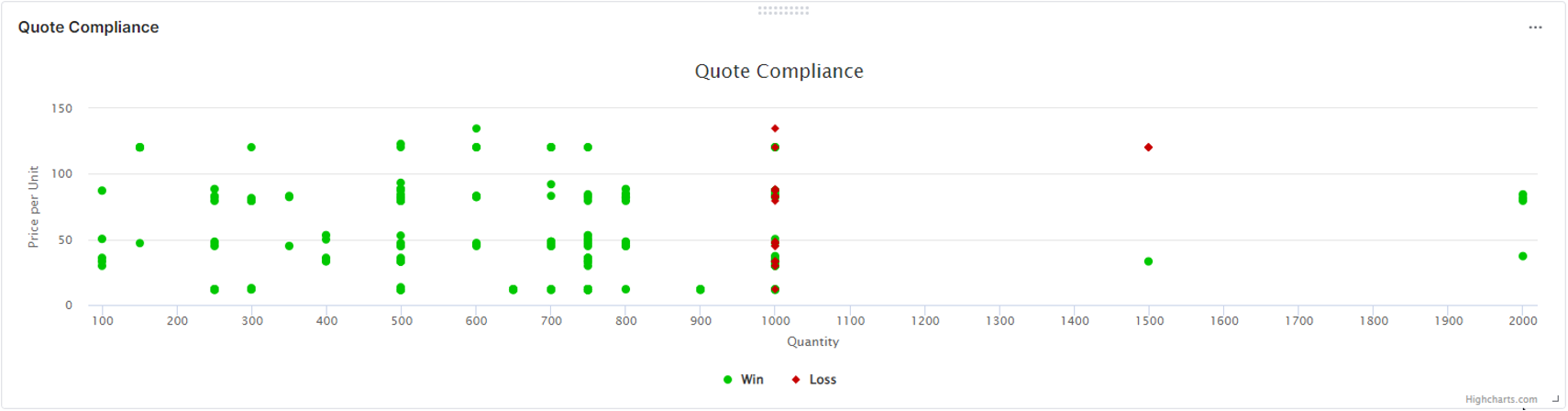
    image-20230822-090142.png


  • Ability to switch level of granularity of the reporting using filters  

  •  The dashboard has the following filter options: 
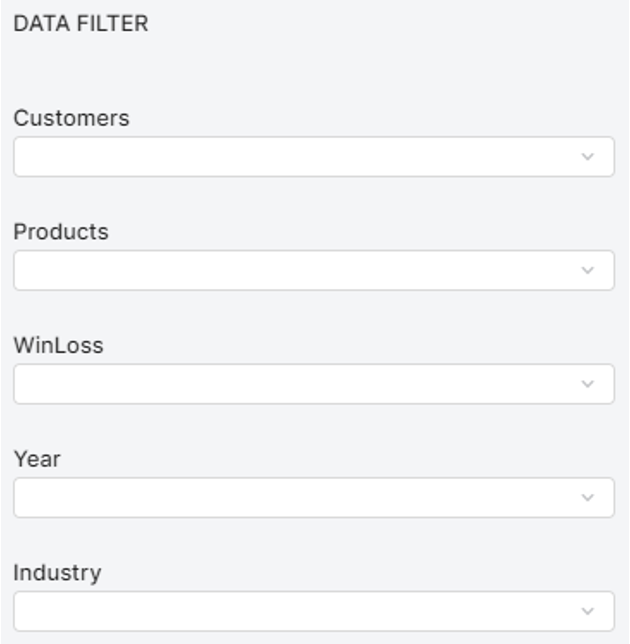
image-20230822-090204.png
  • Ability to get a dashboard where up-to-date Win/loss metrics are collected 

  • Ability to access win/loss ratio per multiple dimensions to compare performance per: Products Groups, Regions, or Sales representatives 
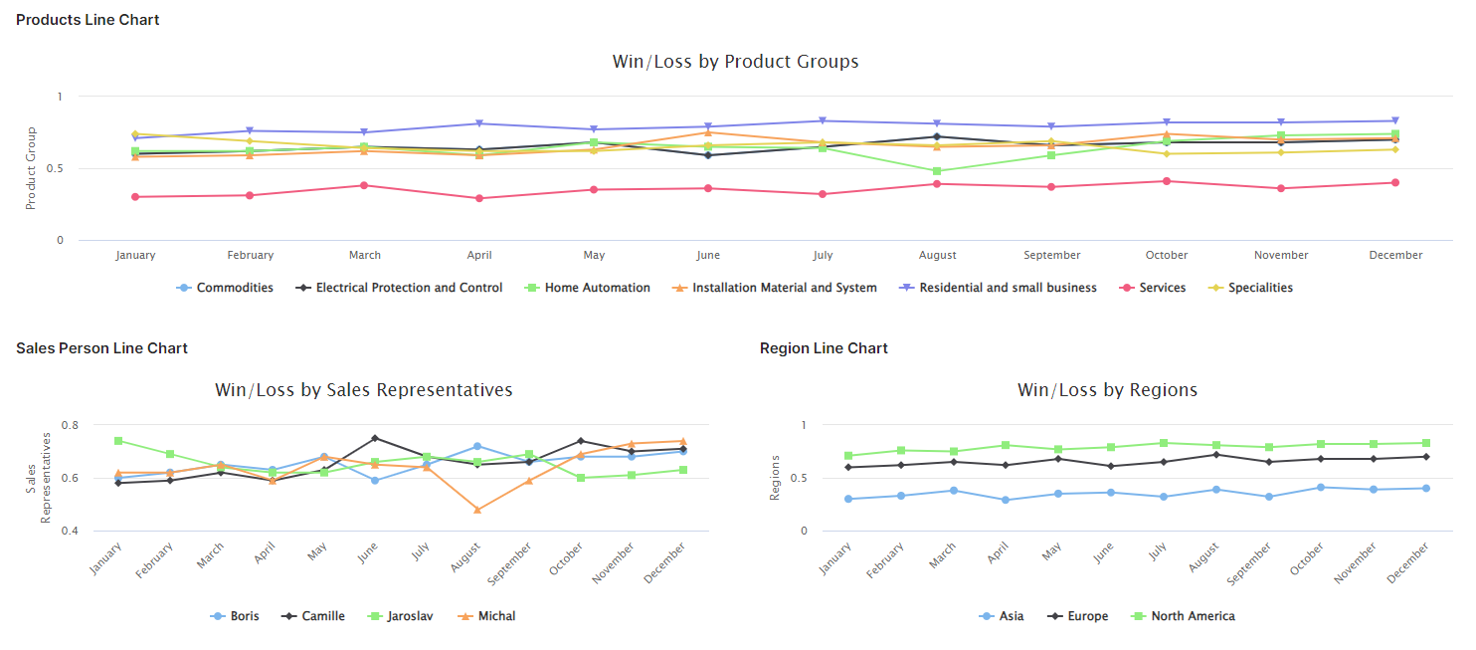
image-20230822-090235.png


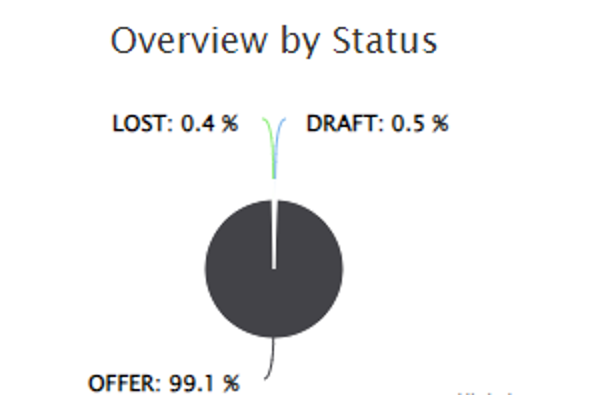
  • Overview by Status 

image-20230822-090315.png


  • Ability to switch level of granularity of the reporting using filters  

  •  The dashboard has the following filter options: 
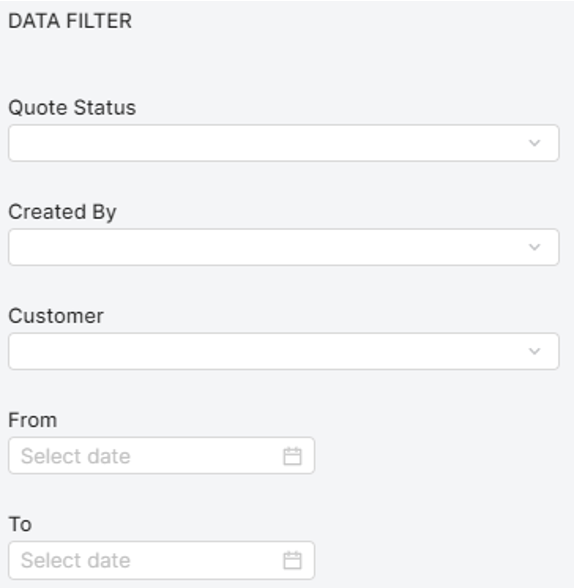
image-20230822-090342.png
  • Ability to get a dashboard where up to date KPIs and benchmarking metrics are collected 

  • Ability to track percent of deals needing approvals and average number of steps in approval process compared to benchmarking, meaning an external dataset constituted of best-in-class customers 
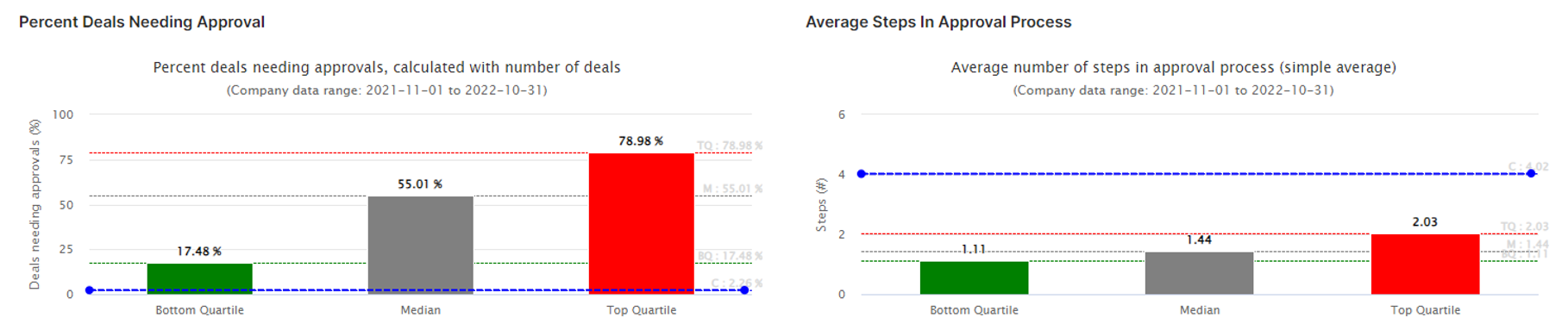
image-20230822-090417.png
  • Ability to download portlets in various formats (PNG, PDF...)  

Non-functional requirements

  • Automatically updated metrics in the dashboard 

  • Prerequisites Use cases:  

  • Be able to store price guardrails history in the quote details in order to use them for quoting analytics KPI’s 

Reporting and Dashboards

This use case has the dashboards and reports as described in the functional requirements section. Check them out, here.

Measures, Calculation and Decision-making KPIs

The following are the primary KPIs for this use case:

  • Win/loss percentage = (Total deals won / Total opportunities) * 100   

Scope Validation and Project Readiness

During the scope validation process we are ensuring that the project deliverables are completed according to the agreed scope and quality standard by asking the following questions.

Scope Validation and Project Readiness Workshop – Validation Questions & Answers: 

Q1: Do you have sales guardrails available? How are they set up?  

A1:

Q2: How many Quotes we expect to have in a month? 

A2:

Q3: How many items a Quote usualy have ? 

A3:


User Stories

These are the epics and the user stories that make up this use case

Epic: Historical data

As a Sales Rep/Pricing Manager I want to be able to access historical data to use for analytical purposes.

User Story Name - Quotes Data

I want to: Be able to access to Historical Quotes data

so I can: Use them for analytics purposes

Acceptance Criteria:

  • There is a place where historical quotes data (prior to Pricefx) are loaded and stored into Pricefx 

  • Quotes data set is accessible from analytics module 


User Story Name - Invoice line items or transactional data 

I want to: Already covered by CHEM00

so I can: Already covered by CHEM00

Acceptance Criteria: Already covered by CHEM00 which is a prerequisite for all CHEM Use cases, and thus for CHEM11 


User Story Name - Guardrails

I want to: Already covered in CHEM09

so I can: Already covered in CHEM09

Acceptance Criteria: Already covered in CHEM09

Epic: Store data

As a Sales Rep/Pricing Manager I want to be able to store data to use for analytical purposes.

User Story Name - Quotes History 

I want to: Be able to store my quotes 

so I can: Use them for analytics purposes 

Acceptance Criteria:

  • Ability to store history of all the quotes line items, both the won and the lost ones 

  • All new quotes managed/ created within Pricefx will be stored. 

  • The quotes history can come to enrich the existing Historical Quotes Data table where existing quotes data prior to Pricefx are stored if any. (See Quotes Data User story) 

  • Quotes history data set is accessible from analytics module 


User Story Name - Guardrails History

I want to: Be able to store history of the price guardrails in the quote details 

so I can: Use them for analytics purposes 

Acceptance Criteria:

  • Ability to enrich quotes history with quotes details and quote line-item guardrails at the time of the quote 

  • It is a must for analytics requires guardrails data 


User Story Name - Win/Loss Data 

I want to: Have access to Win Loss Data 

so I can: Use them throughout the application and especially to perform my Win/Loss analysis 

Acceptance Criteria:

  • Ability to track win / loss deal at quote line-item level in the dashboard based on transactional data 

  • Ability to enrich Quotes history with quote details including the status: win or loss 


User Story Name - Inline analytics - time series history of revenue 

I want to: Get Inline analytics - time series history of revenue 

so I can: Give direct decisions support in the quote to my Sales team 

Acceptance Criteria:

  • Ability to have inline analytics time series chart displaying history of revenue over time compared to guardrails for a specific line-item. 

  • The chart is based on a transactions data set. (We expect Transactions data set to be available based on “Invoice line items or transactional data” User story.) 

  • The following metrics are displayed: Floor, target, Stretch, net, and average prices. 

  • Floor, target and stretch prices are not historical ones, they were the actual guardrails within the context of the current open quote. 


User Story Name - Inline analytics – Benchmark analysis 

I want to: Get Inline analytics – Benchmark analysis 

so I can: Give direct decisions support in the quote to my Sales team 

Acceptance Criteria: Already covered in CHEM09 which is a prerequisite for CHEM11


User Story Name - Inline analytics - revenue and margin break-even analysis

I want to: Already covered by CHEM10 which is a prerequisite for CHEM11 

so I can: Already covered by CHEM10 which is a prerequisite for CHEM11 

Acceptance Criteria: Already covered by CHEM10 which is a prerequisite for CHEM11 


User Story Name - Sales compliance Dashboard 

I want to: Get insights on in and out compliance deals

so I can: Improve individual sales management coaching and performance visibility  

Acceptance Criteria:

  • There is a portlet displaying a quote compliance overview on a table. The following quote information is available: Quote ID, Product, Customer, Win/loss Status, Sold Quantity, Quoted Quantity, Compliance rate, Price per unit. 

  • There is another portlet displaying similar compliance quote information combined with win/loss data in a scatter plot.


User Story Name - Dashboard filter 

I want to: Filter the scope of my quote compliance analysis 

so I can: Focus on a scope 

Acceptance Criteria:

Fields to filter on are: 

  • Customers 

  • Products 

  • Win/loss Status 

  • Year 

  • Industry


User Story Name - Quote Win/Loss Metrics 

I want to: Get better visibility on performance 

so I can: Adjust sales management 

Acceptance Criteria:

  • There are 3 portlets with Time series charts displaying win/loss ratio over time per multiple dimensions. 

  • Each portlet is based on one dimension. 

  • There is another portlet displaying a pie chart which gives an overview by Quote Status. 


User Story Name - Dashboard filter 

I want to: Filter the scope of my quote win/loss analysis 

so I can: Focus on a scope 

Acceptance Criteria:

Fields to filter on are: 

  • Quote status 

  • Created By 

  • Customer 

  • From (date) 

  • To (date) 


User Story Name - Dashboard Generic filter 

I want to: Use a generic filter

so I can: Create an advanced filter with a complex query to filter the scope of my analysis 

Acceptance Criteria: Generic filter option is enabled in both dashboards 


User Story Name - Profit Dashboard   

I want to: Already covered by CHEM00

so I can: Already covered by CHEM00

Acceptance Criteria: Already covered by CHEM00 which is a prerequisite for all CHEM Use cases, and thus for CHEM11 


Data Requirements

The following tables can be either manually loaded in Pricefx via Pricefx Excel Client or can be automatically integrated using CSV files in a Pricefx dedicated SFTP folder: 

  • Basic Master Data (See CHEM00

  • Quotes Data 

  • Transactions Data 


Out-of-Scope

Out-of-scope business functions and features can be configured, but they are not included in the Chemical Industry Catalog.

  • Any reporting other than the ones explicitly mentioned above 

  • Any customization of reporting in scope 

  • Additional reporting filters 

  • User entitlement of the dashboard 

  • Data Integration 

  • Ability to set up Science based guardrails 

  • Ability to set Guardrails based on business rules 


Solution Design

Quotes Data - Quotes History - Guardrails History

By default, all quotes after creation are stored in the PriceFx Partition with every information and they are accessible both from User Interface and by Calculation Logics. That means we don’t need to create a specific place to store their Data. 

Exception will be If the combination of the amount of the quotes and the number of lines inside them will be too much to be handled from the queries needed to generate the analytics. 

In that case we can store only the required Data to a separate table and then use it to show the results  

(Extra effort is needed) 

Win/Loss Data

We need to create a dashboard with a Data filter and 5 portlets. 
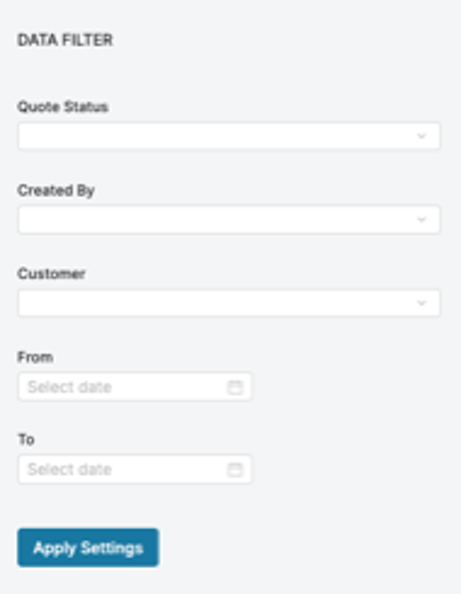
image-20230822-095346.png
Data Filter 

Quote Status: Drop down with Hardcoded values Offer, Deal, Lost, Draft  

Created By: Drop down list with Users 

Customer: Drop down list with Customers 

From: Date picker 

To: Date picker 

Region Line Chart
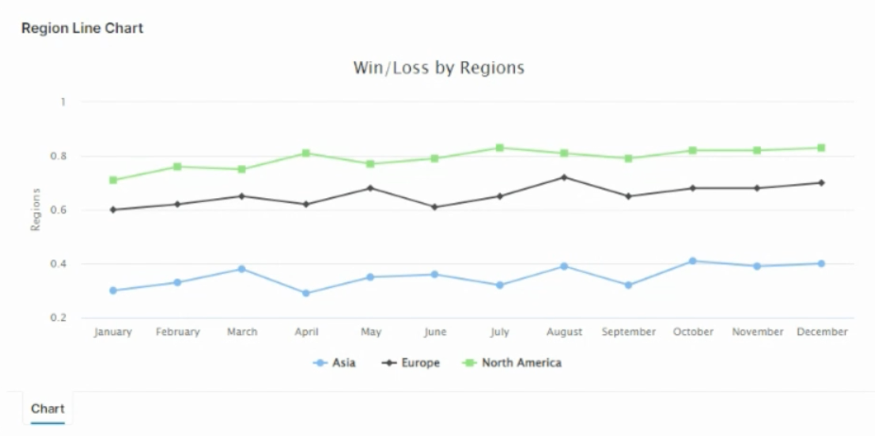
image-20230822-100214.png

We need to create Header quote input to hold the Region of the Quote and can be stored also as Extra info 3 in the quotes overview table. 

The Region input can be pre-populated with the ability to override. For auto filling the field we need to receive region of each customer so based on the customer selection on the quote we can pull the Region. 


Then after querying all the existing quotes using the Data filter, we can group them By Region and Month and calculate the win/loss ratio.

Product Line Chart
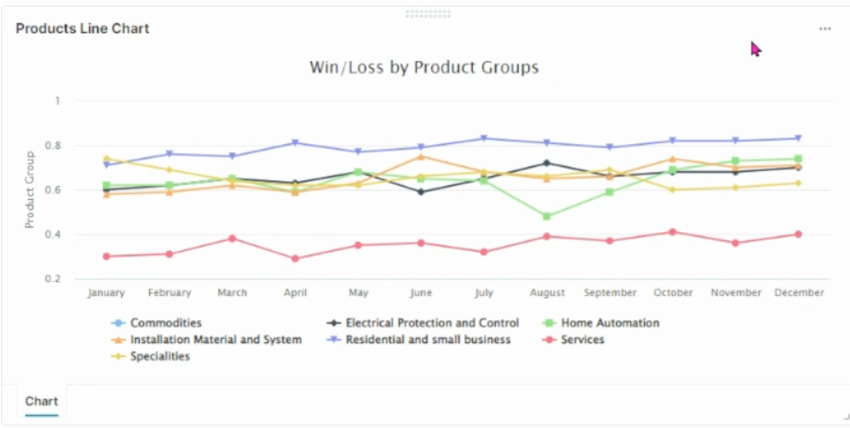
image-20230822-100305.png

Requirement is that we need to receive product data that contains the product group and use it as output in the quote line-item logic. 

Then we need to query all the quote line items based on the Data filter and group them by product group and calculate the win/loss ratio .

Pie Chart Overview

image-20230822-100338.png

We need to query all the quotes based on the Date filter and group them by the status .

Sales Person Line Chart
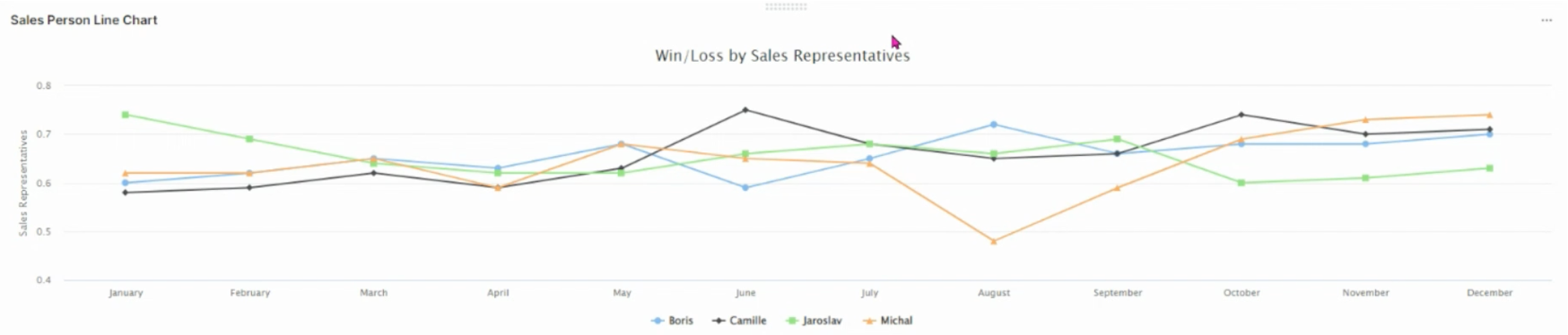
image-20230822-100449.png

We need to create Header quote input to hold the Salesperson of the Quote and can be stored also as Attribute extension in the quotes overview table. 

We can have a customer extension table to assign Salesperson to Customers, then based on the selected customer we can pre-populate the field with the ability to override. 

Then after querying all the existing quotes based on the Data filter, we can the group them by Month and User  to calculate the win/loss ratio.

Inline analytics - time series history of revenue
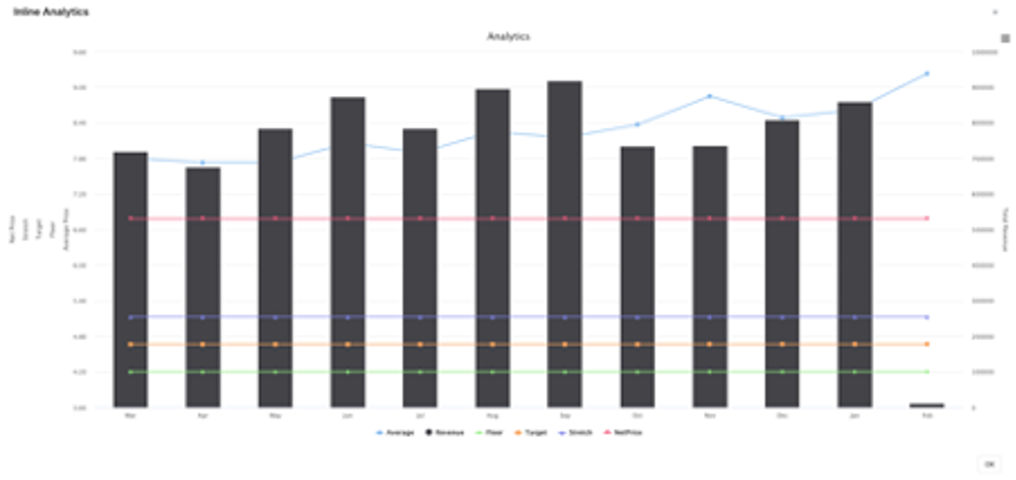
image-20230822-100540.png

Requirement is that we need to have all the available Data in the Transactions Datamart 

We need to query the Transactions Datamart and get the following Data 

  • Average: Average Net Price 

  • Revenue: Sum of Invoice Price 

And group them by month 

 Then Combine  

  • Floor Price 

  • Stretch Price  

  • Target Price  

  • Invoice Price (From quote calculation) 

Sales compliance Dashboard

We need to create a dashboard with a Data Filter and 2 portlets. 

The requirement is that we need to receive with the transactions data the quote reference ID in case the transactions are connected to a specific quote. 
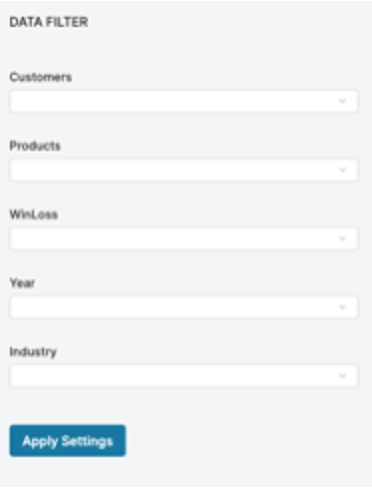
image-20230822-100628.png
Data Filter 

Customers:Customer picker or a Restricted Drop-Down list with customers 

Products:Product picker or a Restricted Drop-Down list with products 

WinLoss:Drop down with hardcoded values “Win”, “Loss” 

Year:Date picker or restricted Drop-Down list 

Industry:Drop-Down list   

Portlets

Quote Compliance 1 
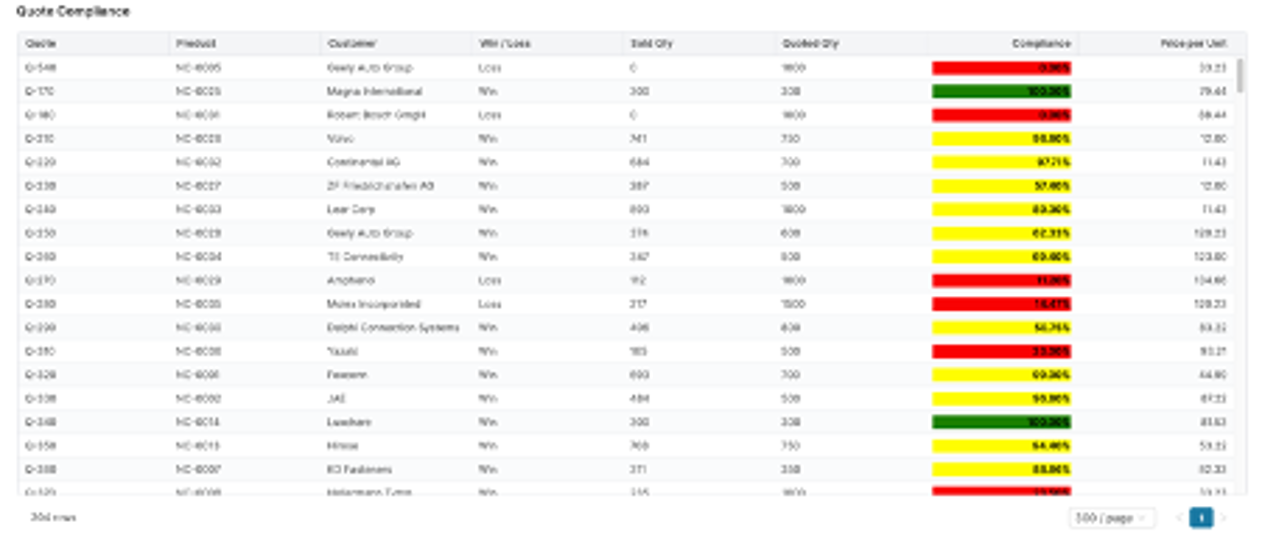
image-20230822-100723.png

For this portlet we need to query the transactions Datamart based on the provided Data Filter and get the sold quantities for all line that have a Quote Reference ID. 

Then we need to query the quote line items and find them inside the quote in order to get the details of the quote. 

In the end we need to show the following details: 

  • Quote: Quote ID 

  • Product: Product 

  • Customer: Customer 

Win / loss: Display will or loss based on a threshold specified by customer. 

Sold Qty: Sold quantity (Based on the transactions) 

Quoted Qty: Quoted quantity (based on the quote) 

Compliance: The percentage of the quote fulfilment 

PricePerUnit: the agreed Unit Price   


Quote Compliance 2 
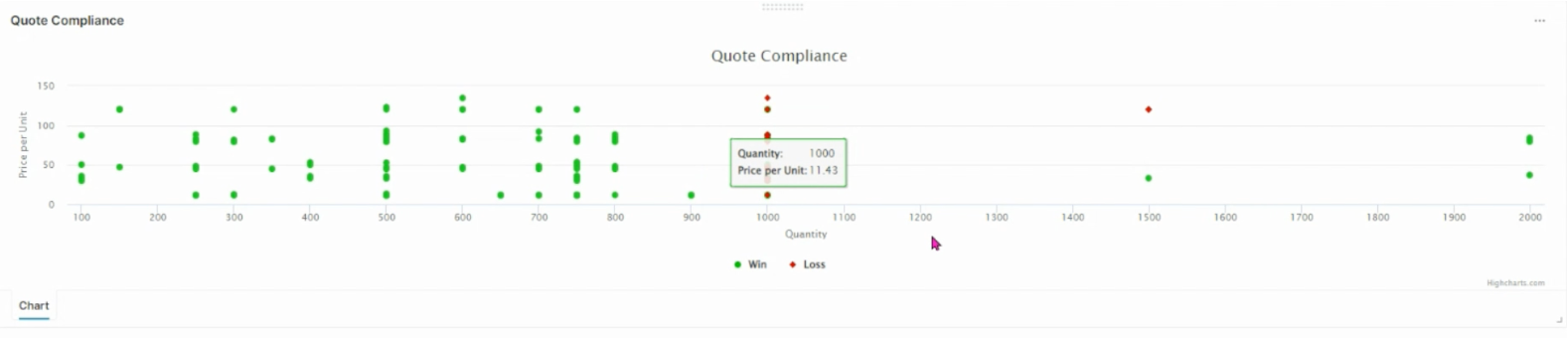
image-20230822-100906.png

 Based on the above data we can also visually represent the information.