CHEM09: Improve margin, speed, and quote win rate with guided selling and decisions support

📽️ Check out a video demonstration for this use case, here.

Use Case Situation Description

Implementing guided selling and decision support allows for optimized pricing strategies based on market conditions, quicker sales cycles, tailored quotes boosting win rates, data-driven decisions for accuracy, standardized processes ensuring compliance, upselling potential, reduced manual workloads, enhanced customer experiences, market-responsive strategies, and seamless integration with business systems. Pricefx has the capabilities to drive profitability, faster cycles, higher conversions, and operational efficiency improvements.

User Role(s) and Business Objective

Sales Account Executive / Sales Management

Business Objective:

Businesses receive inquiries from customers throughout the year for quotes on potential purchase of quantities of products we produce.  These inquiries reflect at least two different purchase scenarios: (1) a quotation for product purchases for an upcoming fiscal year, which often results in execution of a sales contract, or (2) a one-time spot purchase of product for a project or to fulfil a short-term need.  Responding to the customer in a timely manner on these requests, with pricing that is realistic considering the products, markets, and respective volumes involved in the quote.

Complication
  • Quote proposals are usually received via email or direct interface with a customer’s purchasing site.  Quotes must be fed back to teams responsible for proposal management, evaluated for pricing and volume commitments, approved internally, and then transmitted by sales back to the customer. 

  • Impact on response efficiency and time management

  • Difficulty in quickly performing appropriate analysis to determine the right price for the customer considering current and projected market conditions.

  • Linkage with other systems like ERP and CRM are difficult to manage.

Capability Needed

A quick, integrated way to receive, evaluate, and respond to customer quotes that provides the right price to the customer and allows us to win the business.

Benefit(s)

Company volumes, revenues, and margins will improve.

KPIs

Cumulative win/loss percentage on quotes.

Calculations

Win/loss percentage = (Total deals won / Total opportunities) * 100
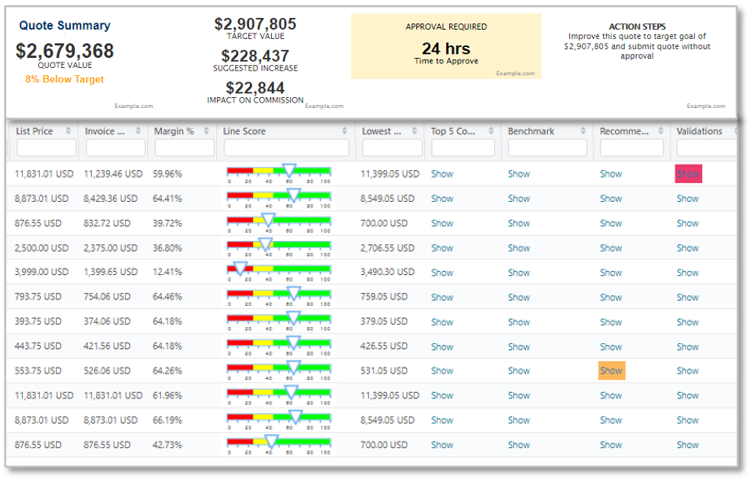
image-20230823-103327.png

Prescriptive Design Requirements

As a Sales Manager, I want to get a quick, integrated way to receive, evaluate, and respond to customer quotes that provides the right price to the customer and allows us to win the business.

so, I can: 

  • Improve sales confidence and efficiency

  • Improve quotes performance and velocity

  • Improve business contribution margin

The overall design requirements are summarized in these articles:

Functional and Non-functional Requirements

The following are the functional requirements for this use case:

  • Ability to access Quoting tool

  • Ability to access a predefined quote template that holds the following components:

o   Quote header

o   Quote Line-Item

  • Import Product functionality or Product picker from the Product Catalogue

  • Access to Input parameters

    • Quantity

    • Price

    • Discount

  • Access to guidance

    • Pricing details

    • Inline analytics

    • Line-item Pricing guidance

image-20230823-110735.png
  • Decisions support

  • Deal performance (both line-item level and quote level)
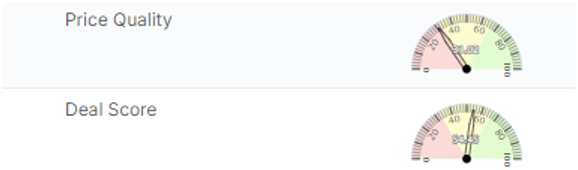
image-20230823-110843.png
  • Access to Quote overview

  • Access to Built-in workflow

Non-functional requirements

  • Prerequisites Use cases:

  • Store approved negotiated quoted prices in a Price Records table

Reporting and Dashboards

These are not included in the baseline estimate.

Analytics from Use Case CHEM11

o   Ability to view time series history of revenue over time compared to guardrails

o   Ability to get benchmark analysis of quotes compared to recent past transactions versus guardrails

o   Ability to get revenue and margin break-even analysis

o   Ability to get context on in and out compliance deals

o   Ability to combine compliance analysis with win/loss data

Measures, Calculation and Decision-making KPIs

The following are the primary KPIs for this use case:

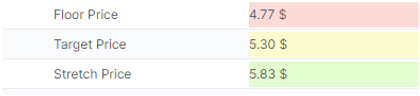
  • Floor, Target and Stretch prices: Values or Formula to be provided by the customer

  • Deal score: Based on Margin%, rules to be defined by the customer

  • Pricing details: All underlying formula must be provided by the customer

Scope Validation and Project Readiness

Information about Scope Validation and Project Readiness for this use case will be available soon.


User Stories

This list encompasses all the epics and user stories that make up this case.

Epic: Input Data

As a Sales Rep/Pricing Manager I want to be able to access data to use it throughout the application and in quotes.

User Story Name - Basic Master Data

I want to: Already covered by CHEM00 which is a prerequisite for all CHEM Use cases, and thus for CHEM09

so I can: Already covered by CHEM00 which is a prerequisite for all CHEM Use cases, and thus for CHEM09

Acceptance Criteria: Already covered by CHEM00 which is a prerequisite for all CHEM Use cases, and thus for CHEM09


User Story Name - Product Cost Data

I want to: Already covered by CHEM00

so I can: Already covered by CHEM00

Acceptance Criteria: Already covered by CHEM00


User Story Name - Competitor data

I want to: Be able to access to Competitor data

so I can: Use them throughout the application, especially in quotes for sales decisions support

Acceptance Criteria: There is a place where competitor prices information are stored at product level.
Competition Data table suitability to be confirmed. In case it isn’t a Datasource will have to be created as well as an Inbound interface to receive and populate the incoming Data.


User Story Name - Product quantity forecast per customer

I want to: Be able to access product quantity forecasts per customer

so I can: And use them in my quote

Acceptance Criteria: This needs to be stored in a separate datasource

Mandatory fields are Date-from, date-to, product ID, customer ID, quantity, UoM

Epic: Quote Type

As a Sales Rep/Pricing Manager I want to have a quoting process set up to quickly access so that I can quickly provide a quote to my customer.

User Story Name - Quote Type

I want to: Access a predefined quote type

so I can: Speed up the process of creating a new Quote

Acceptance Criteria: 1 quote type is available

The quote type holds 1 Quote header and 1 Quote Line-Item logics configured as per corresponding user story.

Basic Quote actions functionalities are available:
Create a new quote, edit a quote, start a workflow, link some attachments to the quote, duplicate a quote, delete a quote, create a revision, email a quote, export a quote …

Workflow Status is set up by the system. There is an interface where the user can access all approval steps and their status. The pending step is highlighted in blue color.

Attachments tab is available: There is an interface where the user can add, and view attached files. For each file, the user can see who and when uploaded it. If it has been sent by email, then the user can see by which user to which recipient.
The ability to add or remove attachments depends on the document status and your user roles.

A messages tab is available as well. There is an interface where the user can communicate with other users about matters regarding this Quote.


User Story Name - Quote Header

I want to: Define quote level parameters

so I can: Provide a price to my customer

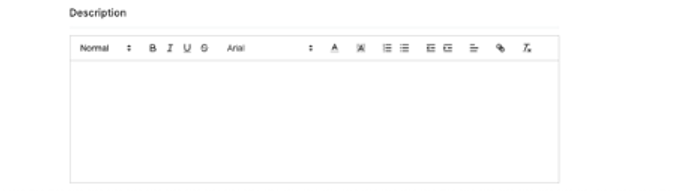
Acceptance Criteria: There is a quote Header interface that summarizes the basic quote information, such as: for which customer the Quote is, effective and expire dates, user group entitlements

Following header options are provided:

·       Description field

·       Effective Date / Expire Date

·       External Reference – Optional free text field.

·       User groups (Edit) - Allows the user to set which User Groups can edit the quote. 

·       User group (View details) - Allows the user to set which User Groups can view the quote.

·       Customer picker


User Story Name - Quote Line Item

I want to: Define line-item level parameters

so I can: Provide a price to my customer

Acceptance Criteria:

There is a quote Items interface where the user can select the products (items) to be included within the Quote.

The user can also set up price parameters per line-items:

  • Price,

  • Quantity

  • Discount.


Use Story Name - Quote Line Item - Product quantity

I want to: Specify a quantity for a quoted Product.

so I can: Provide a quotation matching the quantity needs

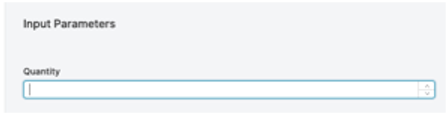
Acceptance Criteria: There is a field where the user can enter a quantity at line-item level.


User Story Name - Quote Line Item - Product Price/discount

I want to: Negotiate a price or discount % for a quoted Product.

so I can: Provide a discount (additional, flat %, default %) to the customer

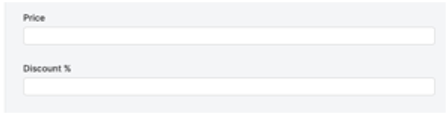
Acceptance Criteria: There is a field where the user can enter a price and a discount at line-item level.
Discount less than 0 is ignored.
Discount input is optional.


User Story Name - Product history

I want to: Access to Product history information

so I can: Get some information on my customer buying behavior

Acceptance Criteria: This user story requires Product quantity forecast at customer level. The later should be provided by the customer.

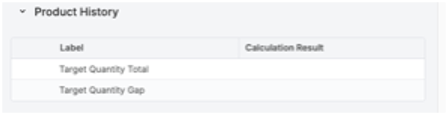
Product history information aims to show the Target Quantity Total (the forecasted sold quantity) VS the Target Quantity Gap which is the difference between the forecast and the Actual quantity sold.
The actual quantity bought is based on transactional data.

A Lookup should be configured to calculate the value and enable the Target Quantity Gap calculation.


User Story Name - Competitor information

I want to: Access to Competitor information

so I can: As a Salesperson, Provide consistent pricing to my customer

Acceptance Criteria: Competitor data is required.

We expect competitor prices at product level.

Competitor prices are retrieved in the quote at line-item level.

Based on the availability of the data, information such as Competitor median price, Lowest competitor price or Top 5 competitor prices can be displayed.


User Story Name - Previous Prices

I want to: Access to previous prices information

so I can: As a Salesperson, Provide consistent pricing to my customer

Acceptance Criteria: There is a lookup configured on transactions data.

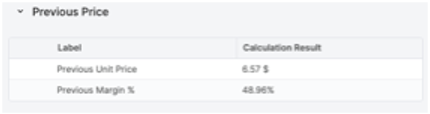
Based on the data availability, previous unit price and the corresponding margin% are displayed.

Transactional data are required as well as margin calculation components details.


User Story Name - Pricing details

I want to: Access to pricing details

so I can: Understand my Price breakdown

Acceptance Criteria: There is a place where pricing details are displayed.

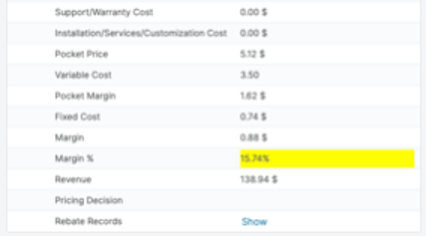
Based on the data availability, the pricing details display the price breakdown meaning all price components details.

We expect at least to be provided with costs data for margin calculation purposes.


User Story Name - Inline analytics – Benchmark analysis 

I want to: Get contextual insights around my item within the quote

so I can: As a salesperson, take better guided decision

Acceptance Criteria:

  • Ability to have inline analytics scatter plot chart displaying past transactions and current open quote versus guardrails

  • Ability to see all the transactions combined, or to benchmark only past transactions focused on same customer type. We expect a customer hierarchy to be available and identifiable in the transactions data set.

  • The chart is based on a transactions data set. (We expect Transactions data set to be available based on “Invoice line items or transactional data” User story.)

  • The following metrics are displayed: Floor, target, Stretch, prices as well as the invoice price and the corresponding quantity of the past transactions.

  • Floor, target and stretch prices are not historical ones, they are the actual guardrails within the context of the current open quote.

  • Ability to drag and zoom in the chart.


User Story Name - Pricing Guidance

I want to: Get pricing guidance within the quote

so I can: As a salesperson, take better guided decision

Acceptance Criteria: This user story requires price guardrails data.

There is a place where Floor, Target, Strech prices guardrails are displayed.

There is a logic configured to retrieve them from the place they are stored (see "Guardrails table” User story).

Those are suggested guardrails defined at line-item level.


User Story Name - Deal Score

I want to: Get direct quote performance insights

so I can: As a salesperson, take better guided decision

Acceptance Criteria: There is a place where a gauge displays the deal score.

Score base calculation should be configured based on business rules based on Margin% provided by the customer.
Business rules can be managed in a parameter table based on Product attributes.


User Story Name - Quote Summary

I want to: View summary data for quoted items

so I can: Review the overview of the quote and understand profitability.

Acceptance Criteria: Summary data for quoted items are visible on Header level.

Epic: Set up Price Guardrails

As a Sales Rep/Pricing Manager I want to give Sales guardrails to my team so I can use them throughout the application, especially in quotes for sales guidance.

User Story Name - Guardrails table

I want to: Be able to set up price guardrails within PFX system

so I can: Use them throughout the application, especially in quotes for sales guidance

Acceptance Criteria: There is a table created for guardrails set up.

We expect 3 levels of guardrails (Floor, target and stretch)

We expect that the set-up of the guardrails will be done according to one of the two following scenarios only:

The user has the ability to either manually enter Price guardrails or load them in the table.

Price guardrails can be defined at any preferred level of granularity based on available customer and product attributes.

In both scenarios, Guardrails can take multiple formats. Guardrails can be defined either as an effective price or as a margin value (absolute value or percentage). If margin values are expected as guardrails, complete cost data is required for future related calculations.
However, only one format will be supported by the table at a time.


User Story Name - Guardrails maintenance

I want to: Be able to maintain price guardrails within PFX system

so I can: Use them throughout the application, especially in quotes for sales guidance

Acceptance Criteria: Ability to manually override guardrails in the guardrails table

Ability to upload a new guardrails file or to add new records directly in the guardrails table.


User Story Name - Guardrails quote logic

I want to: Have a logic that retrieves the proper Price guardrails in the quote

so I can: Get price guidance decisions support for the sales team

Acceptance Criteria: Ability to get visibility on price guardrails for each quote line item.

If price guardrails are defined as price value as per the “Guardrails table” user story, then a lookup logic is configured on the Guardrails table and retrieves the proper guardrails for a given customer/ product combination we are quoting for.

If price guardrails are defined as a margin value as per the “Guardrails table” user story, a logic is configured to back-calculate the corresponding price. With this scenario, complete cost data is required.

Approval Workflow

As a Sales Rep/Pricing Manager I want to set an approval workflow

User Story Name - Approval level definition

I want to: Define the number of approval levels for quotes

so I can: Create a centralized approval process defined by the roles of my team

Acceptance Criteria: The approval workflow meets the approval steps as defined by the business.  IE - Deals above the target margin are approved automatically; Deals between the target margin and the target floor will trigger the approval workflow; deals below the floor can be rejected or sent for approval as defined by the customer.


User Story Name - Approver & watcher definition

I want to: Define approvers and/or watchers for each approval level. This can be specific to a user or user group.

so I can: Empower the appropriate users to review deals and approve or deny

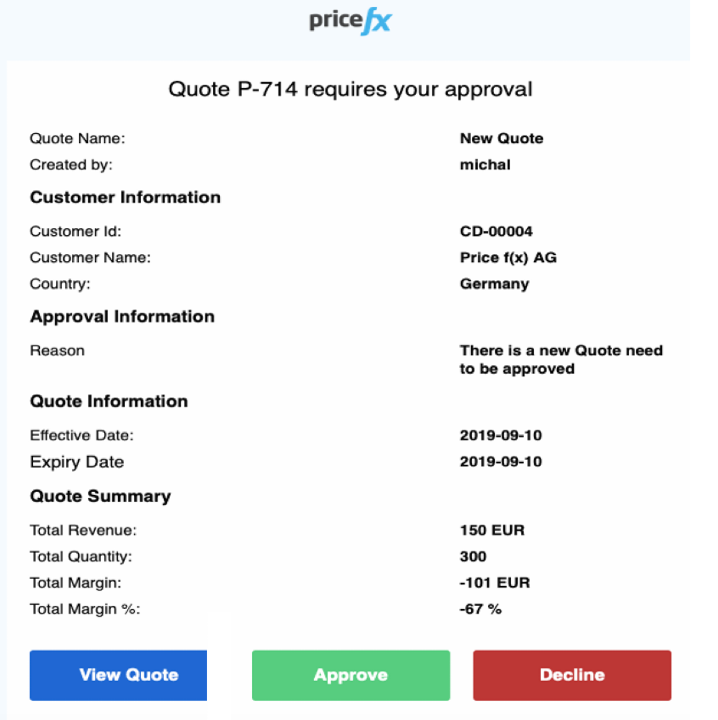
Acceptance Criteria: The selected user type receives an email notification as defined in the approval workflow.
 The selected user is able approve or deny the quote via the call-to-action in the email.
 The selected user can log in to Pricefx and approve or deny the quote.


User Story Name - Approval level conditions

I want to: Define condition(s) for each approval level.

so I can: Direct quotes to the right role for their review and approve/reject decision based on their empowerment levels

Acceptance Criteria: For a quote that falls between the target margin and floor, the approval workflow is triggered, sending a notification to the appropriate party.
The approver is able to approve or deny any notification.


Data Requirements

These are the data requirements for this use case.

The following tables can be either manually loaded in Pricefx via Pricefx Excel Client or can be automatically integrated using CSV files in a Pricefx dedicated SFTP folder:

  • Basic Master Data (CHEM00)

  • Guardrails Data

  • Competitor Data


Out-of-Scope

Out-of-scope business functions and features can be configured, but are not included in the Chemical Industry Catalog.

  • Ability to set up Science based guardrails using Optimization module (CHEM14)

  • Any other quote analytics

  • Notifications and Alerts on quotes

  • Ability to apply rounding rules within each step of the price calculations.

  • Win/loss quote tracking

  • Customer-Facing templates


Solution Design

Quote Type

We need to create a new Quote type with a Quote header logic and a Quote Line-Item Logic

Inputs for the Quote Header Section will be:

·       Description field 

·       Effective Date / Expire Date 

·       External Reference - Optional free text field. 

·       User groups (Edit) - Allows the user to set which User Groups can edit the quote.  

·       User group (View details) - Allows the user to set which User Groups can view the quote.

·       Customer picker (one or Group of multiple)
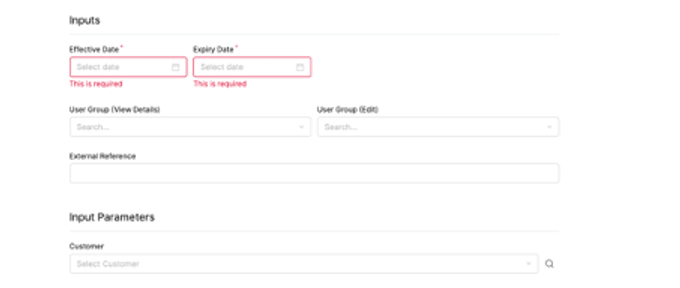
image-20230823-125327.png
image-20230823-125346.png

In Quote Line Item we need to create inputs:

·       Product Picker

·       Quantity

·       Price

·       Discount
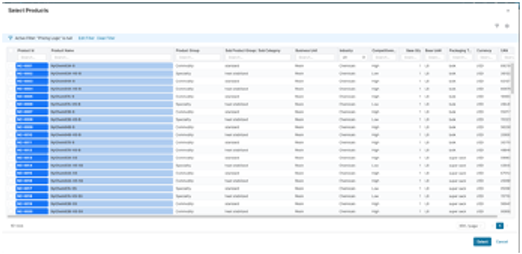
image-20230823-125415.png
image-20230823-125428.png
image-20230823-125438.png
Quote Summary
image-20230823-125517.png

We need to create in the Header Logic an element with quoteProcessor.isPostPhase().

Then we need to generate the results and quoteProcessor.addOrUpdateOutput  and render them.

Calculations

Quote Summary: Sum Total invoice Price of all items

Approval Required: From a Company Parameter we get the required hours needed to approval a quote of a specific Price Range and we compare with the submit time.

Targe Value: Sum Target Price of all items multiplied with the sum of quantities.

Suggested Increase: Targe Value – Current Value (Current value = Sum of all items current value)

Quote Line-Item calculations – Results

To calculate the Quote Line Item-Product Price/discount, we can have a Company Parameter table to hold the discount Strategy.

For example, it can be based on the Quantity, Customer Classification or any other parameter set by customer. Additionally, we have the discount input to override the strategy if needed.

Product history
image-20230823-125814.png

We need to create a PX table to store the forecasted value of the Target Quantity Total.

Then from the Transactions DataMart we sum the Quantity of the transactions of that products and we calculate:

Target Quantity Gap = Target Quantity Total – Total Quantity Sold

Competitor data

To store Competitor Data we need either to use the existing table of Competition Data, which exists in the partition or if it doesn’t cover our needs, we can create a new Datasource. The best way to establish this process is to receive the inbound files regularly via SFTP and create an inbound interface to map the inbound file and the table we are going to store the Data.

If there is a case that we need to also store Competitor History, we should create 2 data sources, one for current competitor Data and one for the Historical. By doing that we avoid querying a huge table when we just need to compare our price with the current Competitor Price.

Competitor information

Assuming we already store Competitor Data as described above, we can create new elements in Quote line-item logic to show the desired Analytics.
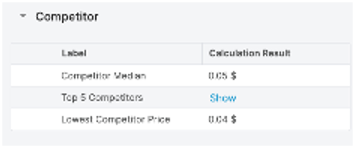

image-20230823-125849.png
image-20230823-125901.png
Previous Prices
image-20230823-125921.png

We need to create new elements in the Quote Line Logic for each.

Previous Unit Price: We need to show Unit Prices of the previous Deal- Quote of that Product.

Previous Margin%: We need to show Margin% of the previous Deal- Quote of that Product.

Pricing details
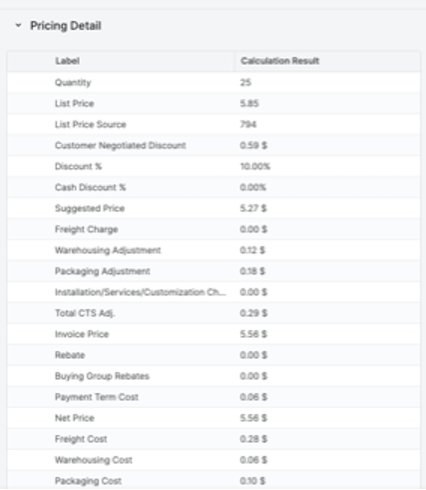
image-20230823-130109.png
image-20230823-130116.png

We need to create for each result an element in the Quote line-item logic to calculate it.

Based on the data availability, the pricing details display the price breakdown meaning all price components details.

In our current case, discount details will be displayed.

Also, we expect to be provided with costs data for margin calculation purposes.

If additional price components need to be taken into consideration, data will need to be provided and corresponding fields will need to be configured as part of the Quote Line-item logic. Only straightforward lookups are part of this design and estimation.

Inline analytics – Benchmark analysis
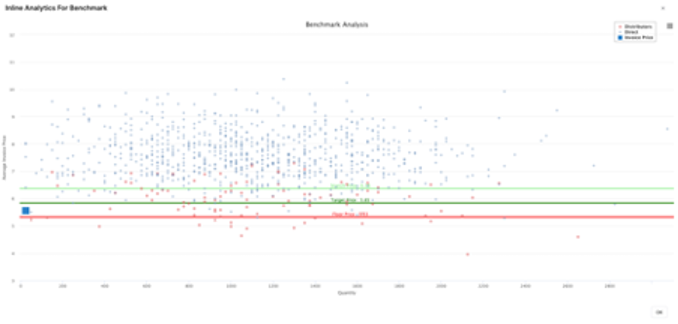
image-20230823-130204.png

We need to query the Transactions DM to gather all the required Data

Chart explanation

  • Y axis: Average invoice Price

  • X axis: Quantity


Direct: it shows all the transactions made to Direct customers (customer attribute)

Distributor: it shows all the transactions made to Distributors (customer attribute)

Invoice Price: current invoice price of the Quote

  • Target Price: it shows the current Target Price

  • Floor Price: it shows the current Floor Price

  • Stretch Price: it shows the current Stretch Price


The Optimization Module to calculate Floor Price, Target Price and Stretch Price is not covered in this Use Case, it is covered as part of CHEM14.

Deal Performance
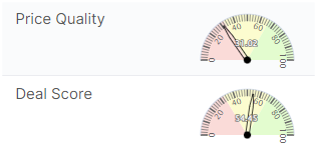
image-20230823-130401.png

For Price Quality and Deal Score we need to create for each a new element in the Quote Line-item Logic with Format Type type Matrix or Charts. Then we need to create a gauge representation.

 Scores can be calculated with a formula provided from the customer.

Range of the chart can be defined by customer.


Guardrails

We need to store the Data for the guardrails and for that we must create a table for the user to load the guardrails data.

There are 3 options to load the Data

  • Direct change on the Partition

  • Excel Client

  • Automated with Inbound File (additional Effort required)

Guardrails can take multiple formats. Guardrails can be defined either as an effective price or as a margin value (absolute value or percentage). If margin values are expected as guardrails, complete cost data is required for future related calculations.

However, only one format will be supported by the table at a time.

We expect 3 levels of guardrails (Floor, target and stretch)


Assumption is that the values of the guardrails will be calculated from the customer and we will just receive them in a ready to use format.

Guardrails quote logic - Line-item Pricing guidance

The Quote Line-Item logic will look up the table to retrieve the Data and display them for each line of the Quote.
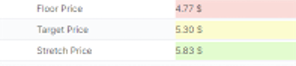
image-20230823-130521.png
Approval workflow

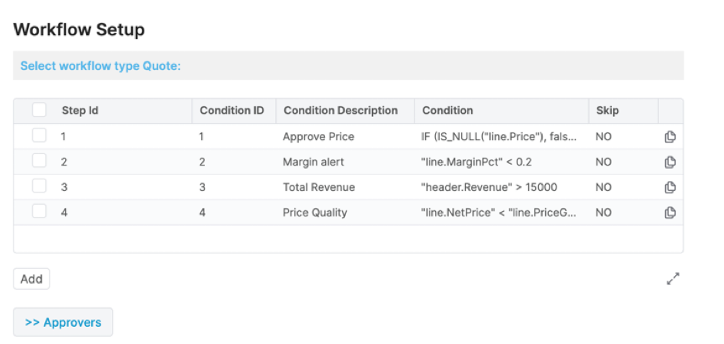
Using the Approval Workflow Package you can get full control and track history of your key pricing decisions through automated approval workflows. You can also define their rules based on your needs and utilize them across your key pricing processes – quotes, rebates, price lists, promotions, Live Price Grid items.

image-20230823-130553.png
Figure 1. Example of approval steps for a Quote document

Key Deliverables

·      Definition of approval workflow types and approval steps for each of them

·      Definition of users, user groups or business roles as approvers

·      Definition of conditions to apply in each approval step

·      Full execution of workflow process

·      Workflow history tracking
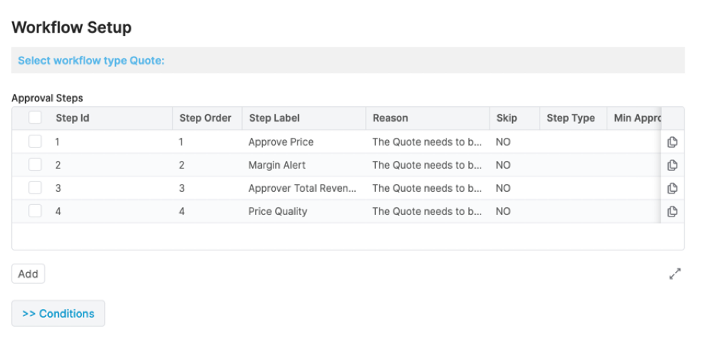
image-20230823-130650.png
Figure 2. Example of approval steps definition
image-20230823-130712.png
Figure 3. Example of conditional decisions for approval steps definition
image-20230823-130733.png
Figure 4. Example of email notification for an approver