
Pricefx supports JSON Web Token (JWT) authentication for external systems such as Salesforce (SFDC).
Unlike the advanced method where you configure externalJWTConfiguration in JSON format manually (How to Authenticate with External JSON Web Token), this UI for JWT Configuration allows you to set up and manage trust relationships directly in the application.
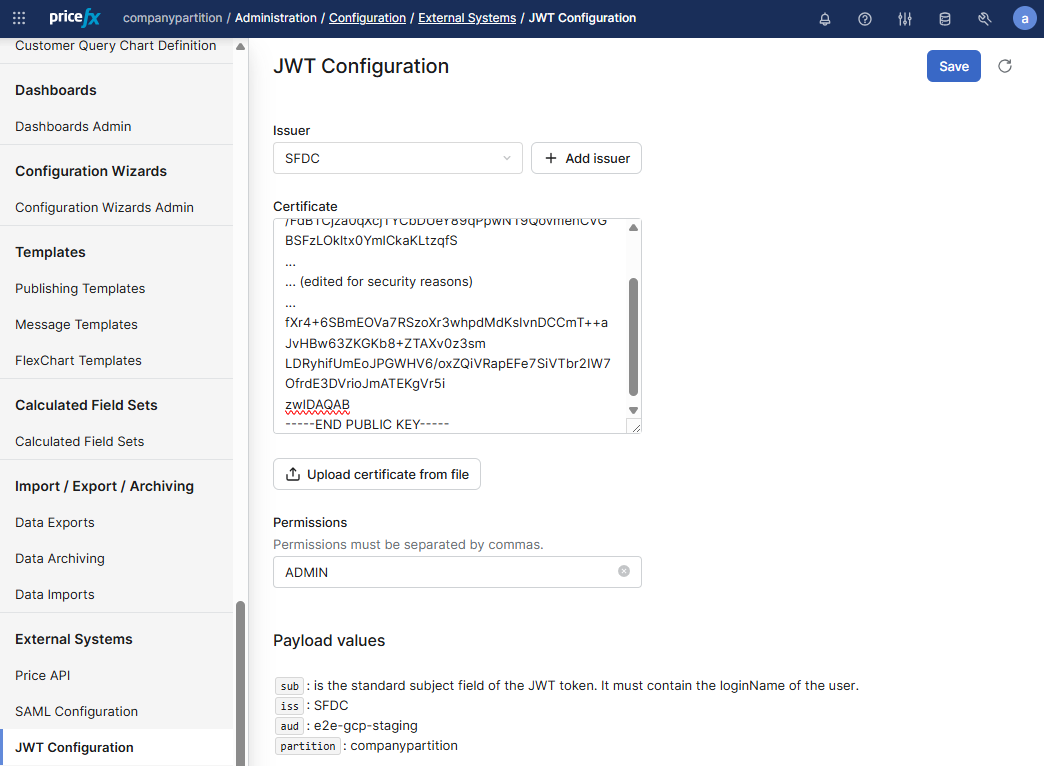
Accessing the JWT Configuration Page
Navigate to Administration > Configuration > External Systems > JWT Configuration.
If no issuers are configured yet, you will see the option to create one → Click + Add issuer to create a new JWT issuer.
Adding a JWT Issuer in the UI
On the issuer configuration screen, provide the following values:
Issuer
A unique identifier for the external system (e.g., SFDC).
This is equivalent to the externalSystemName in the JSON-based configuration.
Certificate
Upload or paste the RSA public key in PEM format. The key will be used to verify JWT signatures.
Same as the publicKey field in the JSON configuration.
Permissions
Enter a comma-separated list of permissions (e.g., SALES, ADMIN, QUOTE_EDITOR).
-
If left empty, all permissions available to the user apply.
-
If specified, the trust is limited to the listed permissions.
Same behavior as the permissions array in the JSON configuration.
Click Save to store the issuer JSON configuration in an Advanced Configuration Option with the name externalJWTConfiguration.
Example Payload
{
  "sub": "root",
  "iss": "SFDC",
  "aud": "e2e-gcp-staging",
  "partition": "companypartition"
}