
Partners can initiate the AI Agents onboarding process on behalf of a prospect. This enables them to quickly prepare a dedicated partition for data upload and agent generation.
The onboarding can be triggered by either:
-
A partner user (starting the process for a prospect)
-
A prospect user (self-service initiation)
Prerequisites
-
The partner must have the
Agents onboarding for partnerspermission. -
The partner account must be linked to the prospect account.
If the prospect already has an active onboarding partition, starting a new onboarding attempt will fail with a duplicate partition error (Partition with serial number <account>-pfxagents already exists (UUID: <id>)).
Steps
-
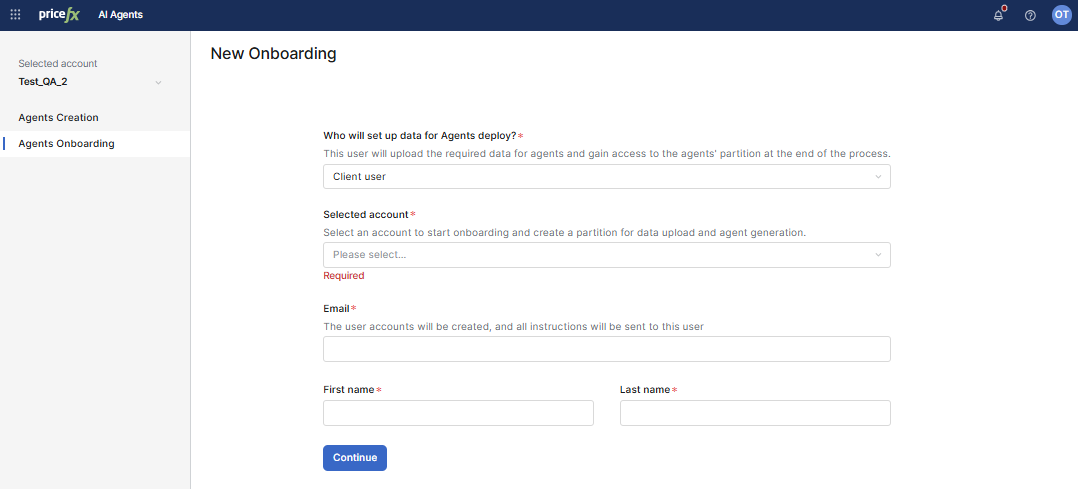
Navigate to AI Agents > Agents Onboarding.
-
Select the prospect account in the Selected Account dropdown (only accounts where the logged-in partner is an implementor are listed).
-
Click Start new onboarding.
-
The system asks: “Who will set up data for Agents deploy?” Choose:
-
Me (partner): The partner uploads data for a prospect and access the partition.
-
Client user: The prospect uploads data and access the partition.
-
Provide email.
-
Enter First name and Last name.
-
-
-
Click Continue to proceed.
If onboarding is valid, the system creates a new partition and shows a confirmation message and notification.