
The following table provides a comprehensive guide to available Groovy API methods for reading, looking up, searching, and finding data within the application. It details the usage of each function, including examples and notes on deprecated methods and their modern replacements using the QueryAPI.
|
Table (when searching...) |
Public Groovy API |
Code Example |
|---|---|---|
|
BoM |
|
|
|
BoM |
|
|
|
Most Master Data tables |
|
|
|
PL, MPL, PG and SIM |
|
|
|
Reference to the currently processed line (i.e., can refer to many types of tables – products, customers, pricelistitem, quoteitem,...) |
Groovy
Notes:
|
|
|
The same as currentItem() |
|
|
|
C |
The method has been deprecated in version 14.0; however, it will remain available to ensure backward compatibility. We strongly recommend starting to adopt the queryApi() with the QapiCustomer for new implementations. Note that while the deprecated method does not entail the removal of functionality, it will no longer be maintained. For more information see the example queryApi() implementation. |
|
|
CX |
The method has been deprecated in version 14.0; however, it will remain available to ensure backward compatibility. We strongly recommend starting to adopt the queryApi() with the customerExtensionRows for new implementations. Note that while the deprecated method does not entail the removal of functionality, it will no longer be maintained. For more information see the example queryApi() implementation. |
|
|
PR, CT, CTLI, RBA, RBALI |
|
|
|
All tables which work with CFS, Calculation Flow |
|
|
|
|
Filters are used when searching for specific rows in data-tables. api.filter() provides the same functionality as "Filter API" functions (see Filters for Data Reading), it is just a different way to do the same. We have two versions:
Groovy
|
|
|
All tables (except QuoteLineItem and some special ones) |
Finds and returns multiple rows of the given table. When you provide a filter, it will return only the filtered set of rows. This function has many various parameters, see Public Groovy API for the full list of options. Groovy
Important: If the result set of rows is too big, then this function does not return all the rows, but only a certain amount of them (see api.getMaxFindResultsLimit()) – if this happens a warning is displayed. If you expect a long result set, you can either use the loop example (below) or the api.stream() function. Example of iteration through all rows
Groovy
The method api.find() will be deprecated in the future releases; however, it will remain available to ensure backward compatibility. We strongly recommend starting to adopt the queryApi() for new implementations. It is already possible for some tables. For more information see the list of supported tables and example of queryApi() implementation. Note that while the deprecated method does not entail the removal of functionality, it will no longer be maintained.
|
|
|
PLI, XPLI |
|
|
|
CFS |
|
|
|
CA |
|
|
|
DL |
|
|
|
LT |
findLookupTable (returns ID) |
The method has been deprecated in version 14.0; however, it will remain available to ensure backward compatibility. We strongly recommend starting to adopt the queryApi() with the QapiCompanyParameterRow for new implementations. Note that while the deprecated method does not entail the removal of functionality, it will no longer be maintained. For more information see the example queryApi() implementation. |
|
LTV |
findLookupTableValues (returns rows) |
The method has been deprecated in version 14.0; however, it will remain available to ensure backward compatibility. We strongly recommend starting to adopt the queryApi() with the companyParameterRows for new implementations. Note that while the deprecated method does not entail the removal of functionality, it will no longer be maintained. For more information see the example queryApi() implementation. |
|
MPL |
|
|
|
PG |
|
|
|
PL |
|
|
|
|
||
|
SIM |
|
|
|
Line items of Q, CT, RA
|
The method has been deprecated in version 14.0; however, it will remain available to ensure backward compatibility. We strongly recommend starting to adopt the queryApi() with the quoteLineItems for new implementations. Note that while the deprecated method does not entail the removal of functionality, it will no longer be maintained. For more information see the example queryApi() implementation. |
|
|
|
||
|
The method has been deprecated in version 14.0; however, it will remain available to ensure backward compatibility. We strongly recommend starting to adopt the queryApi() with the quoteLineItems for new implementations. Note that while the deprecated method does not entail the removal of functionality, it will no longer be maintained. For more information see the example queryApi() implementation. |
||
|
The method has been deprecated in version 14.0; however, it will remain available to ensure backward compatibility. We strongly recommend starting to adopt the queryApi() with the completeCalculationResults for new implementations. Note that while the deprecated method does not entail the removal of functionality, it will no longer be maintained. For more information see the example queryApi() implementation. |
||
|
|
||
|
The method has been deprecated in version 14.0; however, it will remain available to ensure backward compatibility. We strongly recommend starting to adopt the queryApi() with the QapiPriceGridLineItem for new implementations. Note that while the deprecated method does not entail the removal of functionality, it will no longer be maintained. For more information see the example queryApi() implementation. |
||
|
The method has been deprecated in version 14.0; however, it will remain available to ensure backward compatibility. We strongly recommend starting to adopt the queryApi() with the conditionRecords for new implementations. Note that while the deprecated method does not entail the removal of functionality, it will no longer be maintained. For more information see the example queryApi() implementation. |
||
|
The method has been deprecated in version 14.0; however, it will remain available to ensure backward compatibility. We strongly recommend starting to adopt the queryApi() with the QapiPriceListLineItem for new implementations. Note that while the deprecated method does not entail the removal of functionality, it will no longer be maintained. For more information see the example queryApi() implementation. |
||
|
|
||
|
|
||
|
|
||
|
The method has been deprecated in version 14.0; however, it will remain available to ensure backward compatibility. We strongly recommend starting to adopt the queryApi() with the QapiPriceListLineItem for new implementations. Note that while the deprecated method does not entail the removal of functionality, it will no longer be maintained. For more information see the example queryApi() implementation. |
||
|
Matrix PL |
|
|
|
|
||
|
PL |
|
|
|
PL |
The method has been deprecated in version 14.0; however, it will remain available to ensure backward compatibility. We strongly recommend starting to adopt the queryApi() with the QapiConditionRecord for new implementations. Note that while the deprecated method does not entail the removal of functionality, it will no longer be maintained. For more information see the example queryApi() implementation. |
|
|
P |
Returns the value of the given attribute of the current (or given) Product. Groovy
If the "sku" parameter is not specified, it tries to find the current product SKU from the context. The product SKU is available in many contexts – Price List Row, Price Grid Row, CFS (on the Products), Quote Line Item. If the product is not available in the context, the user will be prompted for an input. If you run the code in Test Drive, you can select the context. If you select "Product", Test Drive will ask you to pick the product to be used. Note: To specify which attribute of the product you want, you can use both the attribute name and the column name. The column label cannot be used. The method has been deprecated in version 14.0; however, it will remain available to ensure backward compatibility. We strongly recommend starting to adopt the queryApi() with the QapiProduct for new implementations. Note that while the deprecated method does not entail the removal of functionality, it will no longer be maintained. For more information see the example queryApi() implementation. |
|
|
PCOMP |
|
|
|
PX
|
The method has been deprecated in version 14.0; however, it will remain available to ensure backward compatibility. We strongly recommend starting to adopt the queryApi() with the productExtensionRows for new implementations. Note that while the deprecated method does not entail the removal of functionality, it will no longer be maintained. For more information see the example queryApi() implementation. |
|
|
|
||
|
|
||
|
|
||
|
|
||
|
Roles |
|
|
|
|
||
|
Most tables |
|
|
|
Most tables |
|
|
|
U |
|
|
|
LTV |
Finds and returns the value from a Price Parameter. Example with One Parameter
Given that you have a "simple" price parameter with the "Country adj for price list" label 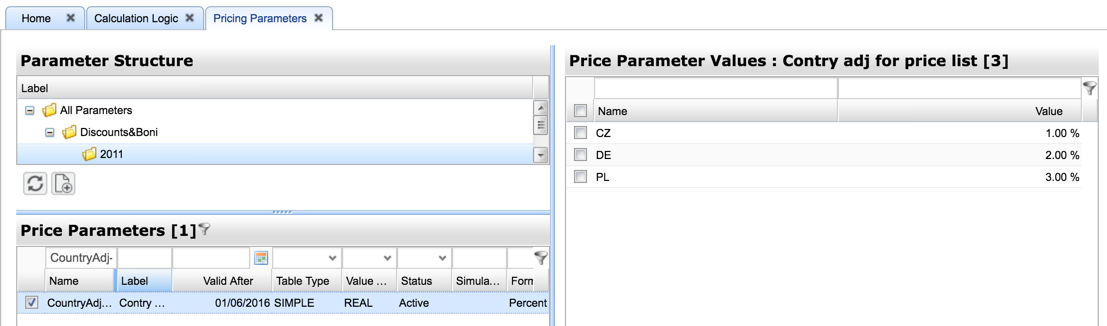
and a calculation logic for a Price List with this code: Groovy
When you make a new Price List, then in the second step "Get Parameters", you will see an input drop down field "Country adj for price list" and when you select "CZ", the return value of the function is a float number 0.01 (which represents 1%). 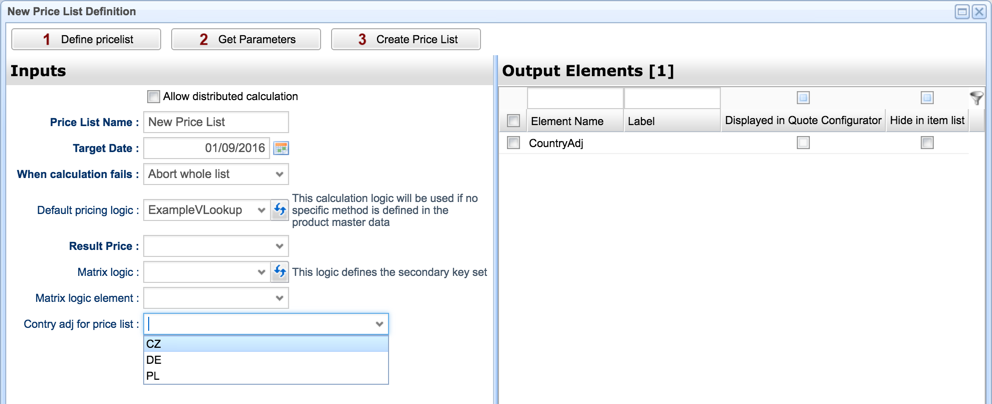
Example with Two Parameters
Given that you have a simple (i.e., it has only key and value) pricing parameter "Shipping_Costs" with a String key. When you run the following code Groovy
then you will get the value for the key calculated by Example with Three Parameters
Given that you have a Matrix (with one key and many attributes) pricing parameter "PriceList_GE". When you run the following code Groovy
then you get the value of the attribute "attribute1" from the row with the key == "Prevailing". Example with a Map of Keys
If you have a matrix with several keys, you can pass the keys as a map and you get back a map with the values of the columns of attributeNames as keys or full object if attributeNames is null. When you have the following Price Parameters table 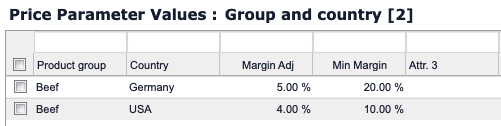
and run the following code Groovy
then you get Groovy
The method has been deprecated in version 14.0; however, it will remain available to ensure backward compatibility. We strongly recommend starting to adopt the queryApi() with the QapiCompanyParameterRow for new implementations. Note that while the deprecated method does not entail the removal of functionality, it will no longer be maintained. For more information see the example queryApi() implementation. |