
ConfiguratorEntry-based Input Builders are deprecated. Since version 17.0/17.1, Forms 2.0 is the preferred technique for building inputs, including inputs previously built via api.createConfiguratorEntry() / api.inputBuilderFactory(). See Forms 2.0, and specifically How to Convert Legacy Inputs to Forms for migrating existing Configurator/Header logic inputs. The content below is kept for reference when maintaining logics that haven't been migrated yet.
Forms 2.0 Equivalent
In Forms 2.0, the same fluent builder style continues, but it is exposed through the form helper (injected into Init, ValueOptions, and Action phase elements of a Form logic) instead of api.inputBuilderFactory(). For example, the Country input shown further down this page as a Configurator parameter would be built like this in a Form logic's Init element:
// Init element of a Form logic
form.createOptionEntry("Country")
    .setLabel("Select Country")
// value options are supplied lazily in a separate ValueOptions element,
// see Forms 2.0 - API Reference
Key differences from the Input Builder / ConfiguratorEntry approach:
-
Value options for
OPTION/OPTIONSinputs are supplied lazily via a dedicated ValueOptions phase element, instead of being set upfront with.setOptions()/.setValueOptions()and persisted with the object. -
Instead of
.buildContextParameter(),.getInput(), or.addOrUpdateInput(quoteProcessor, "ROOT"), inputs are simply created viaform.createXxx()in Init; the Form logic itself is what gets attached to the object (Quote header/line, Model Class tab, Dashboard, etc.). -
Dynamic behavior (showing/hiding inputs, changing labels or required flags, reloading value options) is implemented in an Action phase element using
form.updateInput(...), rather than by re-running the whole configurator logic on every input change. -
Row/collapsible layouts previously built with fake wrapper inputs (
createRowLayout(),createCollapseLayout()) are now built with the dedicatedform.layout()API.
For the full mapping from legacy calls to their Forms 2.0 equivalents, see How to Convert Legacy Inputs to Forms. For a side-by-side comparison of when to still consider the legacy approaches, see Comparison of Static Inputs, Configurator API and Form API.
Legacy Approach: Input Builders for ConfiguratorEntry and Header Logics
The content below describes the pre-Forms 2.0 approach using api.inputBuilderFactory(). It is kept for reference when maintaining logics that haven't been migrated to Forms yet. For new implementations, use the Forms 2.0 approach described above.
Input Builders are a way to build parameters for Configurators and Headers logics to be used in functions api.createConfiguratorEntry().addParameter() or quoteProcessor.addOrUpdateInput(). Previous methods were dependent on being aware of all the InputTypes, logic context (configurator, quote logic, etc.) and manually figuring out what methods are used to set their respective properties. Input Builders handle the selection of the InputType for you and simplify and standardize the implementation of inputs. These methods also fully leverage the JavaDoc so that Pricefx Studio will automatically let you know what properties can be set and how. This structure allows for better readability and re-usability.
For example, here is the previous method for creating a parameter in a Configurator:
def ce = api.createConfiguratorEntry()
def p = ce.createParameter(InputType.OPTIONS, "Country")
p.setLabel("Select country")
p.setValueOptions(["CZ", "DE", "UK"])

if (p.value == null) {
    p.value = "DE"
}
It is important to note that the developer would have to know on their own to use InputType.OPTIONS, p.setLabel(), and p.setValueOptions(). Now this is the updated way of doing so with an Input Builder:
def country = api.inputBuilderFactory()
        .createOptionEntry("Country")
        .setLabel("Select Country")
        .setOptions(["CZ", "DE", "UK"])
        .buildContextParameter()

return api.createConfiguratorEntry()
        .createParameter(country, {"DE"})
Pricefx Studio then suggest the possible options in each case.
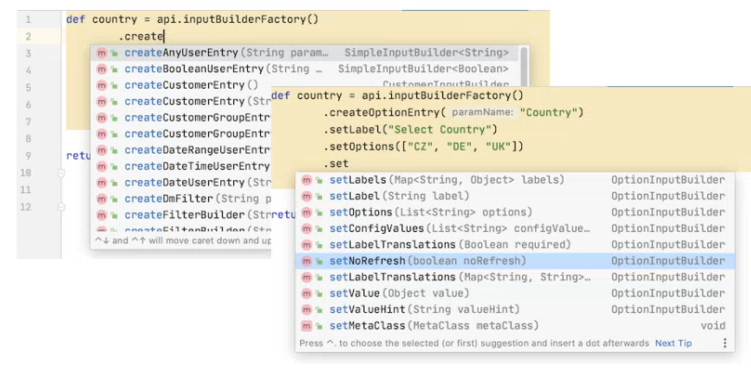
With this level of assistance, there are really only two important parts to remember:
-
Use api.inputBuilderFactory() to start defining the input.
-
After defining it, use the corresponding method to build the input:
-
.buildContextParameter()for Configurators; -
.addOrUpdateInput(quoteProcessor, "ROOT")for Quote Headers; -
.getInput()for general logics or Price List / LPG Headers.
-
For more examples, please take a look at the Configurators documentation.
Here is how you can use the input builders in the common logics:
if (api.isInputGenerationExecution()) {
	return api.inputBuilderFactory()
			.createOptionEntry("Country")
			.setLabel("Select Country")
			.setOptions(["CZ", "DE", "UK"])
			.getInput()
} else {
	return input.Country
}
isInputGenerationExecution is supported from version 10.0. In older versions use isSyntaxCheck.