
This page outlines the process for ensuring all accelerator objects are backed up and properly stored in Git, either by organizing them into dedicated component folders or verifying existing structures.
Accelerator objects must be maintained in a Git repository, similar to other configuration assets. Moving forward, each accelerator’s objects should be stored in a dedicated component folder. The structure of each component folder should mirror that of the root folder. All objects must reside in their respective entity folders (such as CalculationLogic, Dashboard, etc.).
Goal is to:
-
Create a backup for every installed accelerator, containing all objects that may be overwritten by a newer version during an upgrade.
-
Ensure all objects are moved into their corresponding component folders.
Logic folders should not include the validAfter suffix (e.g., +2020-01-01). This aligns with repository storage standards and simplifies comparison processes. The pfxpackage and Pricefx Studio applications handle this automatically by reading the validAfter field from logic.json.
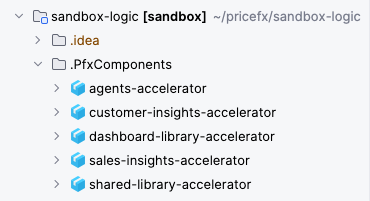
No Accelerator within Scope Was Installed
If none of the accelerators listed are installed in the partition, this section can be skipped. Proceed to the next topic.
Accelerator in Scope was Already Installed
a) Code is in Git, but not in Component Folders
I. Prepare a Commit with the Standard Accelerator Version
This step helps identify any customizations made to the standard accelerator version. If no customizations exist, you may skip this part.
-
Create and check out the
pfxagentsGit branch based on the branch matching the partition (usuallymasterbranch). -
Launch the IntelliJ IDEA with the Pricefx Studio plugin.
-
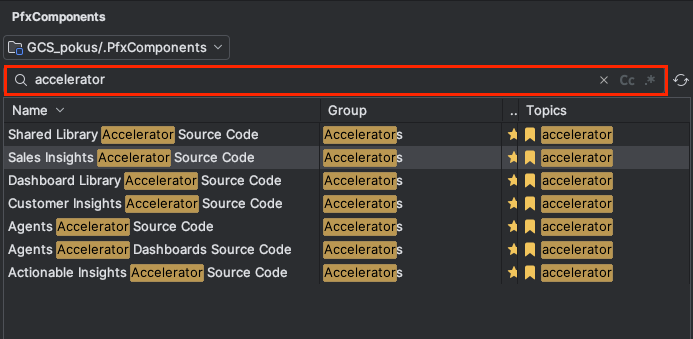
Go to Tool Window.
-
Click PfxComponents.
-
Search for each installed accelerator from the below scope by typing accelerator.
-
Click Import.
This action will download the latest source code.
-
Delete the
Preferencefolder in each component folder. -
Commit each folder in Git with the following commit message such as:
PFAGENTS-123 standard accelerators to component folders
Do not push this commit to origin yet! Since auto-deployment could deploy this standard accelerator and overwrite the customized one on the partition. This commit will be useful later on, when you do the comparison to look for the customizations.
II. Create Backup Commit
-
Update the source in the folders with the actual version. Ideally by moving them in Git (preferred, but only if git is matching the partition) or fetching the actual version from the partition.
-
The move-in-git way – For each component folder, for each object:
-
Remember the object name and delete it.
-
Find the object in the root folder and if it exists, move it to the component folder.
-
-
The download-from-partition way – In the Fetch tool window, for each downloaded component folder:
-
Click the button Select objects that exist in the local directory.
-
Delete all objects from the component folder.
-
Click PfxFetch.
-
Delete the objects in the root folder and if any exists.
-
-
In each component folder and
CalculationLogicorPricingParametersubfolders, rename all object folders that havevalidAftersuffix (e.g.+2020-01-01) and remove it.
\+\d\d\d\d-\d\d-\d\d$. -
For Sales Insights Accelerator – Fetch the following Advanced Configurations:
•SIP_AdvancedConfiguration
•waterfall-configuration -
For Customer Insights Accelerator – Fetch the following Advanced Configuration:
•customer-insights-accelerator -
Commit the component folders in Git with the following commit message such as:
PFAGENTS-123 moving accelerators to component folders
b) Code is in Git and Already in Component Folders
-
Verify that the Git repository code is up to date with the partition.
-
In each component folder (and within
CalculationLogicorPricingParametersubfolders), rename all object folders that contain thevalidAftersuffix by removing it.
List of Required Accelerators
|
Source Code |
Required for |
|---|---|
|
Sales Insights Accelerator Source Code |
|
|
Customer Insights Accelerator Source Code |
|
|
Actionable Insights Accelerator Source Code |
|
|
Shared Library Accelerator Source Code |
|
|
Dashboard Library Accelerator Source Code |
|