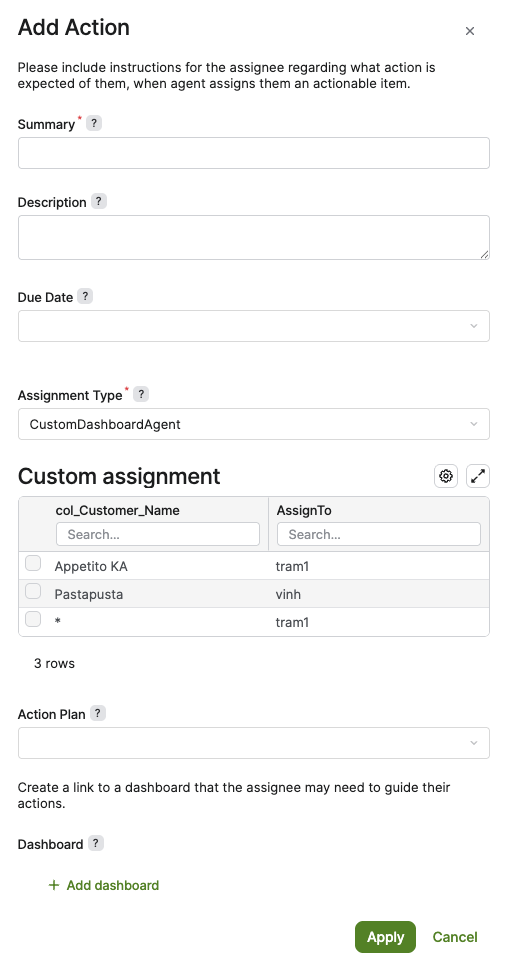
This example shows how to implement an advanced user-assignment strategy for Agents when the standard fallback assignee and dimension-based assignment options are not sufficient. It demonstrates how to define a custom assignment type, build a read-only configurator for assignment rules, transform the configured values into assignment data, and include a fallback mapping so Actions can still be routed when no specific dimension value matches. This approach extends the Action Definition assignment model with custom logic while preserving the expected behavior of dimension-driven routing and fallback assignment in the Agent summary.
Logic Example
import groovy.transform.Field
import net.pricefx.server.dto.calculation.ConfiguratorEntry
import net.pricefx.server.dto.calculation.ContextParameter

@Field String ADVANCED_ASSIGNMENT_NAME = "inputMatrixAssignment"
@Field Map INPUT_COLUMNS = [SEGMENT    : "col_Customer_Name",
                            ASSIGNED_TO: "AssignTo"]

ConfiguratorEntry getAssignmentInputs(Map inputParam) {
    //Script actionDefinitionManager = libs.AG_Library.ActionDefinitionManager

    List columns = (INPUT_COLUMNS as Map).values() as List
    ConfiguratorEntry advancedAssignmentEntry = api.createConfiguratorEntry()

    ContextParameter advancedAssignmentParameter = api.inputBuilderFactory()
            .createInputMatrix(ADVANCED_ASSIGNMENT_NAME)
            .setLabel("Custom assignment")
            .setColumns(columns)
            .setReadOnly(true)
            .setEnableAdvancedFilter(false)
            .setEnableClientFilter(false)
            .setHideAddButton(true)
            .buildContextParameter()

    List rows = []
    List segments = ["Appetito KA", "Pastapusta"]
    List assigns = ["tram1", "vinh"]
    segments.eachWithIndex { String segment, int index ->
        Map row = [(INPUT_COLUMNS.SEGMENT) : segments.getAt(index),
                   (INPUT_COLUMNS.ASSIGNED_TO): assigns.getAt(index)]
        rows.add(row)
    }

    Map fallbackRow = [(INPUT_COLUMNS.SEGMENT) : "*",
                   (INPUT_COLUMNS.ASSIGNED_TO): "tram1"]
        rows.add(fallbackRow)

    advancedAssignmentParameter.setValue(rows)

    advancedAssignmentEntry.createParameter(advancedAssignmentParameter)

    return advancedAssignmentEntry
}

List<Map> getAssignments(Map actionDefinition, List dimensions) {
    //Script actionDefinitionManager = libs.AG_Library.ActionDefinitionManager
    Map actionData = actionDefinition.data
    List assignments = actionData[ADVANCED_ASSIGNMENT_NAME] ?: []

    return assignments.collect { Map assignment ->
        Map data = [:]
        String assignTo = getAssignmentAssignTo(assignment)
        data.assignTo = assignTo
        String dimension = "col_Customer_Name"
        data[dimension] = getCustomerGroupValue(assignment)

        return data
    }
}

protected String getAssignmentAssignTo(Map assignment) {
    api.logInfo("--DEBUG:getAdvancedAssignTo-assignment", assignment)
    return assignment.getAt(INPUT_COLUMNS.ASSIGNED_TO)
}

protected def getCustomerGroupValue(Map assignment) {
    return assignment[INPUT_COLUMNS.SEGMENT]
}
Advanced Configuration Example
{
 "CustomDashboardAgent": {
    "label": "CustomDashboardAgent",
    "description": "Assigns by dimension-based my custom rules without fallback to default user",
    "enginePath": "libs.AG_ActionAssignment_Lib3.CustomAssignmentStrategy"
  }
}
Logic Description
This is a fixed, hard-coded mapping strategy by customer name:
-
Appetito KA>tram1 -
Pastapusta>vinh -
All other customer names >
tram1via*, but only robustly when the assignment comparison is centered oncol_Customer_Nameand not additional dimensions.
Expected Result