
The Advanced/Custom User Assignment is an optional, custom assignment mode for Agents Actions. Instead of using the default rule-based assignment, it lets the system assign actions dynamically based on custom business logicimplemented by a Configuration Engineer (CE).
Prerequisites
-
Pricefx Agents version 1.7.0 or higher.
-
Access to Administration > Logics > Groovy Library.
-
Access to Administration > System Settings > Advanced Configuration Options.
Configure Advanced User Assignment
To implement custom assignment logic, you must create the logic in a library and then register it in the system configuration.
Create Assignment Logic
-
Go to Administration > Logics > Groovy Library.
-
Click Add Logic.
-
In the Add New Groovy Library Logic menu:
-
Enter Name.
-
Enter Label (optional).
-
Select Valid After date.
-
Set Status to Active.
-
Click Add.
This will create a new library, such as AG_ActionAssignment_Lib.
-
-
Click the newly created logic.
-
Click Add.
-
Select {} in Type.
-
Enter Element Name.
-
Enter Element Label (optional).
-
Enter the logic code in Code Editor.
Logic ExampleGroovyimport groovy.transform.Field import net.pricefx.server.dto.calculation.ConfiguratorEntry import net.pricefx.server.dto.calculation.ContextParameter @Field String ADVANCED_ASSIGNMENT_NAME = "inputMatrixAssignment" @Field Map INPUT_COLUMNS = [SEGMENT : "country", ASSIGNED_TO: "AssignTo"] ConfiguratorEntry getAssignmentInputs(Map inputParam) { //Script actionDefinitionManager = libs.AG_Library.ActionDefinitionManager List columns = (INPUT_COLUMNS as Map).values() as List ConfiguratorEntry advancedAssignmentEntry = api.createConfiguratorEntry() ContextParameter advancedAssignmentParameter = api.inputBuilderFactory() .createInputMatrix(ADVANCED_ASSIGNMENT_NAME) .setLabel("Custom assignment") .setColumns(columns) .setReadOnly(true) .setEnableAdvancedFilter(false) .setEnableClientFilter(false) .setHideAddButton(true) .buildContextParameter() List rows = [] List segments = ["Germany", "France"] List assigns = ["tram1", "vinh"] segments.eachWithIndex { String segment, int index -> Map row = [(INPUT_COLUMNS.SEGMENT) : segments.getAt(index), (INPUT_COLUMNS.ASSIGNED_TO): assigns.getAt(index)] rows.add(row) } Map fallbackRow = [(INPUT_COLUMNS.SEGMENT) : "*", (INPUT_COLUMNS.ASSIGNED_TO): "tram1"] rows.add(fallbackRow) advancedAssignmentParameter.setValue(rows) advancedAssignmentEntry.createParameter(advancedAssignmentParameter) return advancedAssignmentEntry } List<Map> getAssignments(Map actionDefinition, List dimensions) { //Script actionDefinitionManager = libs.AG_Library.ActionDefinitionManager Map actionData = actionDefinition.data List assignments = actionData[ADVANCED_ASSIGNMENT_NAME] ?: [] return assignments.collect { Map assignment -> Map data = [:] String assignTo = getAssignmentAssignTo(assignment) data.assignTo = assignTo String dimension = "country" data[dimension] = getCustomerGroupValue(assignment) return data } } protected String getAssignmentAssignTo(Map assignment) { api.logInfo("--DEBUG:getAdvancedAssignTo-assignment", assignment) return assignment.getAt(INPUT_COLUMNS.ASSIGNED_TO) } protected def getCustomerGroupValue(Map assignment) { return assignment[INPUT_COLUMNS.SEGMENT] } -
Click Save and Close.
Register Custom Assignment Type
-
Go to Administration > System Settings > Advanced Configuration Options.
-
Click Add.
-
In the Add Option menu:
-
Enter the pfxAcc_AG_Assignment_Types_Extension_Config into Name.
-
Set the Type to TEXT.
-
In the Value field, provide a JSON object defining your custom option.
Configuration Example -
{
  "Custom": {
    "label": "Custom",
    "description": "Assigns by dimension-based my custom rules without fallback to default user",
    "enginePath": "libs.AG_ActionAssignment_Lib.CustomAssignmentStrategy"
  }
}
-
-
Click Add.
Expected Result
When the Agent runs, it will bypass the Standard rule-based assignment and execute the Groovy function defined in the enginePath. The Action Assignment will be performed according to your custom dynamic logic.
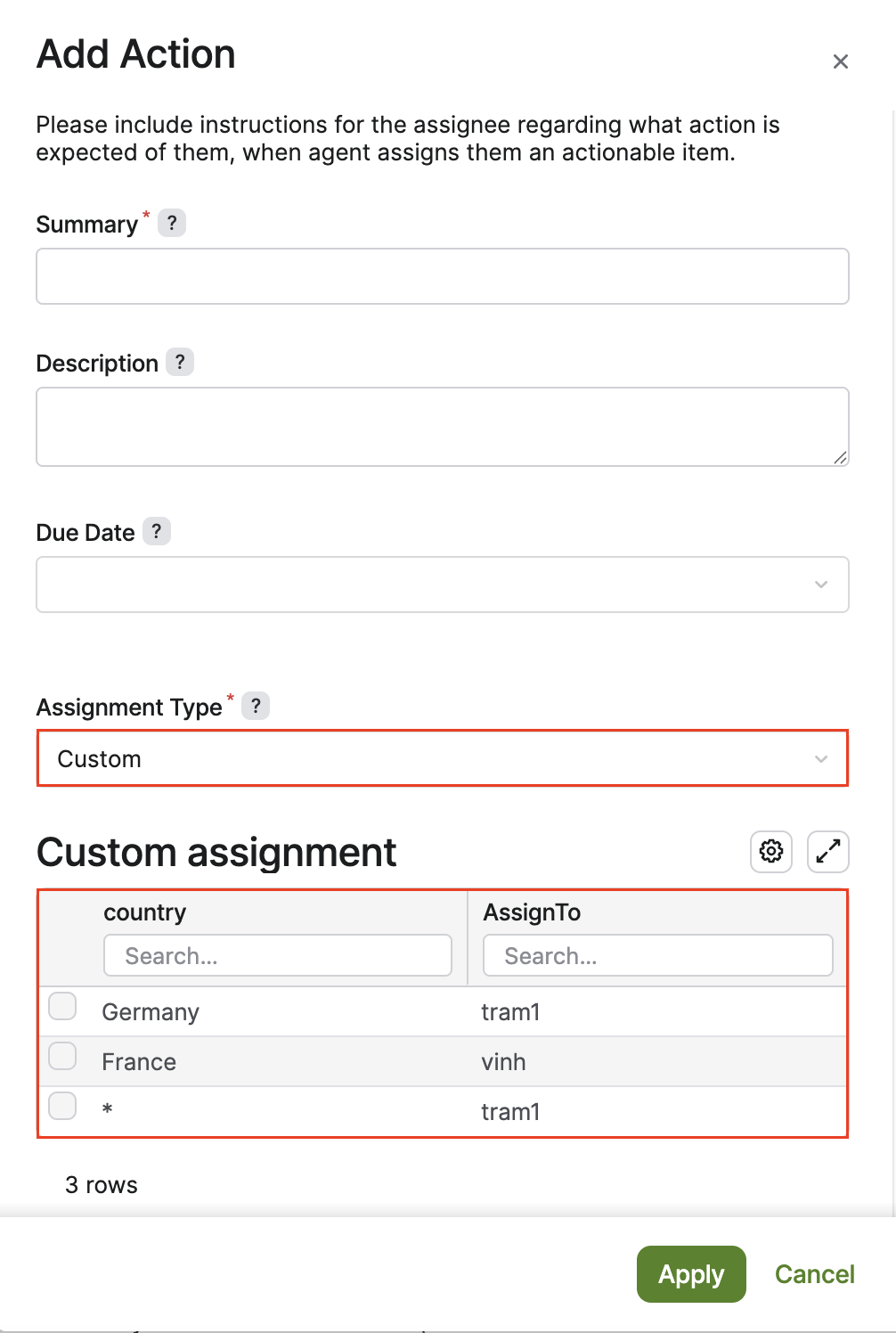
Standard is the default behavior. It uses the current configurator logic to assign actions based on dimension-based rules with a fallback to a specific user.