
The Insights Dashboards model uses a two-pass Extended Field Checker to determine whether numeric waterfall fields and fields selected by user as Reference Price in Transactions Tab. in the transaction data are extended (that is, proportionally scaled by quantity) or stored as per-unit values. Accurate detection is required so that the model applies the correct aggregation logic when computing KPIs such as revenue, margin, and discount. Misclassified fields produce incorrect totals and trigger spurious warnings in the Configuration Information panel on the Review tab.
Why Two Passes Are Needed
The original single-pass checker applied a slope-based formula to a sample of up to 100,000 transaction records. Because the formula computes a weighted covariance between quantity deviations and field deviations, it can return inconclusive scores (score ≤ 40) for fields that are always zero or null across the sampled rows. A field that is consistently zero cannot be distinguished from a non-extended field by the slope formula alone, so a second, targeted pass is required to handle that edge case.
First Pass: Extended Score Formula
The first pass evaluates each candidate field using the following formula against a random sample of up to 100,000 transaction records where quantity > 1:
Extended score = ((Σ(Quantity - AvgQuantity) * (Field - AvgField) / Σ(Quantity - AvgQuantity)²) - 0.1) * 100
The score thresholds are interpreted as follows:
-
Score > 40 – The field is confirmed extended. No second pass is needed for this field.
-
Score ≤ 40 – The result is inconclusive; the field proceeds to the second pass.
The 100,000-record limit is intentional. Computing the full covariance over very large datasets is resource-intensive, so the sample keeps runtime acceptable while still producing reliable scores for most fields.
Second Pass: Zero/Null Check
For each field that scored ≤ 40 in the first pass, the checker runs a second, lighter query against up to 10,000 records to determine whether the field is always zero or null, skip if always zero or null. Otherwise, use the formula in 1st pass to calculate the extended score for it.
-
Score > 40 in the second pass – The field is classified as extended. This occurs if the field is not consistently zero/null and the recalculated score confirms an extended pattern.
-
Score ≤ 40 in the second pass – The field is classified as FOR SURE NOT extended.
This two-pass design avoids false-positive "expected to be extended" warnings for fields that are legitimately non-extended but happen to be sparsely populated or zero-valued in the transaction data.
Decision Flow
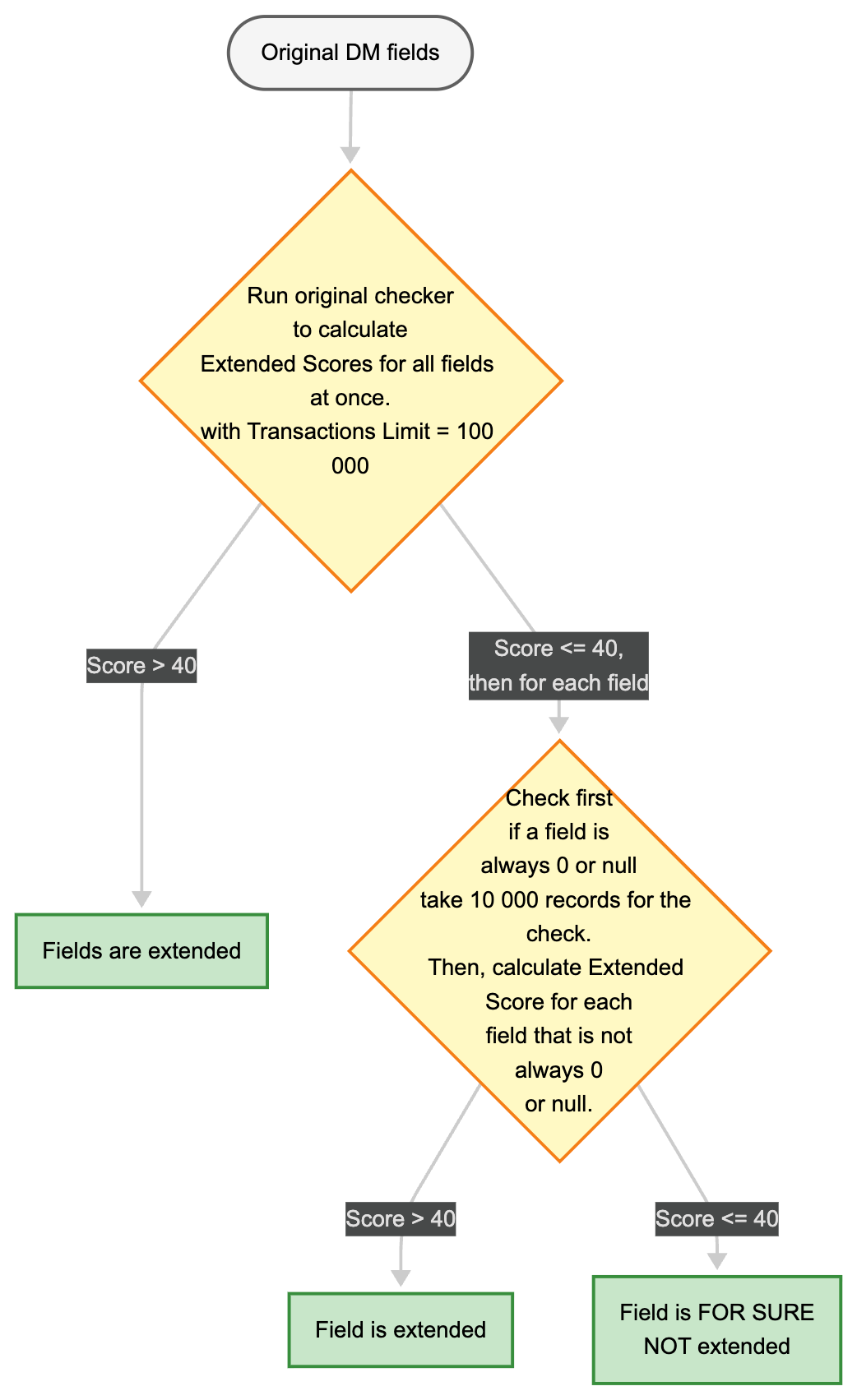
The diagram below summarizes the full decision logic:
-
Start with the original Datamart fields.
-
Pass 1 – Run the slope formula with a transaction limit of 100,000.
-
If score > 40 → Fields are extended (done).
-
If score ≤ 40 → proceed to Pass 2 for each field individually.
-
-
Pass 2 – Check whether the field is always 0 or null (sample of 10,000 records). Then, calculate Extended Score for each field that is not always 0 or null.
-
If score > 40 → Field is extended.
-
If score ≤ 40 → Field is FOR SURE NOT extended.
-
Configuration Information Warnings
When the checker determines that a field is expected to be extended but does not appear to be, a warning is displayed in the Configuration Information panel on the Review tab of the Insights Configuration. Example warning messages:
The field: "InstantRebates" is expected to be extended (meaning for the quantity) but it doesn't seem to be.
The field: "EndCustomerOnInvoiceDiscounts" is expected to be extended (meaning for the quantity) but it doesn't seem to be.
The field: "CustomerPickupAllowance" is expected to be extended (meaning for the quantity) but it doesn't seem to be.
These warnings indicate that the model detected a mismatch between the expected aggregation behavior and the actual data pattern. Review the source transaction Datamart to confirm whether the flagged fields are stored as extended (total) values or as per-unit values, and adjust the waterfall field mapping accordingly.
The two-pass checker was introduced in the Insights Dashboards 1.1.0 to reduce the number of false-positive warnings produced by the original single-pass implementation.