
This module displays transaction and forecast data about products.
Module Visible Elements
Visible elements of the Transaction module are Sales Volume YTD, Turnover YTD, Last Year Sales Volume, Last Year Turnover, Last Period Volume, Last Period Turnover, Sales Volume Forecast, and Turnover Forecast. These elements display transaction and forecast data of the product, which are sales data for the last year and forecast data for the next year.
|
Type |
Technical Name |
Label |
Independent PL/PG |
Dependent PL/PG |
Description |
|---|---|---|---|---|---|
|
Historical |
SalesVolumeYTD |
Sales Volume YTD |
Yes |
Yes |
The sum of sales volume from the beginning of the current year to the calculation date. |
|
TurnoverYTD |
Turnover YTD |
Yes |
Yes |
The sum of turnover from the beginning of the current year to the calculation date. |
|
|
LastYearSalesVolume |
Last Year Sales Volume |
Yes |
Yes |
The sum of sales volume from the whole last year. |
|
|
LastYearTurnover |
Last Year Turnover |
Yes |
Yes |
The sum of turnover from the whole last year. |
|
|
LastPeriodVolume |
Last Period Volume |
Yes |
Yes |
The sum of sales volume in a specified time range in the past. |
|
|
LastPeriodTurnover |
Last Period Turnover |
Yes |
Yes |
The sum of turnover in a specified time range in the past. |
|
|
Forecast |
SalesVolumeForecast |
Sales Volume Forecast |
Yes |
Yes |
The sales volume forecast. |
|
TurnoverForecast |
Turnover Forecast |
Yes |
Yes |
The turnover forecast. |
Currency Exchange
Transaction data may point to Product Extensions, Datamart or Data Source. In the Price Setting Accelerator, the PL/PG logic will ignore the “currency" field in Datamart source tables as the exchange rate has been applied during the data transition from Data Source to Datamart. The exchange rate is only applied when the Datamart’s currency and the calculation's currency are different.
When the transaction data source points to Data Source, the “currency" field of the pointed Data Source table will be utilized. For details, see Set up Currency Conversion in Datamart.
When the transaction data source points to Product Extensions, the currency is converted using the ExchangeRate CP. For details, see ExchangeRates CP.
Lookup
Transaction data lookups return aggregated data for the current and all children dependency levels and there is no fallback like other lookups. Transactions are records of anything being sold. If something has been sold in a city, it means that these transactions should also appear as being sold in the country.
If there is no dependency defined, e.g., a small company working only in a country, without changing their prices depending on the regions, it will grab all transactions.
Example:
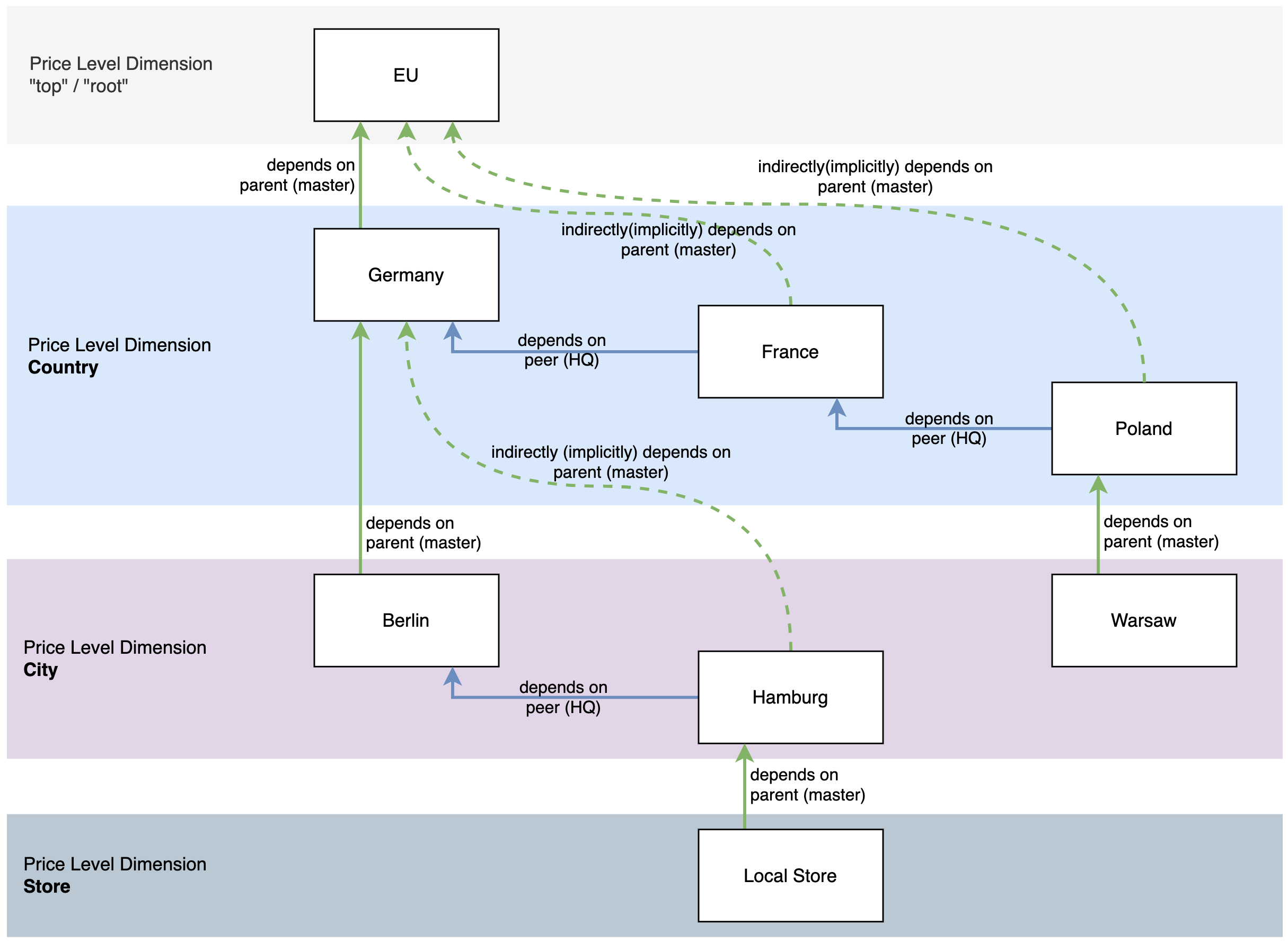
It collects everything from Germany and levels defined as children, and children's children, etc. In this example, Germany data = Germany + Berlin + Hamburg + Local store + Local store. It does not include nodes at the same level, which are France and Poland in this case.
Warning
Technically, if there are too many rows (1 million by default) for a given batch of products (200 by default), the batch will be split in two, a warning will be raised and the SQL query will be executed again. If there are too many rows for only 1 SKU, then the Pricefx restriction has been met, an error will be raised and no transaction data will be read.
In Product Extensions, however, we do not expect to have tens of thousands of rows. We expect data to be pre-aggregated. Having a lot of rows in PX is possible, but counterintuitive.
See also Configure Transaction Module.