
The Price Checks module verifies if a product margin is within a suitable range. For dependent price lists, it also checks the delta between the parent price and the dependent price in a dependent PL/PG.
Module Elements
|
Technical name |
Label |
Available in Parent PG/PL |
Available in Dependent PG/PL |
Description |
|---|---|---|---|---|
|
MinimumMargin |
Minimum Margin |
Yes |
Yes |
The minimum margin specified for the product. |
|
ListPriceCorridor |
List Price Corridor |
No |
Yes |
Delta between the parent price (*) and final list price. On parent price, refer to Element Data Sources > List Price Corridor section below. |
|
AdjustedPriceCorridor |
Adjusted Price Corridor |
No |
Yes |
Delta between the adjusted parent price and final list price. On parent price, refer to Element Data Sources > Adjusted Price Corridor section below. |
|
MinimumMarginPrice |
Minimum Margin Price |
Yes |
Yes |
A price calculated based on |
Element Data
Values for price checks are configured in respective price parameter tables or calculated results.
-
Minimum Margin – MinMargin CP table
From table with naming convention: <<dependency>>MinMargin.
Examples: MinMargin, AsiaMinMargin, GlobalMinMargin,… -
List Price Corridor (Dependent PG/PL only)
The value is taken from the final list price of the referred parent PG/PL.
To set the referred parent PG/PL for a dependency level, see DependencyConfiguration CP. -
Adjusted Price Corridor (Dependent PG/PL only)
The value is taken from the final list price of the referred parent PG/PL with the dependent adjustment applied.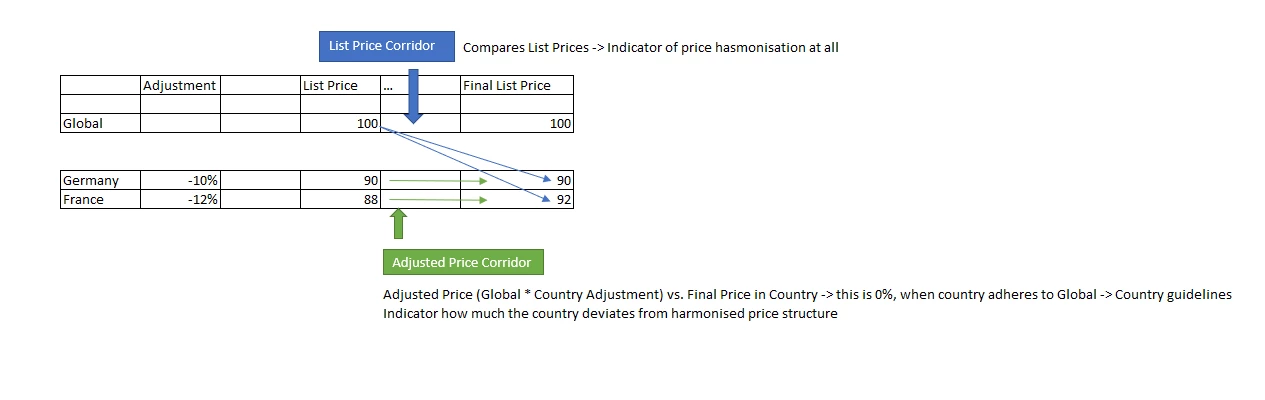
To set the dependent adjustment, fill the data in the corresponding <<dependency>>DependencyLevelAdjustment Price Parameter table.
-
Minimum Margin Price – The value is calculated with the formula:
-
At Gross pricing mode: result = Cost / (1 - MinimumMargin)
-
At Gross/Net pricing mode: result = Cost / (1 - Discount - MinimumMargin + MinimumMargin * Discount)
-
Checking Mechanism
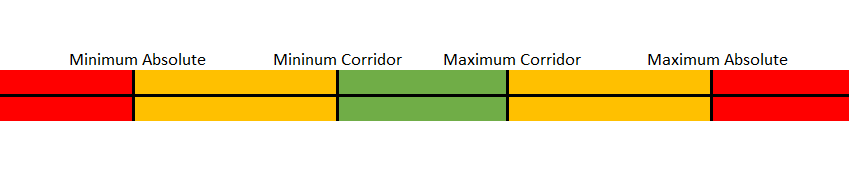
The List Price Corridor and Adjusted Price Corridor elements will be colored based on the corridor ranges which they fall into.
-
When the element value is inside the Corridor range, it will be green.
-
Minimum Corridor <= value <= Maximum Corridor
-
-
When the element value is inside the Absolute range, it will be yellow.
-
Minimum Absolute <= value < Minimum Corridor
-
Maximum Corridor < value <= Maximum Absolute
-
-
When the element value is outside the Absolute range, it will be red.
-
value < Minimum Absolute
-
value > Maximum Absolute
-
-
When the element value is zero, it will be blue.
Configuration
Set Module Status
Set the module status in the Configuration Wizard > Price Checks.
Set Minimum Margin
To specify the minimum margin for product segments, do it in the corresponding <<dependency>>MinMargin CP table.
Examples: MinMargin, AsiaMinMargin, GlobalMinMargin,…
Set List Price Corridor
To validate the delta between the parent price and the final list price of a product, the corresponding boundaries are taken from the ListPriceCorridor CP table.
Set Adjusted Price Corridor
To validate the delta between the adjusted parent price and the final list price of a product, the corresponding boundaries are taken from the AdjustedPriceCorridor CP table.