
Configuration Wizard is the starting point when you want to set up the Price Setting Accelerator to match your needs. You can enable Price Setting modules here (functionality split into independent features for easier maintenance) and configure them.
The recommended approach is to start simple and add complexity as required. The only required module is Core Elements; other modules are optional and independent. If there is a disabled module, it is completely hidden from the user.
To access the wizard:
-
Navigate to Company Processes > Price Setting Accelerator Configuration Wizard.
-
In the drop-down, select the module to configure.
-
Click the Configure Selected Module button.
-
Proceed according to instructions on the individual screens.
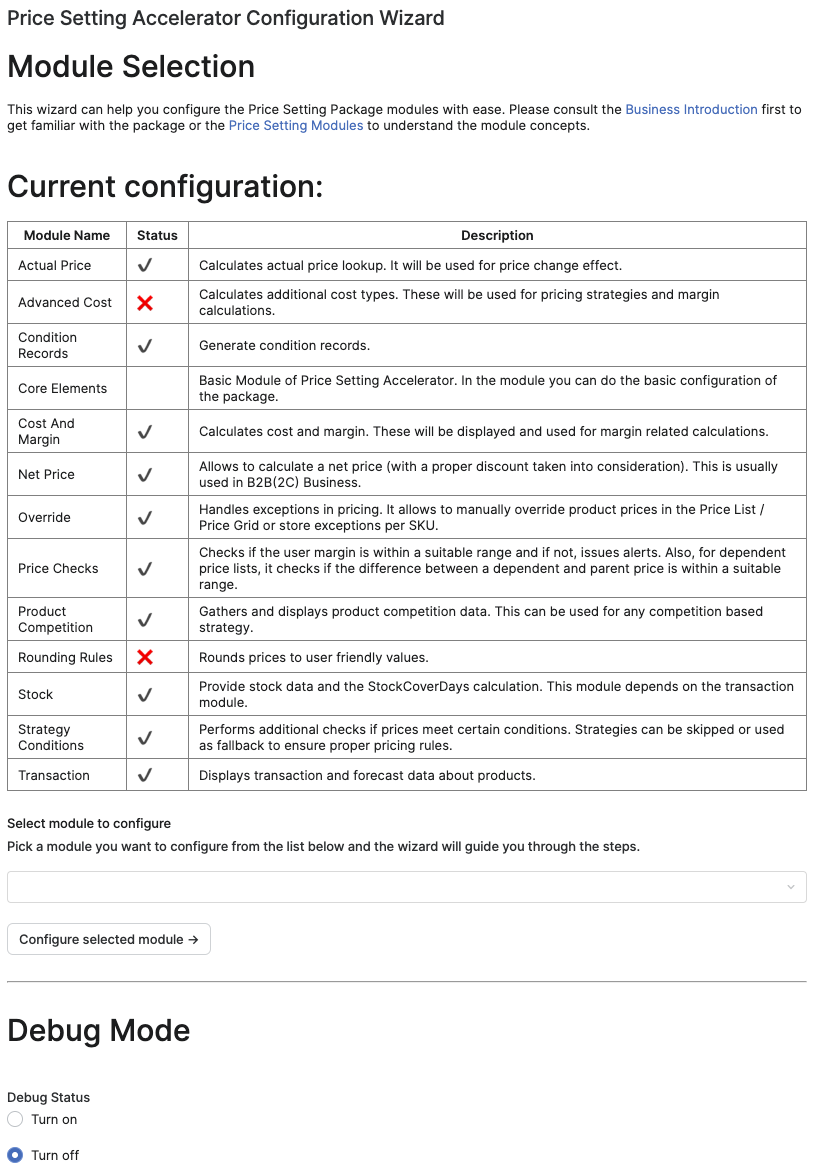
Debug Mode
This section allows you to turn on or off debug mode and configure the level of debugging required for troubleshooting.
-
Debug Status: Toggle between:
-
Turn on: Enables debug mode, which will provide detailed logs and insights for debugging issues.
-
Turn off: Disables the debug mode.
Once the desired debug status is selected, click Update Debug Status to save the change.
-
-
Configure Debug Level: Select the debug level that best fits your needs. Provides different levels of detail for logs.
Further reading:
-
Configure Actual Price Module -
Configure Advanced Cost Module -
Configure Dependency Level -
Company Parameter Management (Price Setting Accelerator) -
Configure Product Segmentation -
Configure Cost and Margin Module -
Configure Override Module -
Configure Rounding Rules Module -
Configure Stock Module -
Configure Transaction Module -
Configure Data Source Properties -
Configure Dependency Mapping Properties