
Configuration Of Bootstrapping
Configuration tables for Hierarchical Lookups are created dynamically by bootstrapping. Bootstrapping receives 4 inputs:
-
There is 1-6 hierarchical attributes configured for any lookup in PriceSettingDimensions CP. These are the keys of newly created Company Parameters. Hierarchical lookups are configs not intended to be configured for a product, but for a group of products. However, the decision how to split products into groups is up to the user. Splitting products per SKU into 1-element group will work just fine.
-
There are 13 features to be configured and one general fallback. It decides which configs (from above) are put in which Company Parameters as keys.
-
Most of the Hierarchical Lookups have one table per Dependency Level + 1 (universal fallback). Dependency Configuration should be prepared before bootstrapping: DependencyConfiguration CP
-
Bootstrapping expects to find on the partition the below listed Company Parameters. These CPs will be removed during the run. They can be found at Company Parameters > Price Settings Package > Hierarchical Lookups in the related lookup folder:
-
AdditionalDiscountTempHook
-
AdjustedPriceCorridorTempHook
-
BaseStrategySelectionTempHook
-
CostPlusTempHook
-
CostSelectionTempHook
-
DependencyLevelAdjustmentTempHook
-
DiscountTempHook
-
ListPriceCorridorTempHook
-
MinMarginTempHook
-
PriceIncreaseTempHook
-
RelevantCompetitionDataTempHook
-
StrategySelectionTempHook
-
VolumeBreakdownTempHook
-
Hierarchical Config Lookup
After generating hierarchical tables, these should be filled with data:
Attributes
Attributes of hierarchical tables are described on their pages.
Keys
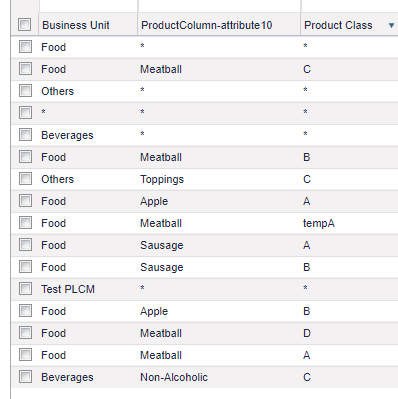
Each hierarchical table has 1-6 keys. Each key is a product attribute. If there was no name to the product column, “ProductColumn-attributeXX” name is used. The user should describe groups of products, with the ability of using “*” fallback. Order of entries is irrelevant – the most detailed config is chosen.
If no entry has been chosen, the user might create a general fallback with only an asterisk (“*“).
If no “asterisk fallback” is used, hierarchical fallback will be utilized. It means there is no need to create configs for very detailed dependency levels on which we do not perform segmentation: Dependent Price Lists and Data Fallbacks | Lookup Keys Config Fallbacks.
Example:
Lookup List
The "TempHooks" CPs listed above each correspond to a single lookup.
-
AdditionalDiscount
-
AdjustedPriceCorridor
-
BaseStrategySelection
-
CostPlus
-
CostSelection
-
DependencyLevelAdjustment
-
Discount
-
ListPriceCorridor
-
MarginAlertsForPriceLists
-
MinMargin
-
PriceIncrease
-
RelevantCompetitionData
-
StrategySelection
-
VolumeBreakdown