
📽️ Check out a video demonstration for this use case, here.
Use Case Situation Description
Customer-specific discounts can provide several benefits in the discrete manufacturing industry. Firstly, including volume commitments or price/discount breaks can incentivize customers to purchase more products, increasing sales and revenue. Secondly, customer-specific discounts can improve customer relationships by offering personalized pricing, improving loyalty and retention. Thirdly, changing customer-specific discounts based on changing customer needs or market conditions can improve competitiveness and responsiveness, ensuring that pricing remains fair and transparent. Overall, customer-specific discounts can increase sales, improve customer relationships, and enable manufacturers to remain competitive in a constantly changing market.
Prescriptive Design Requirements
Coming soon
User Stories
Coming soon
Data Requirements
Coming soon
Out-of-Scope
Coming soon
Solution Design
In this use case we will look at how to set up customer specific discounts based on customer purchasing behavior and other factors in Pricefx. Setting up customer-specific discounts in the discrete manufacturing industry can provide many benefits, including increased customer loyalty, improved pricing accuracy, and better margins while encouraging repeat business. Customer-specific discounts can help ensure that pricing is accurate and reflects the unique needs of each customer to improve pricing transparency and reduce the risk of errors or non-compliance.
Good to know: Some of our screens may be different as we are in a demo environment.
LEARN MORE: This use case is using Accelerate Product Recommendation Package, Accelerate Sales Compensation and Accelerate Negotiation Guidance Package. Click on either of them to learn more.
Workflow: Step 1 - Agreements and promotions
Let’s take a look at how this can be done in Pricefx.
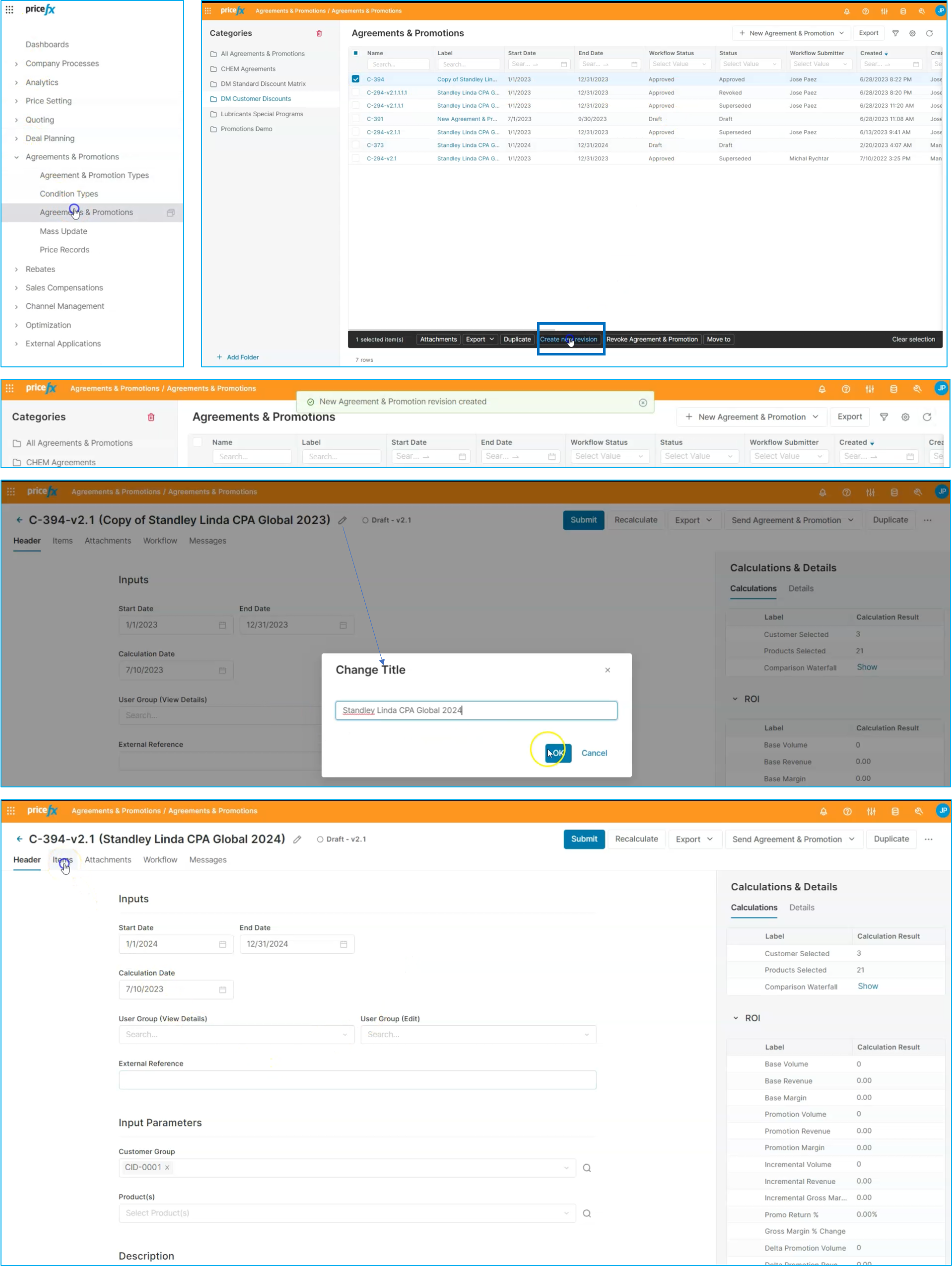
To set up promotions and discounts for different customers, we'll navigate to the Agreements and Promotions component within the solution. Here, you can view a list of existing promotions and discounts. We'll select one of these promotions and create a copy to make modifications for the upcoming year. We will choose an approved promotion and create a revision. This allows us to track the original contract or agreement that was initially created. In this case, we'll adjust the name of the promotion to reflect the new timeframe, such as 2024. We will also select the specific customer and modify the start and end dates accordingly. This ensures that the promotion is tailored to meet their needs.
Workflow: Step 2 - Items
To set up discounts for customers, we'll go to the Items section. Here, we can view different product groups and set up discounts for each one. When you are creating a new promotion based on an existing one, the information is kept from the original promotion. For example, you can see that we're offering a 22% discount for electrical products, a 19% discount for UPS products, and so on. If we want to adjust these discounts for the upcoming year, we can make changes accordingly.
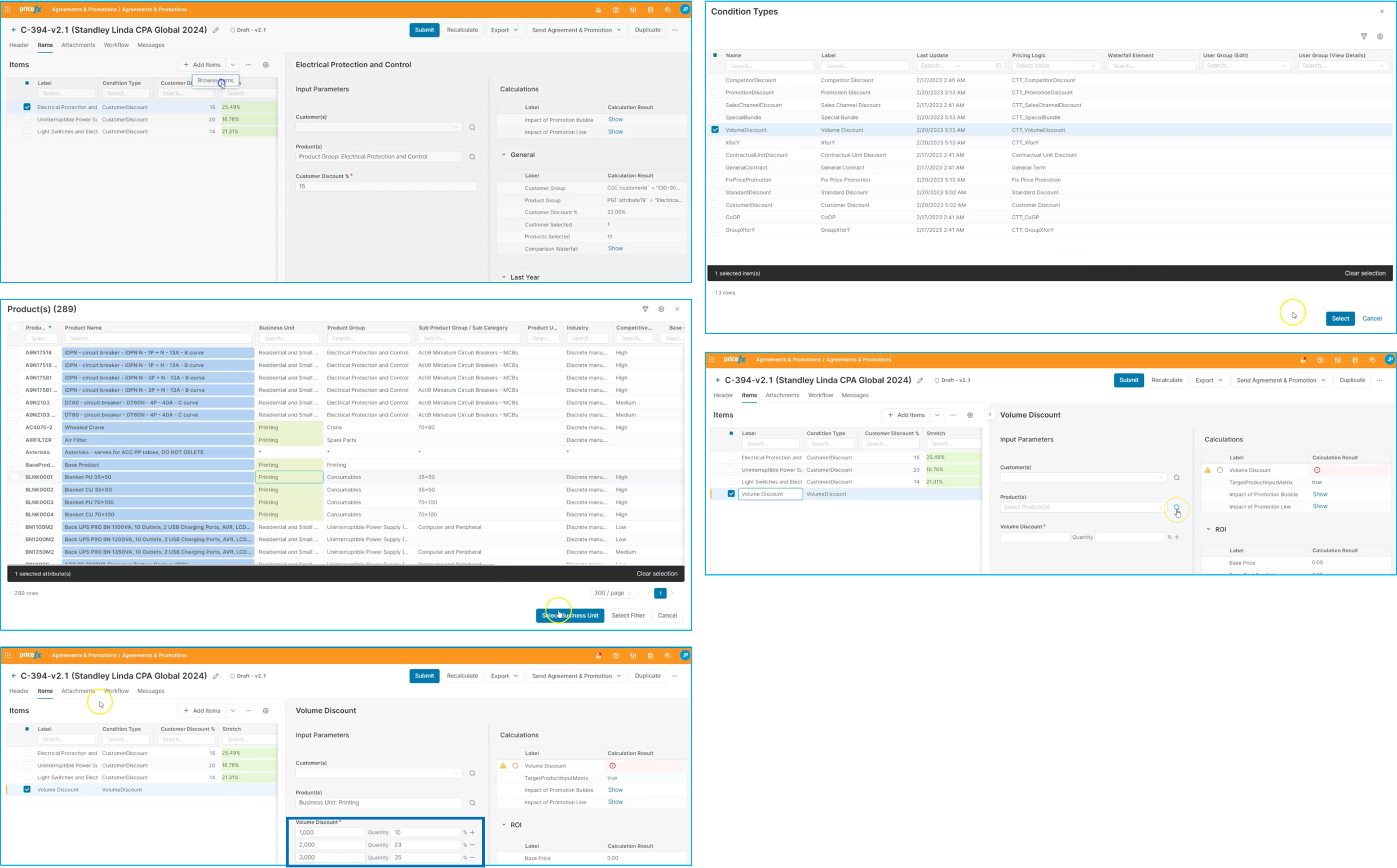
Additionally, we can set up a new condition for this promotion based on volume discounts. This allows us to offer different levels of discounts based on the volume of products purchased by the customer. For example, we might set up a scale for different volumes and quantities for our printing business. This ensures that discounts are tailored to meet the unique needs of each customer and encourages repeat business.
Workflow: Step 3 - Submit and approve
Once you've set up the discounts and conditions for the promotion, you can submit it for review and approval. One of the benefits of using Pricefx is that you can also gain insights into the potential forecast of volume changes that these discounts might represent for the customer and their product selection.
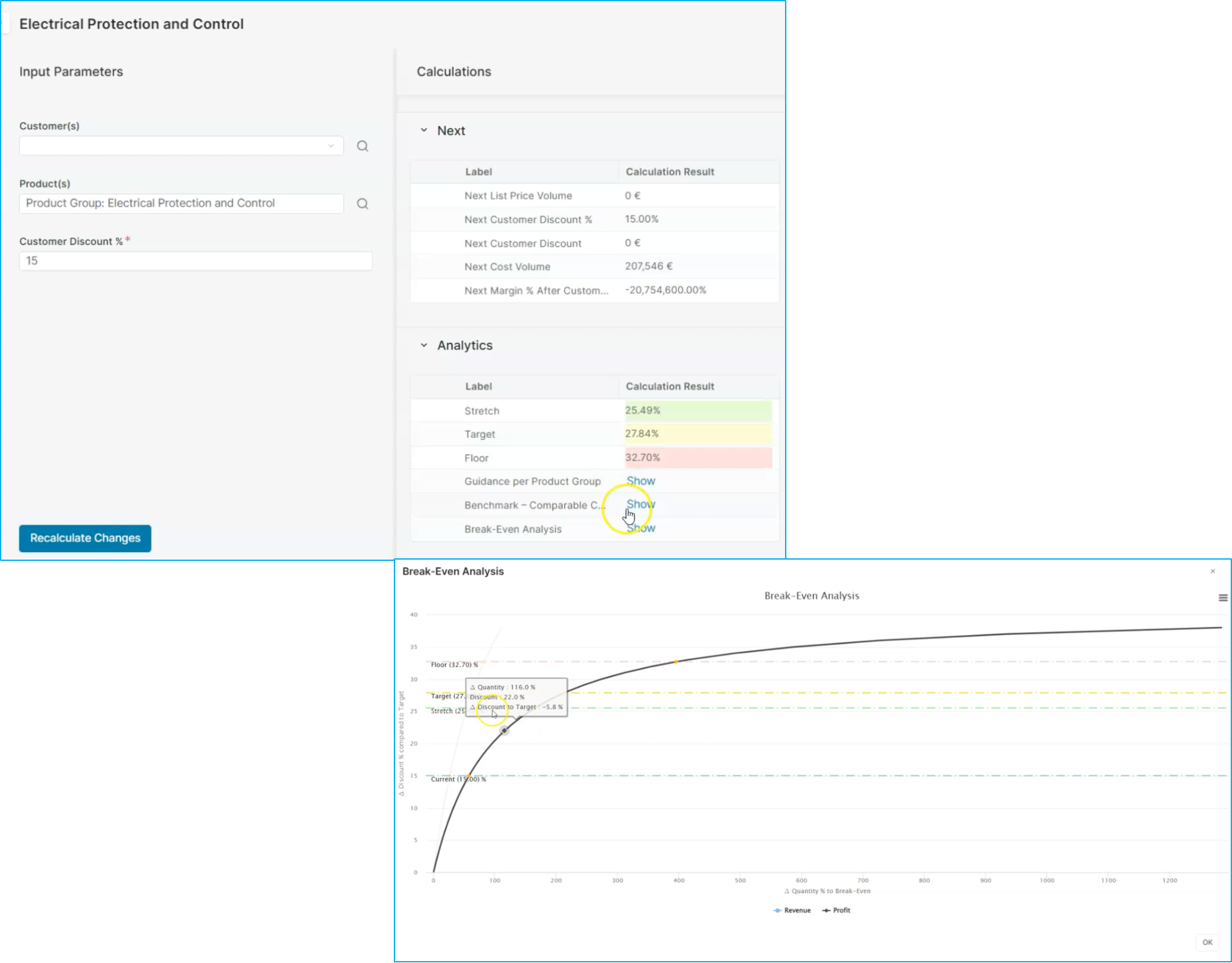
This information can help you better understand the potential impact of these discounts and ensure that they align with our business objectives. By having this visibility, you can make informed decisions about whether or not these policies will have the desired effect that you're looking for. Overall, this approach can help you optimize your pricing strategy and improve customer satisfaction.
Workflow: Step 4 - Negotiation guidance
Pricefx provides guidance on different discount levels, such as stretch, target, and floor discounts. Additionally, you can run a break-even analysis to understand the potential impact of increasing sales volume on revenue and margins (see screen above).
Once satisfied with these changes, you can submit the promotion for review and approval. You can navigate to the workflow section to view the different steps of approval that the promotion needs to go through.
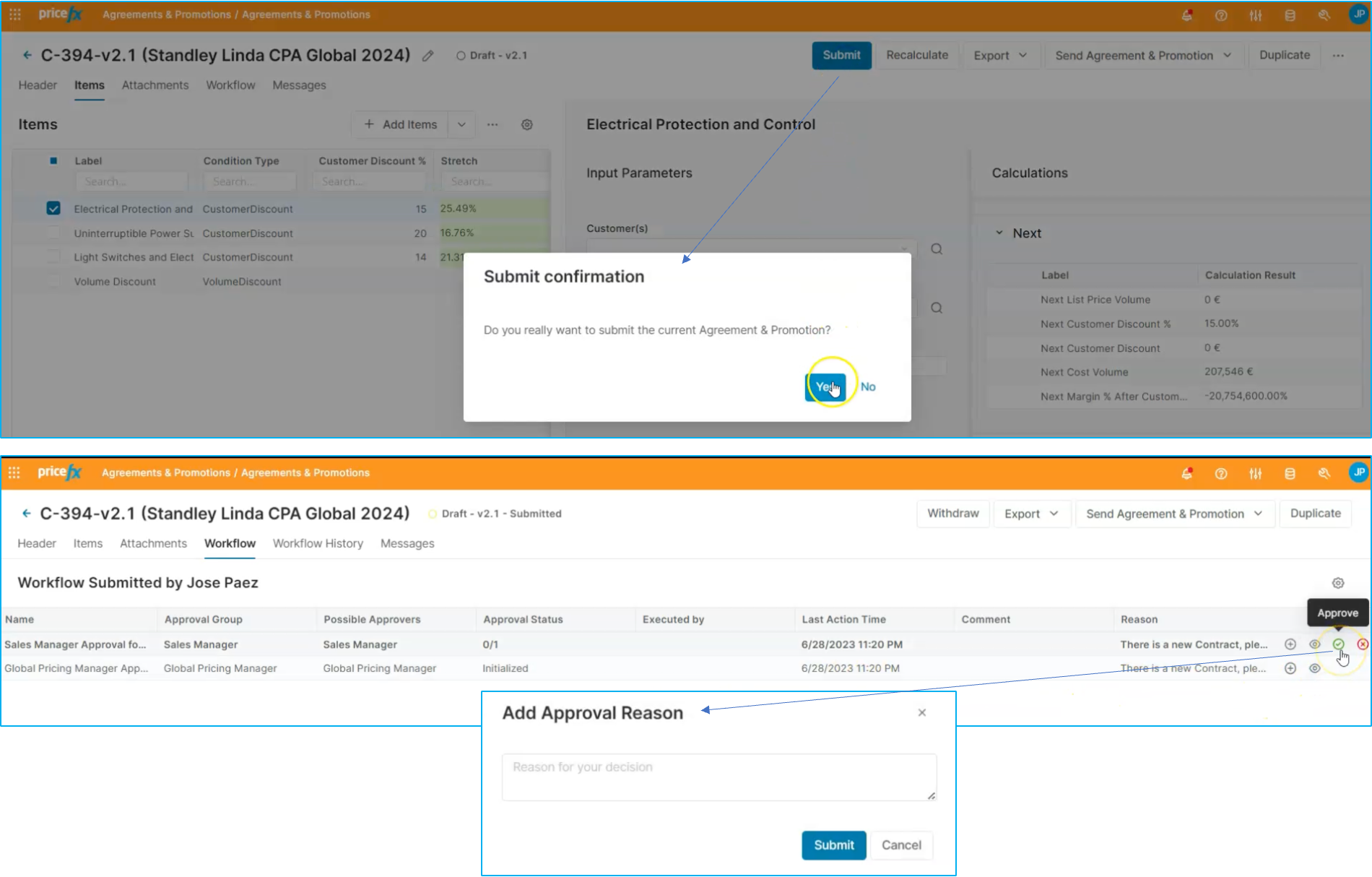
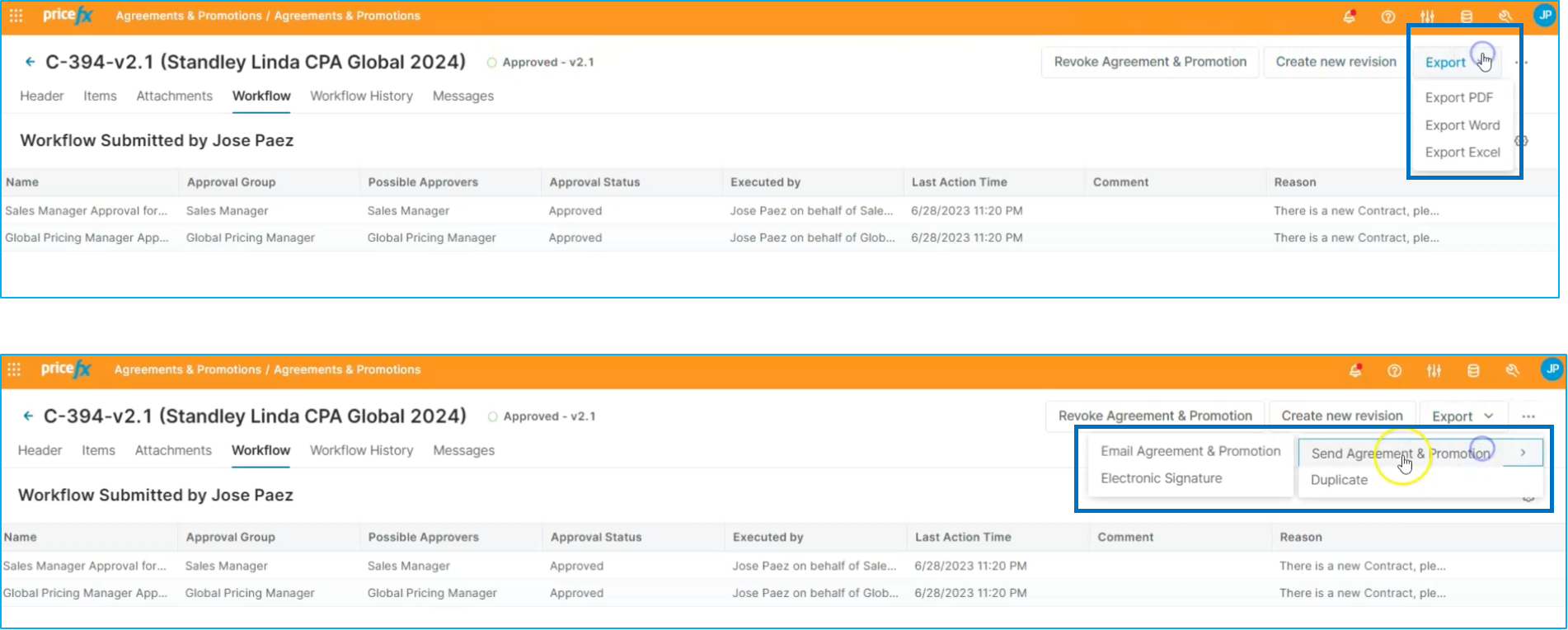
Once approved, you can export the promotion into a PDF and email it to customers. We even have the option to add electronic signature capabilities for customer convenience.
Now you have a better overview of how to set up standard discounts and discount policies in Pricefx.