
Overview
Announcements allow administrators to display system messages to users directly within the Pricefx application. These messages can be used to communicate planned maintenance, important updates, temporary limitations or other 'user group'-wide notifications. Unlike object-specific notifications tied to business logic, these generic notifications are centrally managed and triggered based on predefined rules (time, login, etc.).
This functionality helps:
-
Avoid the need for email or external communication tools
-
Ensure that critical messages are seen by users inside the Pricefx app
-
Control when and to whom messages are shown
Target Audience
-
Administrators
-
Configuration Engineers
Prerequisites
-
Pricefx version 15.0 and later
-
Generic Notificationsuser role assigned to access the Notifications configuration
How to Set Up an Announcement
Follow these steps to configure a message that will display to users during a specified time window within your partition.
-
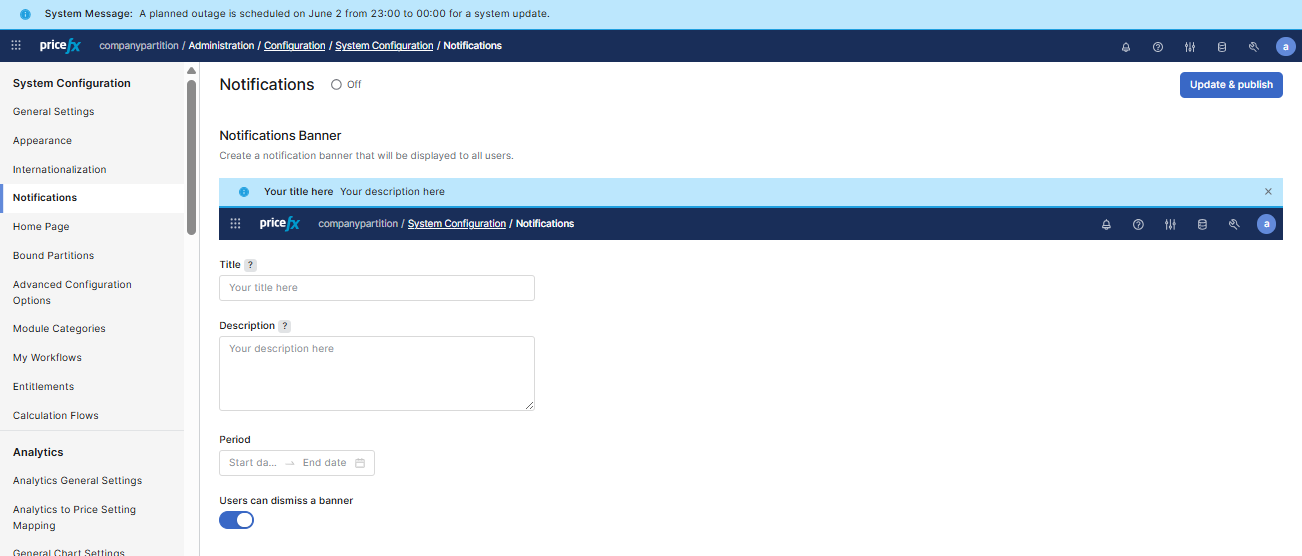
Ensure all prerequisites are met (see above) and navigate to Administration > Configuration > System Configuration > Notifications.
-
Enter the Title (required) and Description. Then review the preview of your announcement above the Title field to ensure it meets your needs.
-
In the Period field (required), specify the time period during which the banner should be displayed.
-
Switch the Users can dismiss the banner toggle to set whether users can close the displayed banner.
-
Click the Save & publish button (top-right corner) to save your announcement setting.
Result
Once saved, users in your partition will see the notification as soon as they log in, the time window is active, and the notification has not been previously dismissed (if closable).
The notification will also appear in the user's Notification Center (User Profile > Notifications) under the the System Notifications topic.
Example Use Cases
-
Alerting users about a planned outage
-
Communicating new version deployment
-
Displaying fiscal year-end processing notices